
REST Interface
Mobile apps can register the device by calling the REST interface provided by the Services module. Don't forget to enable the Push Notifications module. This module adds a permission called 'register device token'. Only roles with this permission may register a device token through a service. This module should work with both anonymous and authenticated users.
Arguments
This service requires 2 arguments:
- 'token' (string): The iOS device token (which is not the same as the iOS UDID) or the Android registration id
- 'type' (string): Pass 'ios' for ios device tokens and 'android' for android registration ids
Result
If successful, the service returns an array with two keys:
- 'success', value is 1
- 'message', value is either 'This token is already registered to this user.' if the token was already registered or 'This token was successfully stored in the database.' for new tokens
Register a token - Step by Step
Navigate to the Services admin interface at admin/structure/services

Add a new services endpoint. For this example, I'm going to create an endpoint called "mobile_data". This will be the base URL for your services, e.g. http://www.yoursite.com/mobile_data

You should see your new endpoint listed at admin/structure/service. Click on "Edit Resources" for that endpoint.

On the "Resource" page for that endpoint, you will see a list of all resources. Make sure "push_notifications" and "create" underneath it is enabled.
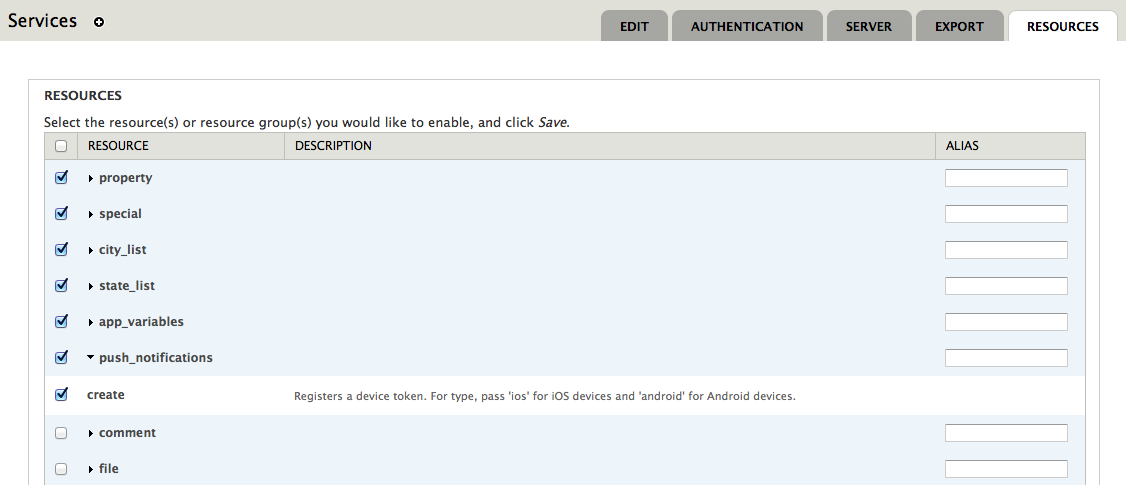
Make sure to enable all parsing types you want, e.g. if you're sending url-encoded data, make sure it's enabled

These are all the steps you need to take to enable your services endpoint. You can then register your device token at http://www.yoursite.com/mobile_data/push_notifications. You should use a POST on that URL and pass two arguments
Register token
- URL: http://my-drupal-installation/services_module_endpoint/push_notifications
- Method: POST
- Payload: token={token}&type={type}
Unregister token
- URL: http://my-drupal-installation/services_module_endpoint/push_notifications/{token}
- Method: DELETE
Help improve this page
You can:
- Log in, click Edit, and edit this page
- Log in, click Discuss, update the Page status value, and suggest an improvement
- Log in and create a Documentation issue with your suggestion
