
Sending Notification Messages
Drupal 7
Once you have created a message type for notification the message can be created (see Creating Message Instances) with the addition of a call to the message_notify_send_message function.
/*
 * Implements hook_node_insert().
 */
function foo_node_insert($node) {

  $message = message_create('foo_message_type', array('uid' => $node->uid));

  $wrapper = entity_metadata_wrapper('message', $message);
  $wrapper->field_node_ref->set($node);
  //$wrapper->save();  <-  don't need - message_notify_send_message does this

  message_notify_send_message($message);
}
And here is the resulting email:
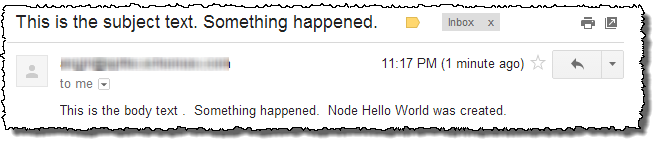
The Message Notify module comes with an example module that provides a more elaborate version of the simplified example above. Note that you will need to disable the Locale module if you try out the Message Notify Example module because it doesn't come with message text definitions for specific languages.
In the Message Notify Example module, two additional fields are added to the message type included with the module. These two fields field_rendered_subject and field_rendered_body act as placeholders for the markup that is rendered by the Message Notify module before it is emailed to a recipient. If you look at the hook_comment_insert() used in the Message Notify Example module, you will see that an options array is passed to the message_notify_send_message function. This array tells the email notifier that the rendered markup from the message_notify_email_subject view mode should be saved in the field_rendered_subject and the rendered markup from the message_notify_email_body view mode should be saved in the field_rendered_body.
/*
 * Implements hook_node_insert().
 */
function foo_node_insert($node) {

  $message = message_create('foo_message_type', array('uid' => $node->uid));

  $wrapper = entity_metadata_wrapper('message', $message);
  $wrapper->field_node_ref->set($node);

  $options = array(
     'rendered fields' => array(
       'message_notify_email_subject' => 'field_rendered_subject',
       'message_notify_email_body' => 'field_rendered_body',
     ),
  );

  message_notify_send_message($message, $options);
}
An example view is included with the Message Notify Example module that illustrates how the rendered text can be presented for each message sent by the system.
Drupal 8
In D8, there is no longer a message_notify_send_message function, so the code to use a message notifier would look like this instead:
    $message = \Drupal::entityTypeManager()->getStorage('message')->create([
      'template' => 'my_message_template',
    ]);
    $message->setOwner($recipient);
    $notifier = \Drupal::service('message_notify.sender');
    $notifier->send($message);
The use of a rendered fields array is optional, but if you do use it then its keys should match the display modes, so for D8:
  $options = array(
     'rendered fields' => array(
       'mail_subject' => 'field_rendered_subject',
       'mail_body' => 'field_rendered_body',
     ),
  );
By default the notification will be sent to the message owner, but this can be overridden in the default Email notifier. For example if you have a list of email addresses to notify, it is not necessary to create an individual message for each recipient, but you can send notifications in a loop:
    $message = \Drupal::entityTypeManager()->getStorage('message')->create([
      'template' => 'my_message_template',
    ]);
    $notifier = \Drupal::service('message_notify.sender');
    foreach ($emails as $email) {
      $options = ['mail' => $email];
      $notifier->send($message, $options);
    }
Help improve this page
You can:
- Log in, click Edit, and edit this page
- Log in, click Discuss, update the Page status value, and suggest an improvement
- Log in and create a Documentation issue with your suggestion
