
On this page
Installation
The Gov Notify module depends on two PHP libraries:
- alphagov/notifications-php-client
- php-http/guzzle7-adapter.
Depending on which strategy you're using to manage your project dependencies you'll either need to:
- Use Composer to install Drupal core and manage dependencies (For more information see - https://www.drupal.org/node/2718229)
- Modify composer.json in your Drupal's root directory (https://www.drupal.org/node/2404989)
Configuration
In order to use this module you'll need to have an account for the notification service that you want to use. The Gov Notify module currently supports:
- Gov.UK Notify (https://www.notifications.service.gov.uk)
- Government of Canada Notification Service (https://notification.alpha.canada.ca)
Note the previously supported Australian Government Notify Service at https://notify.gov.au appears to no longer exist.
The screenshots in this documentation are taken from the Gov.UK notification service, but the steps and forms for the other services are similar, in some cases identical.
To start using a Notify service to send emails you'll need to have created a Notify account, have created an API key and have created a 'default' template.
1. Create a Notify account at https://www.notifications.service.gov.uk/register, https://notify.gov.au/register, https://notification.alpha.canada.ca/register as appropriate
2. Create an API Key:

- Login to your Notification service.
- Click on 'API Integration'
- Click 'Create an API Key'
- Give the Key a name and select the type of key
- Note down the API Key you're given.
3. Create a 'Default' template:
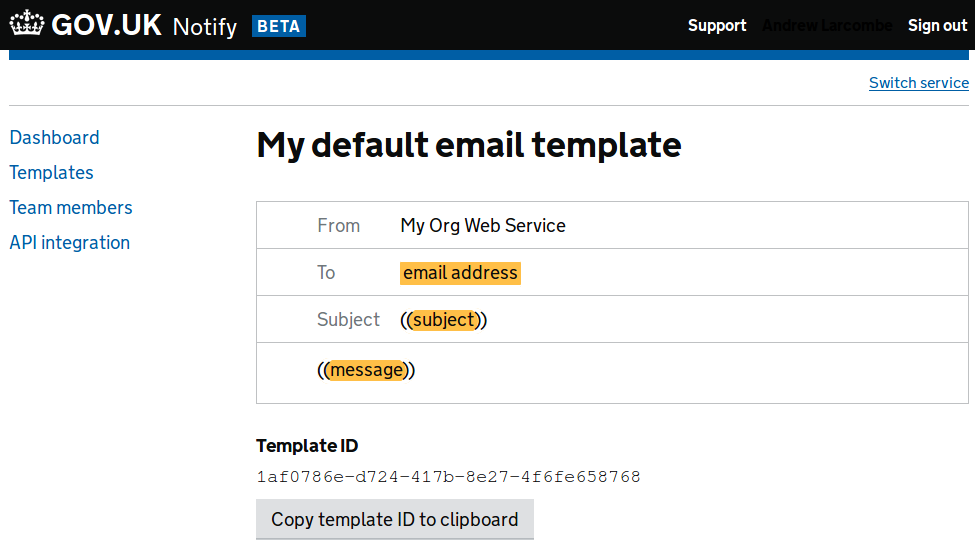
When sending messages through the Gov Notify API Drupal can either use a specific template, or a 'default' template which just contains one replacement token for the subject and one for the entire message body. This provides some flexibility as to whether to use Drupal's templating engine or Gov.UK's. Your choice will be dependenent upon the solution you're trying to deliver.
- Login to Gov Notify
- Click on 'Templates'
- Click 'Create Template'
- Select 'Email'
- In subject just enter ((subject))
- In message just enter ((message))
- Save the Template and note the message ID.
5. Similarly for SMS messages, create a 'Default' SMS template:
- Login to Gov Notify
- Click on 'Templates'
- Click 'Create Template'
- Select 'Text'
- In message just enter ((message))
- Save the Template and note the template ID.
5. Enable the govuk_notify module if you've not done so already, then go to /admin/config/govuk_notify/settings to configure the module.
6. In the field 'API Key' enter your Gov Notify API Key from step 2.
7. In the field 'Default template ID' enter the ID of your default template from step 3.
8. In the field 'Default SMS template ID' enter the ID of your default SMS template from
step 4.
9 (optional). To test the system enter an email address in the 'Test email address' field. When you click the 'Save configuration' button an email will be sent to the email address that you've entered. NB If your account is still in trial mode then you'll only be able to send emails to members of your team.
10. (optional). To test the system enter a phone number in the 'Test SMS
address' field. When you click the 'Save configuration' button an SMS will be
sent to the phone number that you've entered. NB If your account is still in
trial mode then you'll only be able to send SMS messages to members of your team.
11 (optional) If you want to send enable all system emails to be sent through Notify ensure that then check the 'Use Gov Notify to send system emails' field.

12 (optional) If you're using a Test (not Trial) API Key then you can simulate temporary and permanent failures by checking either the "Always force a temporary failure" or "Always force a permanent failure" - this will force the module to use the email addresses listed at https://docs.notifications.service.gov.uk/php.html#smoke-testing
Help improve this page
You can:
- Log in, click Edit, and edit this page
- Log in, click Discuss, update the Page status value, and suggest an improvement
- Log in and create a Documentation issue with your suggestion
