
Usage of ConfigPages
ConfigPages have a lot of possible use cases. For example, they can be used for Configuration Forms or your site's Homepage.
Add a new ConfigPage
After the module has been installed you will see a new item in Admin Menu -> Structure called Config pages

Under this link, you will find a dashboard with the list of available ConfigPages and the second tab called "Config pages settings" will lead you to the page where you can create/manage your config pages.
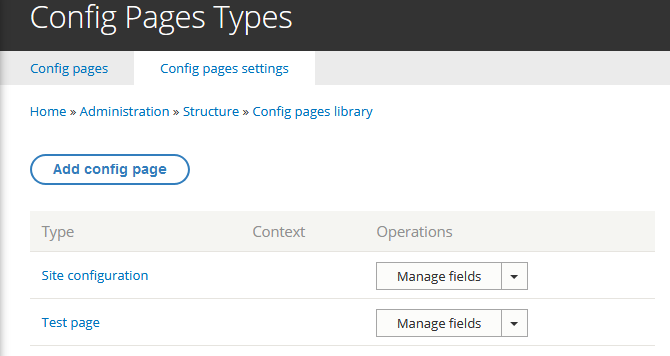
So, to create a new ConfigPages just click on Add config page and fill a simple form with few values:
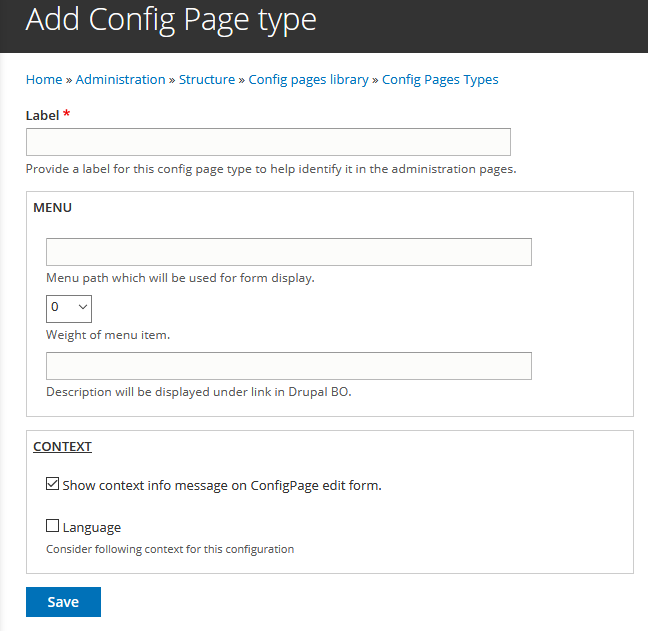
- Label: Human readable name for you ConfigPage
- Menu: consists of three items:
- Menu path ( the path which will be used to reach you ConfigPage)
- Weight ( allows you to change the place of your link)
- Description ( will add a description to link and will make a UX more user-friendly)
- Context ( you can choose which context will rely on your ConfigPage) in case if you won't choose anything ConfigPage will not use any context and will store a single configuration.
After the form has been submitted you will find your config page in Config pages library, so you can add required fields for your form, all process is the same as for any other Entity in Drupal.
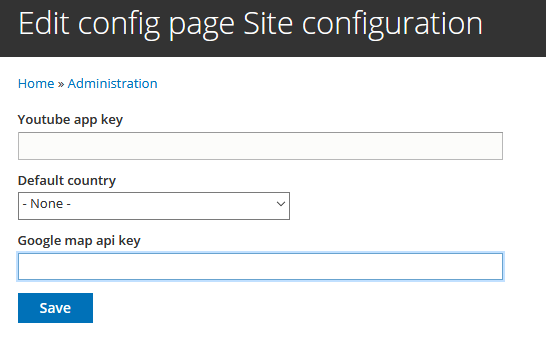
When all these operations are finished you can visit the URL, which was configured during the creation of config page or you can find a link to edit the configuration at: /admin/structure/config_pages
Load entire ConfigPage entities
You have three ways to do that, the best way (Drupal 8+) is to either inject or side-load the config_pages.loader service, then use the load method. This example uses side-loading for simplicity but you should always use dependency injection (DI) when you can.
$config_pages = \Drupal::service('config_pages.loader');
$entity = $config_pages->load($config_page_machine_name, $optional_context);
The second is to make a call to static method load:
$entity = ConfigPages::config($config_page_machine_name);The third option is to get a config page via storage manager:
$storage = \Drupal::entityTypeManager()->getStorage('config_pages');
$entity = $storage->load($config_page_machine_name);
as a result of any of these methods, you will get a loaded entity with a given active context.
To get values from the field(s) you can use the same approach as for any other entity in Drupal, or:
Load ConfigPage entity fields individually
Using the loader service (DI or side-load as per above) you can either load a rendered field including all relevant cache tags:
$config_pages = \Drupal::service('config_pages.loader');
$variables['single_field'] = $config_pages->getFieldView($config_page_type, $field_name, $view_mode);
Or just grab the value of the field if you want to do something specific with it:
$config_pages = \Drupal::service('config_pages.loader');
$field_value = $config_pages->getValue($config_page_type, $field_name, $deltas, $key);
Using ConfigPage in template files
In case of need to render the field from ConfigPage in the TWIG template you can use TWIG function or a preprocess to extract data.
The TWIG function can be called in this way:
{{ config_pages_field('my_config_page', 'field_something', 'full') }}
The first parameter is the ConfigPage machine name, second the field machine name and the last one is the view mode.
If you want to use values from ConfigPage in your theme, you can add the entire ConfigPage or specific fields in a preprocess function:
// globally add a config page value as variable to all theme files
function MYTHEME_preprocess(array &$variables, $hook) {
  $myConfigPage = \Drupal\config_pages\Entity\ConfigPages::config('my_config_page');
  $variables['my_global_value'] = $myConfigPage->get('field_something')->value;

  // optional: add a cache dependency
  CacheableMetadata::createFromObject($myConfigPage)->applyTo($variables);
}

// add the entire config page as variable to page.html.twig
function MYTHEME_preprocess_page(array &$variables) {
  $myConfigPage = \Drupal\config_pages\Entity\ConfigPages::config('my_config_page');
  $variables['my_config_entity'] = $myConfigPage->toArray();

  // optional: add a cache dependency
  CacheableMetadata::createFromObject($myConfigPage)->applyTo($variables);
}
ConfigPage as a referenced entity
Config pages can be used as a referenced object. It can be attached to any entity. Moreover, having used a special formatter you will have the possibility to get rendered config pages.

Help improve this page
You can:
- Log in, click Edit, and edit this page
- Log in, click Discuss, update the Page status value, and suggest an improvement
- Log in and create a Documentation issue with your suggestion
