
User data blocks.
Despite the power of ESI blocks provided by this module, it's not always convenient to set block as ESI or have a few ESI blocks just to show some small user info, like "HI, username!" in header for example. To avoid unnecessary ESI requests module provide one more way to deliver a user data to tha page.
This is only actual if you're using options "Enable varnish for authenticated users" and "Enable Varnish ESI support"
Each time the page is rendered the special ESI tag will be added to the page. When the page is served by Varnish a callback to Drupal will be done in order to retrieve the user info. How to provide such info? Let's check here.
To provide User data info you need to create a special plugin and place it in the your_module/src/Plugin/UserBlocks
Let's say Hi to our logged in user once he started to serve pages from varnish!
<?php

namespace Drupal\user_info\Plugin\UserBlocks;

use Drupal\adv_varnish\UserBlockBase;
use Drupal\Core\Session\AccountProxyInterface;
use Symfony\Component\DependencyInjection\ContainerInterface;

/**
 * Provides a language config pages context.
 *
 * @UserBlocks(
 *   id = "example",
 *   label = @Translation("Example"),
 * )
 */
class Example extends UserBlockBase {

  /**
   * User account interface.
   *
   * @var \Drupal\user\UserInterface
   */
  protected $account;

  /**
   * {@inheritdoc}
   */
  public function __construct(array $configuration, $plugin_id, $plugin_definition, AccountProxyInterface $account) {
    parent::__construct($configuration, $plugin_id, $plugin_definition);
    $this->configuration = $configuration;
    $this->account = $account;
  }

  /**
   * {@inheritdoc}
   */
  public static function create(ContainerInterface $container, array $configuration, $plugin_id, $plugin_definition) {
    return new static(
      $configuration,
      $plugin_id,
      $plugin_definition,
      $container->get('current_user')
    );
  }

  /**
   * User block data for ESI request.
   *
   * @return array
   *   Content for user data block.
   */
  public function userBlockData() {
    $block = [];

    $block['js_settings'] = [
      'user_info' => [
        'user' => [
          'name' => $this->account->getDisplayName(),
          'id' => $this->account->id(),
        ],
      ],
    ];

    $block['content'] = [
      '#block-bartik-account-menu ul .menu-item:first a' => t('Hi, @user', ['@user' => $this->account->getDisplayName()]),
    ];
    $block['tags'] = ['user:' . $this->account->id()];

    return $block;
  }

}
As you can see it's a normal Drupal plugin, which supports DI to get all required services etc..
One method which you need implement is "userBlockData" this block should return array of user data, the possible keys are:
- js_settinggs - array of settings which will be merged with drupalSettings on the page
- content - array of HTML items where the key is a jquery selector which will be used to place content on the page
- tags - cache tags which will allow you to invalidate user data content
After that you just need to clear cache and try to login on your site.
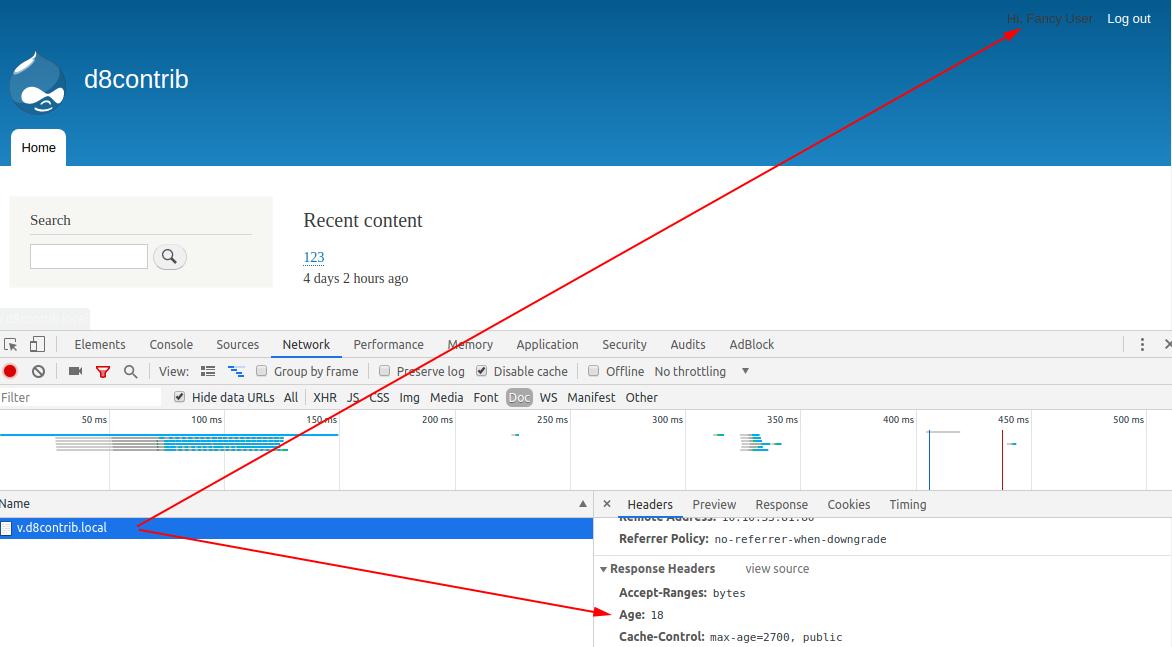
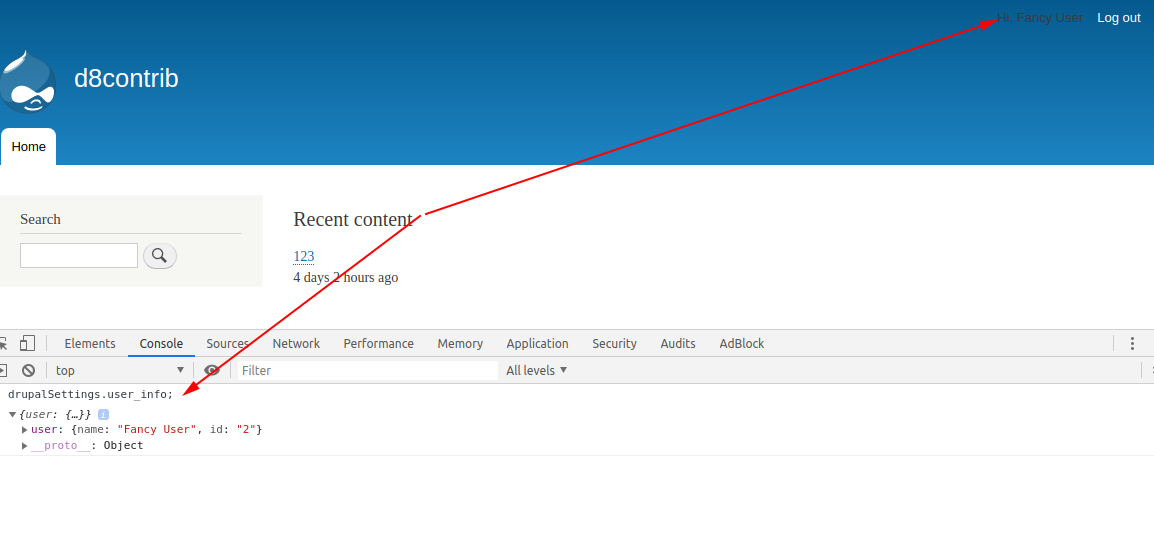
As you can see the logged in user starts to get content from Varnish with personalized data, and it was so easy to achieve!
Help improve this page
You can:
- Log in, click Edit, and edit this page
- Log in, click Discuss, update the Page status value, and suggest an improvement
- Log in and create a Documentation issue with your suggestion

