
 The 2026 Drupal Business Survey is open. Your response will help shape the future of the Drupal business ecosystem.
Setup
Last updated on
19 December 2018
Instructions for setting up Instagram Block for D8
Installing
The Instagram Block module can be installed like any other Drupal module - see general documentation.
Configuring
There are 2 things that need configuring, the connection to instagram and the settings for the block.
Instagram API
To configure the module with instagram it needs to be connected with a specific account. You need to be able to log into that account when asked to.
- Go to 'admin/config/services/instagram_block'
- Click on the link that lets you authorize your account
- After signing into an instagram account and authorizing the application to share your details you should end up on a page on http://instagram.yanniboi.com/
- Copy the details that you are given here to the settings page on your website (see step 1)
You can also configure your block settings on this page, however that is not necessary.
Instagram Block
- Go to the blocks page ('admin/structure/block')
- Select the "Place block" button in the correct region (don't forget to save)
- Configure the size and number of images on the block config page
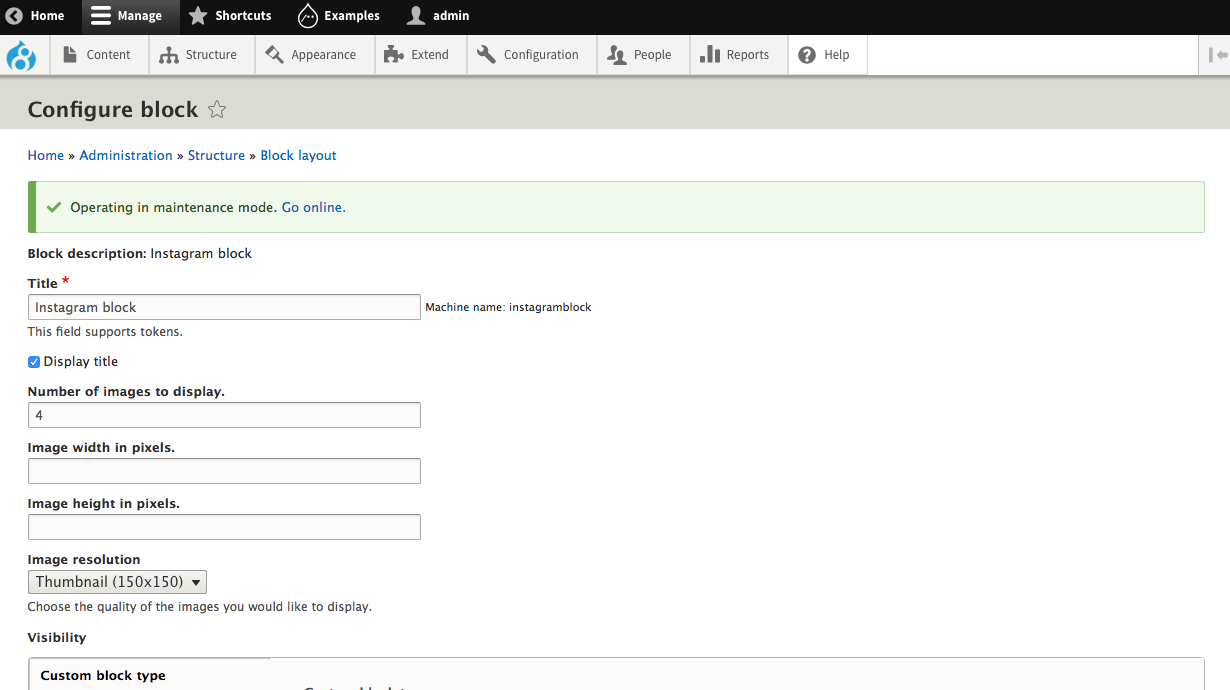
And we are done!
Help improve this page
Page status: No known problems
You can:
You can:
- Log in, click Edit, and edit this page
- Log in, click Discuss, update the Page status value, and suggest an improvement
- Log in and create a Documentation issue with your suggestion
