
Usage
This is documentation for Drupal 7, which is no longer supported. Learn more and find resources for Drupal 7 sites
User UI
The Views Save module can add a "Save" button to any View. When the user hits save, a popup appears asking for the name of the saved view. By clicking OK, the View with the current configuration of exposed filters is saved. The popup disappears and the user remains on the same page.

Saved Views are stored as entities. Views can be used to display lists of saved views. VBO can be used to allow users to manage lists of saved views.
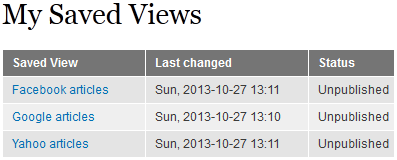
Anonymous users will be required to login or register in order to save a view. Upon completion of the registration/login, the the saved view is created and the user is redirected back to the View.
Admin UI
A Views header is used to add and configure the save option. When configuring the header, the "Type" dropdown allows you to choose which Views Save type will be linked to this View. Saving a View will create a new entity for the Views Save type that is selected. The "Help Text" is the text that appears in the popup box. For "Behaivor for Anonymous Users" you can choose to hide the save button, or you can show the button and the user is prompted to register when they attempt to save a view.

For added flexibility, multiple Saved View types can be created in addition to the one that exists by default. Saved Views types are fieldable entities and are integrated with Pathauto.


Help improve this page
You can:
- Log in, click Edit, and edit this page
- Log in, click Discuss, update the Page status value, and suggest an improvement
- Log in and create a Documentation issue with your suggestion
