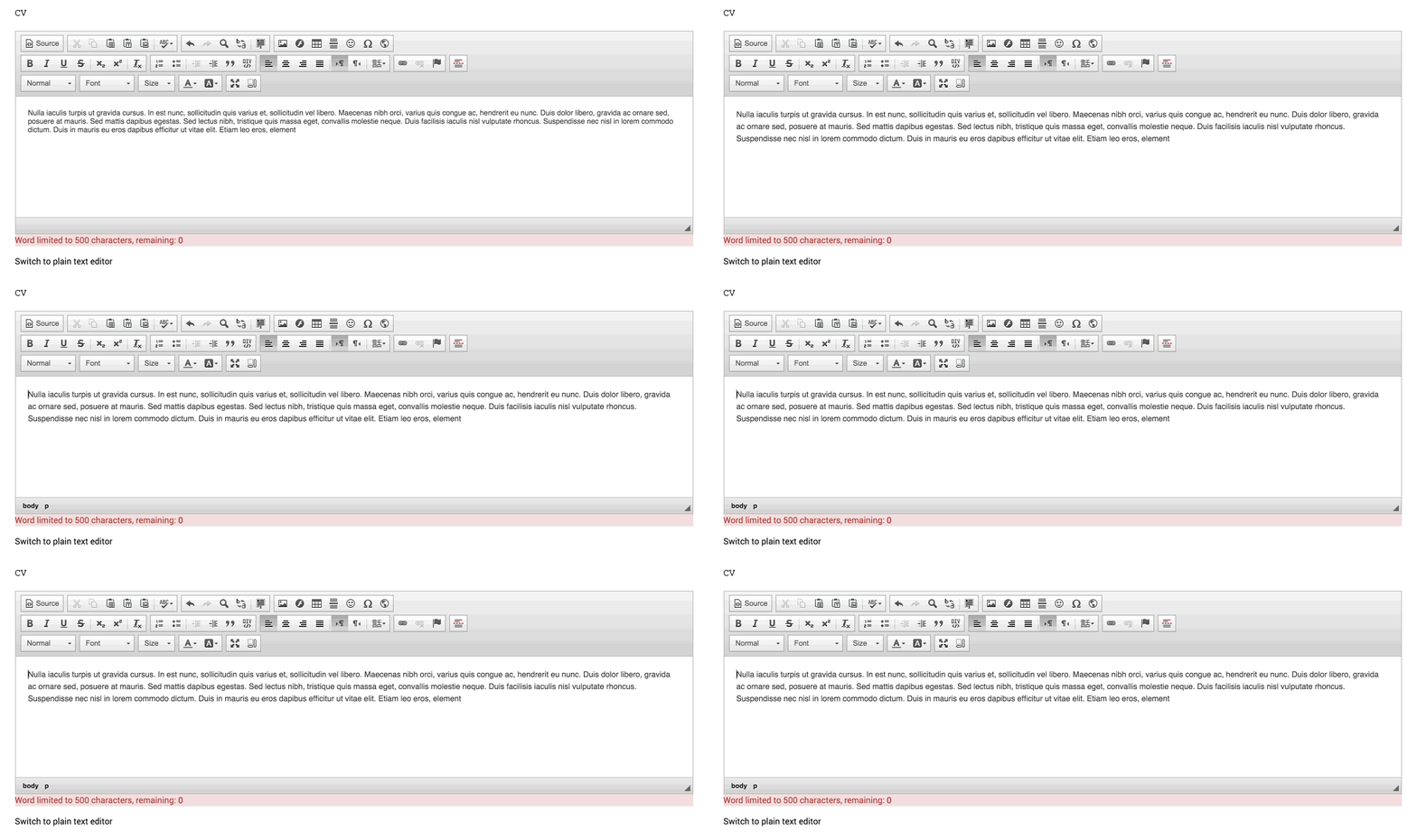
I am using CKEditor for my fields and for some reason when I'm typing in filtered or full text mode, the character counter will flash the number of characters left and then re-display the default maximum character limit length. If I navigate to another browser page and then back to the page I am editing, the character count displays the correct number of characters left.
Also, If I switch to plain text mode the character countdown always displays the number of characters left.
I see no javascript errors in my chrome console.
Would anyone know which javascript may be causing this?
I am using:
Maxlength 7.x-3.0-beta1+6-dev
Drupal 7.22
CKEditor 7.x-1.12+12-dev
Jquery Update 7.x-2.3-alpha1+0-dev


Comments
Comment #1
yosepkur commentedTry to unbind keyup event that is set from the maxlength.js and it will works normally.
Comment #2
khaled.zaidan commentedI ran into the same issue.
I found out that CKeditor itself triggers the onChange event for the textarea (probably to allow any existing js code on the page to still function "properly"), but when it does, the textarea is actually empty, so the counter keeps on resetting.
Attached is a patch against dev to fix that. I just copy the value from the CK to the textarea every time it changes. I'm sure this doesn't result in any other problems, because CK already does this when you disable it and re-enable it.
Comment #3
khaled.zaidan commentedSetting status to Patch to trigger the git script to have a look :)
Note: I didn't test what happens with tineMCE, but a similar fix can be applied for that as well.
Comment #4
murraybiscuit commentedpatch #2 looks good to me
thanks for the work khaled. the flashing text was driving me nuts...
Comment #5
d34dman commentedA different approach than the patch in #2 that worked for me.
Comment #6
danharper commentedTested patch in #2 and it worked for me.
Cheers Dan
Comment #7
zil.arman commentedBoth patches are counting till eleven and then disappear. They help with this flashing issue, but field limit still does not work.
The #5 patch also breaks the other counters on simple text fields.
Comment #8
steveoriolpatch #2 works for me.
Comment #9
kungfu4 commentedHey all,
Thanks for the patches, and patch #2 appears to fix the flashing total, but I've noticed that when I input the first character, it interprets it as 10 characters (so if my limit was 2000, on the first key down, the total changes to 1990, and then works as anticipated, 1989, 1988, etc.) Has anyone else seen this happen? I'll let you guys know if I pinpoint the issue for myself.
Thanks
Comment #10
kungfu4 commentedQuick update, this is related to the html that is generated by CKEditor as switching to Plain Text or Full HTML (with view source enabled), the count works as intended. I checked this in the #2 patch as well as the original and I'm still seeing it. I don't know if that is with the scope of the group, but if I have time, I'll try to see if I can add a rule that will exclude tags from the count IF truncate HTML isn't enabled. That definitely presents some challenges. Just thought I'd share with the group.
Thanks!
Comment #11
kungfu4 commentedAnd now I see that the truncate HTML is supposed to do that...sorry for all the hubub
Comment #12
TorbenBP commentedThank you for patching this!
Patch #2 and #5 both worked for me with solving the flashing issue. But hitting return at the end of the textfield, starting a new paragraph, makes the curser go to the top of the text field. This seems to apply for both patches. Admitted a minor bug.
Comment #13
quironThe patch #5 works for me but disable the counter in fields without editor. I added a condition to the patch to avoid this issue.
Comment #14
knalstaaf commented#13 does the job.
Comment #15
sukh.singh commentedThank a lot for patching this! Patch #2 works for the initial issue, however I am still seeing one more issue. When copy pasting text to the ckeditor, it shows flashing text. I am attaching a screengrab so that it should be more understandable.
This generally occurs when the limit has been crossed. In my case I have added 500 words limit, If I add more than 500 words to the ckeditor field this issue arises.
Comment #16
scotwith1tSeems the patches here are assuming WYSIWYG module is in use. Can this module not be used with plain old CKEditor module?
Comment #17
redzeufHi, I put this issue as needs review for the patch #13
Comment #18
redzeufAs I'm not posting the patch my self but just reviewed it I change as RTBC.
The website I'm working on actually use that patch on production until 4 years now...) this patch #13 from @quiron work like a charm for WYSIWYG with ckeditor and also with plain text...
And thanks to @knalstaaf to having confirmed that.
Comment #19
cedeweyWe are only maintaining the Drupal 7 version of the module for critical security fixes, so I'm marking this Closed (works as designed). Thank you everyone for working on this issue. If you do want to maintain the Drupal 7 version, do reach out. We'd be happy to bring you on board as a maintainer.
I also encourage you, if you haven't already, to upgrade your site to Drupal 8/9. We are actively maintaining that version and you would enjoy all of the other features of the latest version of Drupal.
Comment #20
d34dman commentedThanks for the module :) I can consume this patch via composer, so not a biggie.