

Closed (fixed)
Project:
Drupal core
Version:
7.x-dev
Component:
file.module
Priority:
Critical
Category:
Bug report
Assigned:
Unassigned
Reporter:
Created:
29 Sep 2010 at 06:34 UTC
Updated:
22 Nov 2015 at 15:14 UTC
Jump to comment: Most recent, Most recent file



Comments
Comment #1
aaron commentedsubscribe
Comment #2
sunI'm not sure how #740834: Form elements cannot be rendered without form_builder() is related - can you clarify?
I rather think that #756762: AJAX should follow same rules for whether to call drupal_rebuild_form() as non-AJAX submissions looks like the cause. If the form uses a button in a way that follows the odd expectation that a button does nothing upon submitting the form (literally nothing), then that behavior was changed in aforementioned issue. I don't know the affected code of File module though.
Furthermore, quite some code was probably broken, since element_set_attributes() introduced in #740834 did overwrite already existing attributes on an element with internal element property values. That has been fixed via #140783: A select list without #default_value always passes form validation
So first at all, I'd like to know whether this bug can still be reproduced on latest HEAD?
Comment #3
aspilicious commentedI'll test it on latest head.
Comment #4
aspilicious commentedStill broken...
Comment #5
grendzy commented#740834 was implicated by bisect, though I can't explain how it's related. I've been doing some testing on the form_builder() patch, reverting the non-obvious hunks one at a time, but I haven't found anything yet.
Comment #6
Bevan commentedsubscribe
Comment #7
jody lynnI'll take a crack at this one.
Comment #8
jody lynnIt seems as though $form_state['values'] only contains the values for the last file in file_managed_file_submit.
The same thing happens with or without javascript.
Comment #9
Bevan commentedHave you seen the issue that found this one? #913846: Image/file field breaks after uploading two files
This sounds like a similar bug related to #limit_validation_errors
Comment #10
effulgentsia commented#913846: Image/file field breaks after uploading two files landed. Can someone please update on whether anything has changed relative to the original issue description? Also, for each sequence of steps that causes a bug, does the bug also occur if you perform the same steps with JavaScript disabled? If so, can someone please submit a patch that contains corresponding tests that fail (you can use drupalPost() to emulate a no-js browser, see other tests for file module)? Thanks!
Comment #11
hatsch commentedjust tested with cvs head
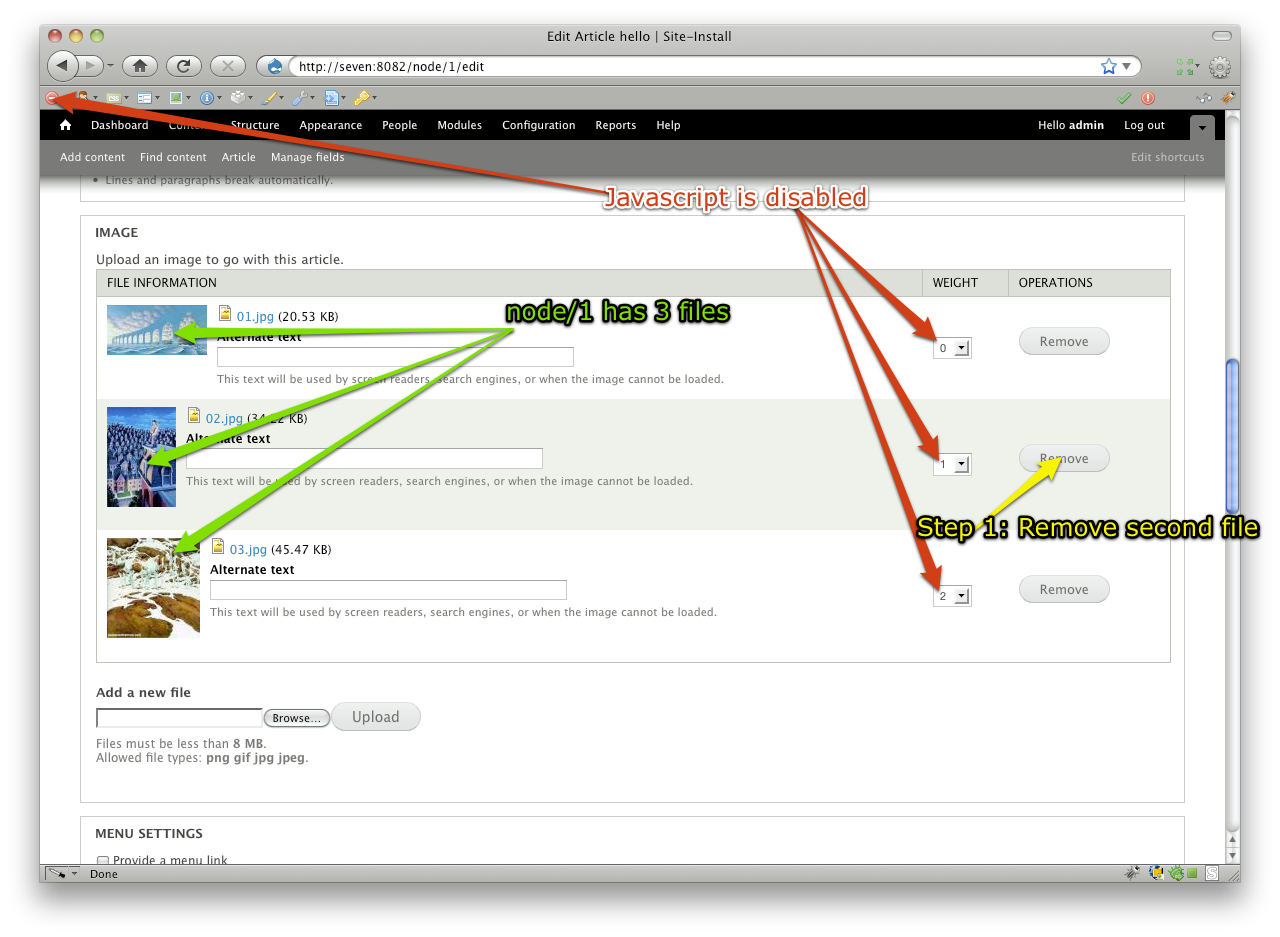
upload -> remove -> upload (last upload fails)
still not working
upload -> upload -> remove[1] - remove[0] (second remove fails)
still not working
upload -> upload -> remove[0] (removes both files)
seems to be fixed although remove[1] doesn't works as in case 2
Comment #12
cfennell commentedNo, the bug does not occur with JS disabled.
Comment #13
jody lynnWhen I tested yesterday it did occur the same with JS disabled, but I was testing "upload -> upload -> remove[0] (removes both files)", which hatsch says is fixed now.
Comment #14
hatsch commentednow tried with JS disabled. everything is working as expected
Comment #15
chrisshattuck commentedI found the same thing as hatsch in #11 and #14. The non-js works fine, and the first two scenarios are still a problem.
One other thing to note is that this is a UI issue. Images are being uploaded and removed as expected, it's just that the UI is not updating the image list.
Comment #16
chrisshattuck commentedIt looks like the problem is that the form is re-naming the element because it things it exists already. So, the first time you remove an image, it replaces the entire element, and gives it a new ID that's unique. Then, when the ajax runs for the second remove action, it's looking for the old ID, but can't find it.
So, for example, before the first delete, the ID of an input might be edit-field-image-und-ajax-wrapper. The next time, it's edit-field-image-und--2-ajax-wrapper.
You can watch the problem happen in ajax.js, under Drupal.ajax.prototype.commands where the wrapper is selected:
In this case, ajax.wrapper points to the old ID.
I'm going to dig a bit deeper to see what the best solution to this would be, but just posting a progress point in case other folks have insight.
It seems like there could be 3 options:
1. Instead of replacing the entire field, just remove the image removed. Adding images works like this, is there a reason why removing can't as well?
2. Update ajax.wrapper to use the new ID
3. Figure out how to re-build the form after the input has been removed so we can use the original ID.
Comment #17
chrisshattuck commentedPiggybacking on my last post, here is a patch that fixes the problem. However, this seems like more of a hack.
Fixing the real problem will require a bit more time. Here's what's going on:
When the Remove button is clicked, the entire field is re-loaded, replacing the old one. But, when the form goes to create unique ID for the new element, it still has the IDs from the original element stored in
$seen_ids_initindrupal_html_id(). So, it thinks it needs a new ID and appends something like --2 to it. The #wrapper set for the #ajax property stays the same, so the next time you try to use the wrapper, either to add a new image or remove one, the element no longer exists.This patch removes the appended --2 at the end of the new ID so that it remains the same as the original.
If we want to do this right, it seems like there needs to be a way to remove items from the
$seen_ids_initarray. That would better model what's actually going on with the DOM. So, when the Remove button is clicked, it checks to see what IDs will be removed and removes them from the$seen_ids_initso they can be registered again.Alternately, the #wrapper value needs to change when the DOM changes, but after a bit of experimentation, I wasn't able to get this to happen. The #wrapper value actually seemed to remain static even though the form element was changing the name of it when the element was refreshed. So I'm thinking that the #wrapper value is intended to stay the same throughout the life of the form?
Thoughts?
Comment #18
moshe weitzman commentedIs there an easy way for the Ajax request to specify an #id and opt out of the automatic handling?
Comment #19
jody lynnI confirmed that rolling back #384992: drupal_html_id does not work correctly in AJAX context with multiple forms on page fixes this bug. There are several other issues around that also say that drupal_html_id has broken ajax handling.
Comment #20
jody lynnWe should be able to clear the $seen_ids_init with drupal_static_reset('drupal_html_id:init'), but I haven't found a place to do that that's working. Moshe's idea is also good, as another way to circumvent drupal_html_id.
But ultimately this seems like a problem with drupal_html_id and if we work around it then many more will have to work around it too. http://drupal.org/node/384992#comment-3116220
Comment #21
sunNot having looked at the actual code, this can mean one of the following things:
1) The Remove button is output preemptively, so the AJAX behavior is attached on the "parent"/base page, but it has to be attached in the AJAX request.
2) The AJAX callback of File module does not properly set #ajax, so new AJAX settings for the new HTML IDs are not delivered to and processed on the page.
3) ajax.js is wrong in that does not exclude the IDs of the #wrapper (if there is one) when collating and sending the known HTML IDs to the server.
My personal bet is 2). 3) would be a nice separate issue we could do to at least not increment HTML IDs within content that is going to be removed from the page either way.
Comment #22
effulgentsia commentedI'm assigning this to myself as an indication that I will look at this next chance I have. If others want to submit patches in the meantime, please do, but rest assured, I won't let this issue go unresolved. It's a great opportunity for us to add more test coverage to file.module, which has been sorely needed, and thankfully, already gradually improved in other issues. Thanks to #17 and #19, it's pretty clear what the problem is, and I'm confident a non-hacky solution is possible.
Please link to them in #384992: drupal_html_id does not work correctly in AJAX context with multiple forms on page (don't re-open the issue, but please add links there to the specific issues, so I and other people who were involved with the original issue know about them). It may be annoying that something that was using an ID attribute in a way that is incompatible with AJAX and the requirement of unique IDs on a page, is now broken, but the answer is to fix it, not to continue to ignore that web standards require unique IDs on a page, so please do not roll back that issue.
Comment #23
effulgentsia commentedHere it is, with tests and some cleanup of the existing tests.
Comment #24
hatsch commentedthe patch from effulgentsia in #23 seems to fix the issue.
all three scenarios from above work. i've played a little bit around with uploading and removing and everything worked as expected!
Comment #25
Bevan commentedDo we need more manual reviews? Or is this RTBC?
Comment #26
Bevan commentedPatch from #23 does not change anything that I could see, and I experience all of these issues both with and without javascript.
Comment #27
Bevan commentedComment #28
effulgentsia commented@Bevan: Thanks for finding those. I don't remember seeing those earlier, but then again, I can't be sure. All those issues exist in HEAD too. How would folks feel about RTBC'ing and committing #23, which at least fixes what's been identified prior to that, and then setting this issue back to "needs work" (and left critical) to add tests for and solve #26? Writing tests for file.module is tedious, and I'm not sure when I'll have time again to continue with this, though of course, if others want to push this along, awesome!
And by the way, as frustrating as it is to be finding these bugs, it's great that they finally are being found. We've known for a long time that we didn't have nearly enough automated tests written for file.module, and that's slowly improving with each of these bugs found. So thanks again, Bevan, for #26.
Comment #29
effulgentsia commented#23: drupal.file_remove_button.23.patch queued for re-testing.
I asked for a re-test, because I'm curious if #26 is indicative of some very recent change in HEAD.
Comment #30
giorgosktested #23 on latest DEV version dated OCT 5th
3rd file REMOVE OK
2nd file REMOVE OK
1st file (you have to press REMOVE twice)
After save / edit no files exist in node
1st REMOVE OK
2nd REMOVE (removes 2nd and 3rd file)
After save / edit no file exists in node
patch probably needs more work
Comment #31
effulgentsia commentedThanks.
Comment #32
effulgentsia commentedComment #33
Bevan commentedOh, I didn't realize that there are separate bugs. I thought they were the same.
Comment #34
effulgentsia commentedMarked #935772: The function of the remove image button doesn't work correct a duplicate.
Comment #35
effulgentsia commentedWorking on it.
Comment #36
effulgentsia commentedI think this fixes all of the identified bugs, and includes tests for them. Please test identified combinations of clicking, and any new ones you can think of.
Comment #37
effulgentsia commentedNot working on it any more, unless bugs are found or there's code review feedback, so unassigning myself.
Comment #38
sunIf I get this right, then this concept/processing applies to many many other AJAX implementations. So if I get this right, then I'd recommend to change the property name to simply #ajax_wrapper; i.e., to basically start a common "pattern" for this problem space.
Powered by Dreditor.
Comment #39
giorgosktested again the problems from #30
patch seems to solve these problems
Comment #40
effulgentsia commentedI'm not sure where else it applies. What's happening is file_managed_file_process() is setting #ajax['wrapper'] to a perfectly acceptable id:
$element['#id'] . '-ajax-wrapper', which is the right way to do it: i.e., based on a #id that has has gone through drupal_html_id(). But then file_field_widget_process() does$new_wrapper = preg_replace('/-\d+-/', '-', $element['remove_button']['#ajax']['wrapper'], 1);, the purpose of which is to target an ancestor DIV, the DIV for the entire multi-valued field, rather than a single 'managed_file' element. But this is bad, because it assumes what the ID of that ancestor DIV is, without taking into account that drupal_html_id() might have appended a counter. So, this patch provides a property for file_field_widget_process_multiple() to communicate what that ancestor DIV id is.So this is really a special case of a child element's #process function needing to know the ID of an ancestor element. I'm not sure where else this applies, but I don't think #ajax_wrapper is necessarily the right name to capture the pattern, and it could lead to confusion with #ajax['wrapper']. What we really need is for PHP to not suck so much, and to have trees that can be traversed up as well as down.
Comment #41
effulgentsia commentedD'uh! Well, PHP still sucks, but FAPI does provide a way for #process functions to access parent elements. Here's using that, which can be a common pattern for other scenarios where the AJAX wrapper needs to be some ancestor of the element being processed.
Comment #42
effulgentsia commented.
Comment #43
effulgentsia commentedToo wordy, and it doesn't make sense for the new unset() to be within this "if" statement. This patch simplifies.
Powered by Dreditor.
Comment #44
giorgoskpatch applied successfully
but
Notice: Undefined index: #id in file_field_widget_process() (line 659 of \td7\drupal\modules\file\file.field.inc).
when node/add/page
this was not on a clean install but on the previously tested clean install
I downloaded all code anew from repository and tested
I am also going to try a clean install
EDIT:
had to download new d7 from HEAD since I was getting PDOexception
anyway the patch above behaves as described
Comment #45
effulgentsia commented@GiorgosK: I'm not clear from your comment whether you're still getting the PHP Notice or not. Can you please clarify? Thanks.
Comment #46
giorgosksorry @effulgentsia for the misunderstanding
after reinstalling I am not getting any error messages or warnings and patch works as expected
Comment #47
fagohm, this logic belongs to a rebuild operation a submit handler "invokes", so why not put it into that submit handler? We've done it that way for http://api.drupal.org/api/function/poll_more_choices_submit/7 too.
Comment #48
effulgentsia commentedThanks!
Comment #49
effulgentsia commentedIt's so easy to forget to enclose in array(). This patch fixes that.
Powered by Dreditor.
Comment #50
rfayI've tested #49 quite thoroughly with and without javascript to go through the problems described in #935772: The function of the remove image button doesn't work correct, and it is solid as a rock. There were a number of little inappropriate behaviors (weight field dropping down into the wrong place, etc.) that have also now been resolved. It just seems totally solid.
Nice work!
+1
I'll also take a spin with some of the problems described in this issue.
I'm sure impressed at how much went into this patch. I was looking for a little flaw :-)
Comment #51
rfayI tried out every path that I understood in this issue; The original issue and Bevan's #26 are clearly resolved.
Also there were some real issues before this patch with files actually being removed from the node before the node edit was submitted; those are also resolved. (Earlier, with JS on, you could edit a node, remove some files with the remove button, NOT press the submit button, and reload the node/xxx/edit and you'd find that the images had already been removed! Not so any more.)
And a huge shout-out to @effulgentsia for demonstrating the new drupalPostAjax() in a test for (I think) the first time. Nicely done.
So from an experiential point of view I think this one is good. It probably needs one more person to take a good look at the code. I'm probably too cooked to do that right now. (And I'm not even admitting I don't understand what I'm seeing :-)
Comment #52
fagoThanks, code looks good and the comment explains it very well. Also great work on the tests!
As randy is happy with the patch too, RTBC.
Comment #53
Bevan commentedI tested this too, and didn't find any bugs.
It would be nice to get #925854: Image fields are not aligned in forms in before it's too late.
Comment #54
dries commentedCommitted to CVS HEAD. Thanks.
Field API is hard, but Field API + File field = triple hard. ;-)
Comment #56
Road Kill commentedI have Drapal 7.41 and it appears that this issues is back. I can not find anything in the error logs so I am not sure what the problem could be but it seems to exactly the same issue as this original issue.
I try to remove an image which does not remove and then I get a message saying:
The content on this page has either been modified by another user, or you have already submitted modifications using this form. As a result, your changes cannot be saved.
Comment #57
aspilicious commentedJust hard refresh the page and try again, should solve your issue.
Comment #58
Road Kill commentedI have tried a hard refresh but the problem still remains but I have noticed that it is only happening with one node of which their are three other nodes created from the same content type.