


This project is not covered by Drupal’s security advisory policy.
INTRODUCTION
XML sitemap Http Cache (XHC).
This module uses non blocking batch job requests for generating http cache pages for Nginx fastcgi and such, from sitemap.xml files provided by the xmlsitemap module.
The method used for cache generation is PHP's Curl "fresh connect" requests.
You will also get the optional xhc_cron module, for planning daily http cache warmup with cron tasks for Drupal's awesome Elysia cron module.
INSTALLATION
The only prerequisiste is the xmlsitemap module enabled with one or more sitemap.xml files.
XHC supports any xmlsitemap's file, for instance multilingual websites and custom xmlsitemap_base_url will be found automatically.
CONFIGURATION
Once xhc is enabled (drush en -y xhc), a new "HTTP CACHE" menu entry will appear in the XML sitemap configuration.
This link goes to the /admin/config/search/xmlsitemap/http-cache page which lists Http cache generation links for each of your sitemaps.

CACHE GENERATION
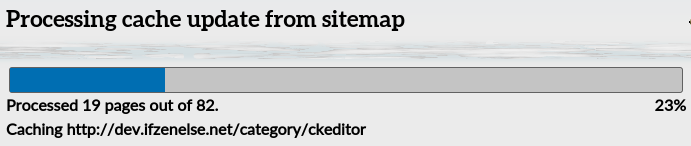
Just visit one of the links listed on the above page with the 'administer nodes' permission, you will be redirected to the progress bar from a Drupal batch job.
You can trigger the cache generation incode with the xhc_generate($smid) function, where $smid is the xmlsitemap id.
It is also possible to generate a single page cache. Use the xhc_path($url) with the absolute $url parameter.
XHC Cron
The XHC Cron submodule (xhc_cron) uses Elysia Cron. It will add a button on the configuration page for adding XML sitemap's Http cache generation tasks to Elysia cron. This button will redirect you to the /admin/config/search/xmlsitemap/http-cache/cron form.
Tips:
- Reset your cron statistics to ensure the first cron run on schedule: /admin/config/system/cron/maintenance.
- Trigger your xhc_cron jobs by visiting /cron.php?cron_key=your_cron_key
- Visit Elysia cron status page to verify that your cron ran and its execution time (/admin/config/system/cron).
CACHE REFRESH
Here is an example unix webserver's cron script for refreshing the nginx fast-cgi http cache every 24hours at 4am:
# webserver's crontab (e.g. nginx user)
0 3 * * * /path/to/webroot/scripts/fast-cgi-cache-purge.sh
#!/bin/sh
# webroot/scripts/fast-cgi-cache-purge.sh
rm -rf /var/cache/nginx/website/*
curl http://example.com/cron.php?cron_key=your_cron_key_hereYou will need to adapt the xhc_cron Elysia cron Schedule rule setting accordingly (/admin/config/system/cron/settings).
MAINTAINERS
The module is maintained by B2F (ifzenelse.net)
Project information
- Project categories: Administration tools, Content editing experience, Content display
 4 sites report using this module
- Created by b2f on , updated
 This project is not covered by the security advisory policy.
Use at your own risk! It may have publicly disclosed vulnerabilities.

