Problem/Motivation
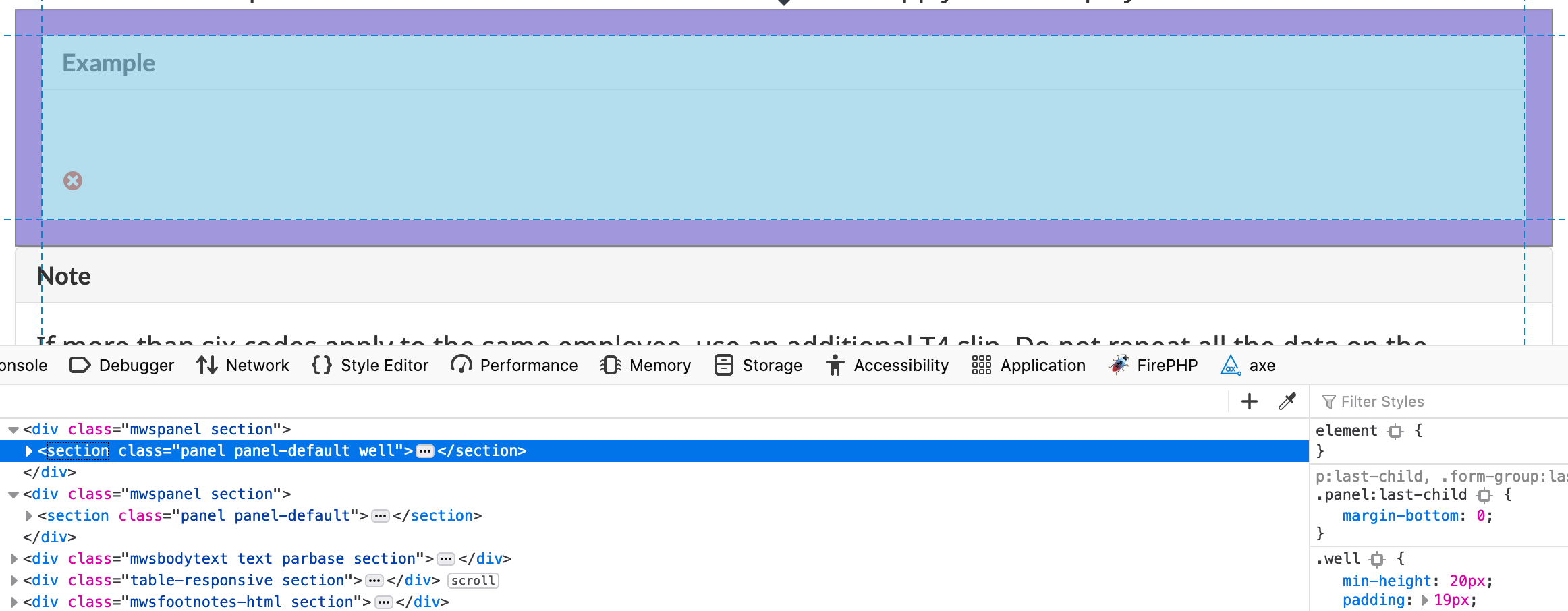
In converting a client to DrupalWxT we have found that bootstrap panels are displayed without any space in between - see image. It occurs specifically if the upper panel is wrapped in a div which triggers the following CSS in wxt_bootstrap style.css that removes the bottom margin:
p:last-child,
.form-group:last-child,
.panel:last-child {
  margin-bottom: 0; }
Steps to reproduce
To reproduce:
1. Paste the following markup into the WYSIWYG source editor:
<div class="my-class">
<section class="panel panel-default well"><header class="panel-heading"><h3 class="panel-title">Example</h3>
</header><div class="panel-body">
<p>Panel 1 text</p>
</div>
</section>
</div>
<section class="panel panel-default"><header class="panel-heading"><h3 class="panel-title">Note</h3>
</header><div class="panel-body">
<p>Panel 2 text</p>
</div>
</section>
2. Save the node and the problem will be seen on node view.
Proposed resolution
I am not sure the reason for this code, so I am unsure whether it should be removed or re-targeted, so I am unsure of how to fix the problem.


Comments
Comment #2
sylus commentedUnforutnately I am unsure of this logic but I removed it since can't see it causing an issue, and if the problem surfaces for the reason for this code we can target it better.
This is now removed in the 4.0.x line.
Comment #3
joel_osc commentedThank-you!