

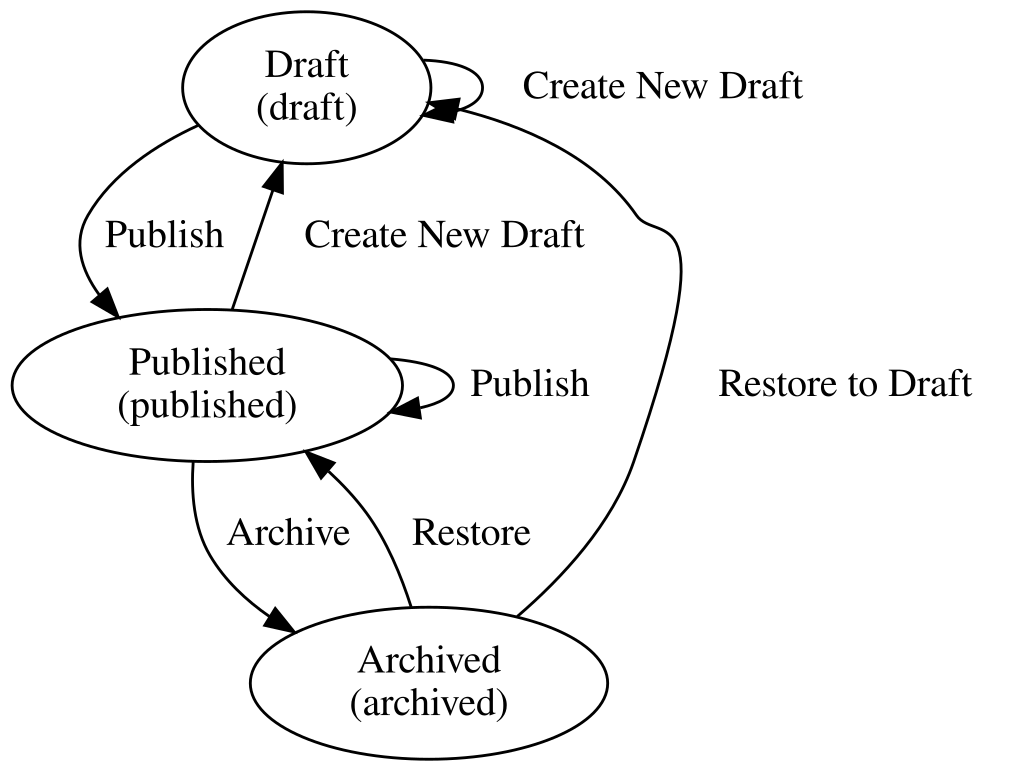
A helper module that produces a Graphviz digraph (dot) file for a given workflow configuration.
Features
A Drush command to produce a Graphviz digraph from a given workflow configuration entity machine identifier.
E.g. Umami editorial workflow as a digraph looks like the following image.

Additional Requirements
To render the Graphviz digraph file, see Graphviz install documentation.
Usage
Assuming a publishing workflow configuration entity exists, the following drush command will create a publishing.dot file with the corresponding Graphviz digraph.
drush workflows_graph:draw publishing > publishing.dot
Then, an SVG file can be generated.
E.g.
dot -Tsvg publishing.dot > publishing.svg
Or, to generate a dot file for every workflow, the following command can be used.
E.g.
drush workflows_graph:draw:all
Project information
 Minimally maintained
Maintainers monitor issues, but fast responses are not guaranteed.- Project categories: Developer tools
- Created by marvil07 on , updated
 Stable releases for this project are covered by the security advisory policy.
Look for the shield icon below.

