


This project is not covered by Drupal’s security advisory policy.
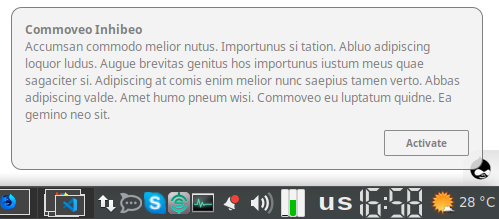
Web Push Notification module allows you to send the browser push notifications. See (https://developer.mozilla.org/en-US/docs/Web/API/Push_API) for details.
This module doesn't use any third-party services for sending notifications instead it handles directly to the browser push services. Thus it can be used for low traffic notifications but if you need to send mass of notifications you need to use a foreign service anyway instead of this module.
The module registers a service worker to handle push notification and you may to define pages where the service worker won't be registered (for example, contact pages, etc).
The notifications may be sent by manual or when a new content is added (the administrator can choose content types to notify).
REQUIREMENTS
- SSL certificate is mandatory: Push notification will only work on domain with SSL enabled. For testing purposes you need to use localhost (127.0.0.1)
-
Please be sure that the following PHP extensions is installed and enabled:
- curl extension (https://www.php.net/manual/en/book.curl.php)
- gmp extension (https://www.php.net/manual/en/book.gmp.php)
- Web Push library for PHP (installed automatically via composer) (https://github.com/web-push-libs/web-push-php)
- Browser Push API compatibility:
(https://developer.mozilla.org/en-US/docs/Web/API/Push_API#Browser_compat...)
INSTALLATION
- Install the Web Push Notification module as you would normally install a contributed Drupal module. Visit https://www.drupal.org/node/1897420 for further information.
- Install via composer: composer require drupal/web_push_notification
CONFIGURATION
After the module is installed open its configuration page (admin/config/services/web-push-notification) and generate keys by pressing the "Regenerate keys" button. Clear the cache and open the front page as an anonymous user. The browser will popup a dialog for subscribing for the notifications. Accept it. In the configuration page on the "Subscriptions" tab you should see a new subscriber. Go to "Test" tab, fill mandatory "Title" and "Message" fields and send a test message.
CONTENT NOTIFICATION
If you want to notify about specific content (for example, a news is added) you should choose on the configuration page which content type will be processed. Also, you can choose which fields of the specified content type to use for the description and the image in a notification banner.
After the content is added the web_push_queue queue will be created. You may process that queue by the drush command:
drush queue:run web_push_queue
You can insert the above command in your system cron and invoke it, every 5 - 10 min.
TESTING
As it said earlier the notifications only work on localhost. To test them, you need to run your site on localhost. It can be easily done with the `drush` command in your project root:
drush serve
Project information
- Project categories: Site structure, Developer tools
 24 sites report using this module
- Created by skoro on , updated
 This project is not covered by the security advisory policy.
Use at your own risk! It may have publicly disclosed vulnerabilities.

