

Closed (outdated)
Project:
Waffles
Version:
6.x-1.3
Component:
Code
Priority:
Normal
Category:
Bug report
Assigned:
Unassigned
Issue tags:
Reporter:
Created:
25 Mar 2009 at 21:29 UTC
Updated:
25 Sep 2020 at 08:32 UTC
Jump to comment: Most recent, Most recent file




Comments
Comment #1
dorien commentedI have the same thing, but only with panel pages.
Comment #2
dnaromance commentedHi,
What I did is set fix width for the content and last sidebar.
May I know have you use any WYSIWYG editor?
Comment #3
dorien commentedNo, I don't use any WYSISYG editor
Comment #4
dnaromance commentedHi,
May I know what is on your first sidebar or left sidebar in the previous attached image? Is it Panel or Views? I worry that is the problem with Views or Panel.
Comment #5
Molesz commentedThe same one is my problem. All remarks get to the bottom of the content.
Comment #6
tdobbs commentedHi,
I am not using any views. What I have on my right and left sidebars right now are just normal Drupal blocks. I have the recent comments on the right, and just the navigation on the left. Yet is still get this problem?
I am using Internet Explorer 7 and have tried Mozilla, same issue.
It seems to only happen upon logging in?
Comment #7
dnaromance commentedHi all,
Sorry, I couldn't sort out the exact problem, but I do suspect that it's the matter of width percentage and pixels. As if you check, the three column layout sidebar first is 240pixels, and sidebar last is 280pixels, but the center content doesn't specify width. And, it's also matter of clients' screen resolution.
Don't forget, each of them still have margin of 20pixels. What I did is specify fixed width for each column.
The problem is, the center column doesn't specify width, so it will grow, and push the sidebar last to bottom.
Comment #8
tdobbs commentedSo how can we make this problem not happen? I like the theme, but this is making it hard for me to use it.
Comment #9
dnaromance commentedHi,
What I did is set fixed width for all three column, either by percentage or pixels. I can help or guide you that, but hope you spend some patient on me. We'll slowly sort it out the problem, is it OK for you?
Since you never modify the theme, I think percentage suit you better.
Comment #10
tdobbs commentedSure, whatever can solve the issue is fine with me. Do you need my email address?
Comment #11
dnaromance commentedHi,
I would always love to help!
I think never mind for your email, we can make use here and I also can use contact form. Let's straight away get into the topic, and sort out the problem quick.
What I do is here:
/**********************************/
/* THREE COLUMN LAYOUT */
/* (Sidebar:Main Content:Sidebar) */
/**********************************/
body.layout-first-main-last #sidebar-first {
float: left;
margin: 10px 10px 0 0; /* margin: 20px 20px 0 0; */
overflow: hidden;
width: 21%; /* width: 240px; */
}
body.layout-first-main-last #content-wrapper {
float: left;
margin: 10px 10px 0 0; /* margin: 20px 0; */
overflow: hidden;
width: 54%;
}
/*
body.layout-first-main-last #content-wrapper #sidebar-last {
background-color: transparent;
margin: 0;
padding: 0 0 0 20px;
width: 280px;
}
*/
body.layout-first-main-last #sidebar-last {
float: right;
margin: 10px 0 0 0; /* margin: 20px 0 0 10px; */
overflow: hidden;
width: 21%;
}
body.full-node.layout-first-main-last #sidebar-last {
background-color: transparent;
float: right;
margin: 10px 0 0 0; /* margin: 0; */
overflow: hidden;
width: 21%;
}
BTW, do you have access to your script? I hope so you have. As you can see here, those commented out were original CSS, and I've modified it, to left and right 21%, and the center 54%. This ratio aspect fit best with the included margin, so if you want larger margin, then you might edit the percent. Could you try this out and see whether it works? If not, we'll work on it again.
Sorry, patient...
Comment #12
tdobbs commentedHmmm, doesnt seem to work. Makes things worse actually. Here is what I had in there before I changed anything:
body.layout-first-main-last #sidebar-first {
margin: 20px 20px 0 0;
width: 240px;
}
body.layout-first-main-last #content-wrapper {
margin: 20px 0 0;
}
body.layout-first-main-last #content-wrapper #content-inner {
}
body.layout-first-main-last #content-wrapper #sidebar-last {
background-color: transparent;
margin: 0;
padding: 0 0 0 20px;
width: 280px;
}
body.full-node.layout-first-main-last #sidebar-last {
margin: 0;
}
When I removed that and put your css in its place, it seemed to get worse. I attached a snapshot.
Comment #13
dnaromance commentedHi,
Oops, sorry for that, I apologize my fault. Maybe shall we try add in overflow: hidden into each of them first? Before we trying modify too many things at once, sorry again.
w3schools CSS overflow: http://www.w3schools.com/Css/pr_pos_overflow.asp
I've downloaded the original waffles theme and install in my local machine, I'll try my best to help out. But we have different content and block, so...anyway, I'll try my best.
Comment #14
pingu2k4 commentedHi.
i am wanting to use this style too but am getting the same problems. its hapening because the style you based this one off was using the right sidebar inline with the content, which in turn causes this to happen if content is too wide.
ive partially fixed it, although theres sill one problem with my fix.
ive brought the width of the main content in, and taken the right sidebar out of the main content. i did this by setting the width of content in the style.css to 600px (it needs to be a little wider, but 600 just while i test it to get it to work) then in the page.tpl.php file, i did the following:
in case you cant see straight off, the second chunk (the bit that makes the right sidebar appear) WAS above the other chunk, and hence included inside the "content" div. we dont want this.
now its displaying properly, other than the right sidebar is being pushed below any content. like shown in my attatched image.
if you can figure out how to move that right of the content and not pushed down... then problem solved.
Im going to compare the page.tpl.php and style.css to a style already working and not using an inline right sidebar... if i can figure that out ill repost, and upload patched files if i manage to fix it.
Comment #15
pingu2k4 commentedive come up with a TEMPORARY fix. i inserted a table into the page.tpl.php
if you need a quick fix solution right away, open up page.tpl.php and select everything between and including:
and paste this code in instead of it.
This is just temporary. im still working on a proper fix, this is jsut for those who need it now. would like to see a better fix in next version...
Comment #16
pingu2k4 commentedIve figured out what needed changing. if youve fiddled about with any files other than style.css then reinstall the style first.
upload and place my patch in your style folder and rename is to style.css. (you may want to save your old style.css in case this doesnt work)
let me know if anyone gets any problems.
Comment #17
pingu2k4 commentedHey, ive jsut spent the last little while transforming this style into a format more commonly used. (with breadcrumb above any messages etc for example).
i uploaded a screen shot of my site using it. to use, just download the 2 patches i uploaded and replace the filed in you theme directory.
I just think it will be more to peoples taste, that is all...
Comment #18
Anonymous (not verified) commented*** My right sidebar is displayed below the main content
Hi all,
I to am playing with this theme and like it features but am also experiencing some formatting issues.
The patches @ #16 and #17 don't fix the issue...
Page not display in XP running IE7/FF 3.0.10, MAC OX Safari
Hopefully we can get a quick fix,
Gary
Melbourne
Comment #19
kompatv commentedYea I am experiencing the same issue w=even after uploading patches.
What I encountered is, It does work properly on every page except the default Home page.
Comment #20
breeze76 commentedHas a fix for this been released yet??
I do not have a problem with it unless I am viewing a page form the book module that has child-pages, and a block in the sidebar-left. As you can see in my attached image.
Someone please get this problem fixed...
Thanks...
Comment #21
Critical Tinkerer commentedSame problem.... subscribing!
Comment #22
vicente commentedHello!
I had the same problem with this theme, but on my site the proble was the CSS of the image_attachment module...I notice that only when you attach image the content drops.
If you're using this module goes to: ../modules/image/contrib/image_attach/image_attach.css and you can see :
[..]
.node {
clear: both;
}
[...]
This float both the class node! Really this class is a killer theme statement :) Comment it and your content goes up again.
Ciao!!
V
Comment #23
stieglitz commentedI'm not sure where I picked this up but I like the way it works to solve the same problem. It also works well in the Black Mamba Waffle sub-theme. I put this in my local.css
Hope this helps
Jon
Comment #24
avpadernoComment #25
onlinevariable commentedFacing the issue with fieldgroup tabs. subscribing.
Comment #26
breeze76 commentedI think the reason for this is:
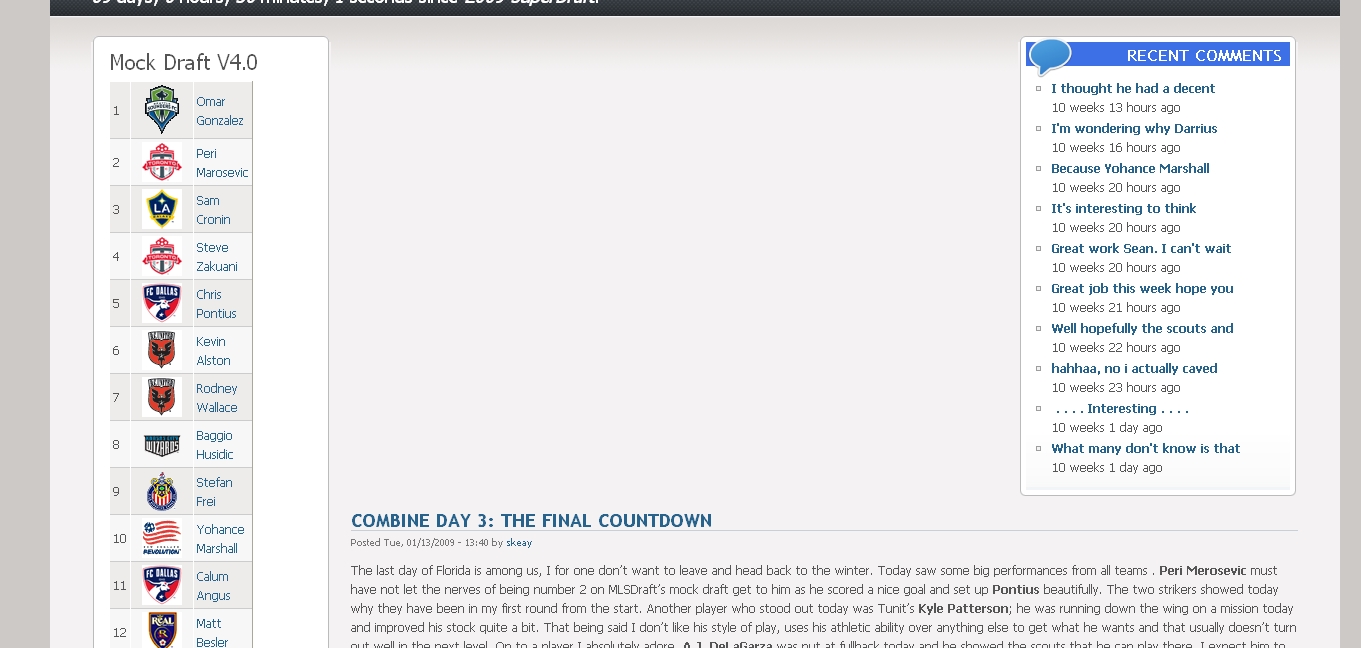
The left sidebar is by itself, but the right sidebar is within the content section, thus, any time content is larger then the viewable space in the content area, it flows under the right sidebar. If the right sidebar is outside the content area it would work fine. Look at say the garland them and see what I am talking about.
Gene
Comment #27
dorien commentedThat's exactly right.
What about this option:
- leave the right floating column, it can be cool in some cases
- add a third column outside of the content section.
Comment #28
crabcakes commentedsame problem here, none of the proposed fixes work...subscribing
Comment #29
NateGreenberg-1 commentedSame issues... even with patches. Any help appreciated.
Comment #30
pomakk commentedI guess everyone have got same issues. Any help appreciated. Thnx
Comment #31
Anonymous (not verified) commentedsubscribing - same problem
Comment #32
iori57 commentedsame problem... help!!
why don't just fix the right column? the floating-inside-content right column causes alot of issues..
Comment #33
david7 commentedsee my quick fix for this problem at http://drupal.org/node/711424
Comment #34
tatariw commentedHello,
I changed the following and it worked for me.
Before:
#content-inner {
}
Now:
#content-inner {
width: 530px; /* for ex. 530px; */
}
Comment #35
charybdiss commentedThe same problem, nothing works... I'm not very skilled in codes, but love the theme... waiting and hoping for complete (and well described:-) solution.
Comment #36
hmahmed commentedStill nothing??
Comment #37
Ken512 commentedHere is the fix for the Black Mamba theme, should work for Waffles as well... http://drupal.org/node/962206
Comment #38
arnotixe commentedI have this problem but only WHEN NOT LOGGED IN.
version = "6.x-1.3"
All stuff I put into right sidebar is appearing right of the center pieces when logged in, but when looged out, it's appearing right below the center pieces:
(wonder how this works out on a non-mono-font...)
As a quick "fix" I stuck the stuff into left sidebar. Doesn't look like what I want, but does not have that problem.
Comment #39
Roxasaurus commentedGuys pardon me not posting this with attachments and everything but im pretty sure i've fixed it for my site at least. My issue was my content was fine and positioned correctly with the sidebar-last on the right side where it should be. But if i displayed a view at all, the exposed filters were in the correct place but the view contents were down below the sidebar last. Like they said up the page more, the content-wrapper contains the sidebar-last within its div, which is sort of strange. I took the sidebar-last chunk and stuck it after the content-wrapper, and added a few lines to my local.css and its good to go.
My local.css has this added to it:
#sidebar-first {
float: left;
}
#content-wrapper {
float: left;
width: 650px; /*(may vary depending on your settings and preference)*/
position: relative;
}
#sidebar-last {
float: right;
}
Comment #40
Jim Hoyt commentedI was having problems with the titles and content extending into the area under the right (3rd) column. As noted above.
So I used Roxasaurus' fixes, but added the 'content-inner' width specification. That made everything fall in line for me. The block I have in the right column is a View. Not sure how that figures in, but now you know.
File: local.css
#sidebar-first {
float: left;
}
#content-wrapper {
float: left;
width: 750px; /*(may vary depending on your settings and preference)*/
position: relative;
}
#content-inner {
width: 550px;
}
#sidebar-last {
float: right;
}
body.layout-first-main-last #sidebar-first {
width: 200px;
}
Notes: The styles declared in local.css override the ones in style.css.
I wanted a narrower left column, so that is why the width above in sidebar-first.
For those just starting your reading here, you get local.css by copying then renaming local_sample.css, which is in your waffles folder.
Comment #41
olisb commentedcomment No. 22 fixed it for me :)
So the main body content is no longer lower than the sidebar content.
Thanks
Comment #42
avpadernoI am closing this issue, which is for a not supported Drupal version.