

This project is not covered by Drupal’s security advisory policy.
Introduction
View Permission Per Node (VPPN) is a very simple access control module with relation to viewing content on a per-node basis.
Note: This module only deals with viewing nodes, it does not affect other op's (ie. create/delete/update).
There are a lot of access control modules, many of them are compared here.
This module only implements hook_node_access, so it should play fairly well with other access control modules.
Installation
- Enable as usual,
- Set permissions for users that can use and administer VPPN.
Configuration
- Navigate to
admin/config/content/vppnand select the content types, - Create or edit a node with one of the types selected above,
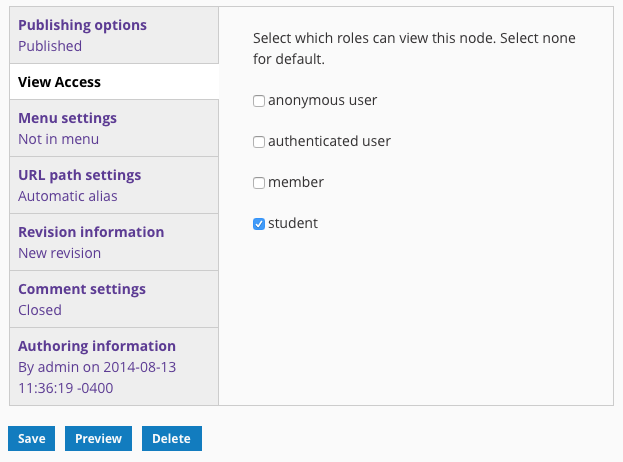
- There will be a new vertical tab named View Access,
- Select the roles that will have view access to this node.
Notes
- Roles with the bypass node access permission will not be listed,
- Selecting no roles will skip using this module for access control,
- Selecting even one role will enable this module for access control, and deny access to any users without one of the selected roles.
Project information
- Project categories: Access control
 57 sites report using this module
- Created by skh on , updated
 This project is not covered by the security advisory policy.
Use at your own risk! It may have publicly disclosed vulnerabilities.

