

Closed (won't fix)
Project:
Views Column Class
Version:
7.x-1.0-alpha1
Component:
Code
Priority:
Normal
Category:
Support request
Assigned:
Unassigned
Reporter:
Created:
19 Sep 2012 at 20:23 UTC
Updated:
21 Dec 2012 at 14:53 UTC
Jump to comment: Most recent file



Comments
Comment #1
nlisgo commentedCan you show me the markup that your view outputs?
Comment #2
Triumphent commentedI assume you mean the HTML markup? I will do that as soon as I re-install the module. For your info, I also tried it on a fresh D 7.15 install and it didn't work either. :)
Comment #3
nlisgo commentedI will need to see the HTML markup before I comment.
Comment #4
nlisgo commentedAlso, what theme are you using?
Comment #5
nlisgo commentedRenamed the title.
Comment #6
Triumphent commentedHere is the HTML text file (attached.) This was done on a fresh install of Drupal 7.15. It does not create the grid (4 in this instance) like it is supposed to. Hope you can figure out what's wrong with it. Thanks. :)
Comment #7
Triumphent commentedAnd here is how the HTML above shows in the browser:
The theme is Bartik
Comment #8
nlisgo commentedCan you also provide me with a screenshot of the settings screen for the views column class display in your view?
Comment #9
Triumphent commentedHope this helps. :)
Comment #10
bjlewis2 commented@Triumphent As far as I know, Bartik is not a responsive theme. From what I understand, this purpose of this module is to make responsive grids, so you wouldn't really get a good idea of how it works if you're using Bartik.
@nlisgo However, I am trying to get it to work with Omega, and that's not working either. Here's a video (3:29) showing exactly what I'm doing. The end result is that the grid stays within the "content" area even though there are no sidebars.
Any direction would be greatly appreciated! Thanks!
http://screencast.com/t/U6zvSxTEn8Vi
Comment #11
nlisgo commented@bjlewis2 I can help you. So, you're right a grid based theme is going to help out here but isn't an essential. It will just save you writing some css.
I can see straight away what is causing your problem and it is as a result of having the develop tools switched on for the omega theme. Specifically, you need to disable the placeholder blocks as the regions will not disappear even if you don't assign blocks to them.
I loved the idea of you sharing a video and so I decided to use the same technique to respond. Just uploading now. Excuse the coughing. I was just choking on something.
http://screencast.com/t/JAldzPvn4
Comment #12
nlisgo commented@Triumphent I can tell from your screenshots and the markup that although you may have enabled the views column class module you are using the unformatted list format instead of the views column class format. Follow @bjlewis2's screencast to see how he has created his view. Although he had some issues with the result because of the omega debug tool that I mention in comment #11 his approach is perfect.
@bjlewis2 rightfully points out that using a grid based theme is essential if you want to have quick results (e.g. omega 3) but you can just write the css if you wish.
Comment #13
nlisgo commentedComment #14
bjlewis2 commentedThanks so much! I didn't realize the debugging blocks did that to regions.
Comment #15
nlisgo commentedNo problem @bjlewis2. Are you getting better results now?
Comment #16
bjlewis2 commentedYes, working great!
(Now I'm having issues with using borealis to make my images responsive inside the responsive grid. Not sure which module is causing the issue yet though.)
Comment #17
pyxio commentedGreetings,
This does not appear to be working with any theme other than Omega for me. I tried with Bartik and AT Commerce. I thought perhaps the issue was related specifically to Adaptive Themes but that does not appear to be the case. I like Omega and would use it, but Adaptive Themes offers responsive grids that work beatifully in Display Suite layouts which I desperately need. Any suggestions on how to get this to work in themes other than Omega? Cheers, K
Comment #18
nlisgo commentedtalengix,
essentially this module allows you to add classes to your rows output. This module does no styling itself, it just amends markup. So you need a degree of familiarity with your theme grid to be able to get it to work with quick and easy results.
I have not used the Adaptive Theme, but I have used this module with the Bartik theme with success. But I needed to do all the styling (css) for myself.
To check if the module is truly working you would need to inspect the markup that your view is producing. Perhaps you can post it here if you are unsure.
Nathan
Comment #19
pyxio commentedThanks for the reply. Right, that sounds logical. I thought the module came with it's own built-in responsive grid standards css. My mistake. I will try to figure out what css adaptive themes would be using in this situation... though like most of the these base themes with subthemes there are a number of files to hunt through. I'd like to get it working so will do my best. Cheers, K
Comment #20
pyxio commentedHi Nathan,
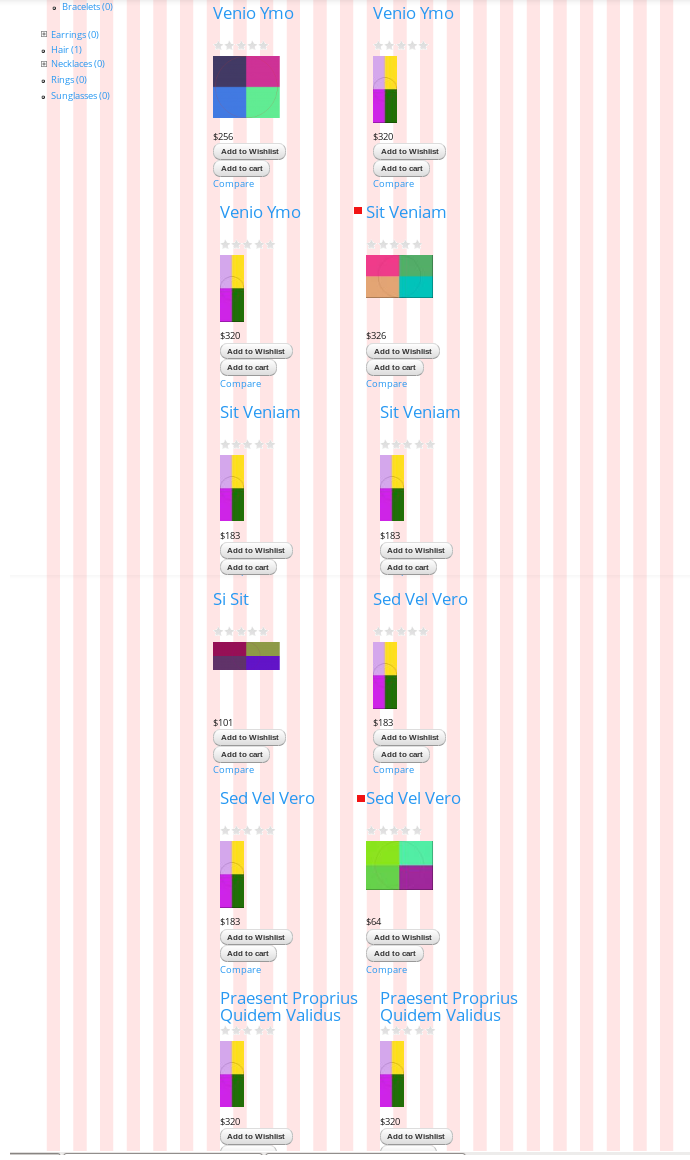
I got Display Suite layouts working beautifully in Omega so decided to switch back. So I am now able to use your module much more successfully. While almost there, I am still struggling with making my grid display perfect. This is not an official issue, I think it is simply a configuration problem on my part. However, since you are a helpful person I figured I would run it by you. Attached is an image of how my product grid currently looks. I put a red square next to the items that are placed correctly. The rest are out of whack. I trust this has something to do with my Views Column Class settings... I played around with different results but can't get it to look right. Since you have probably seen everything the solution may be obvious to you.
Here are my view settings:
===
Row class: grid-6
Add view classes and row stripping are not checked
Number columns: 3
I am not using any row or column class prefixes (might be the problem but I don't know how to use them)
Class left column is alpha
Class right column is omega
Rest of setting empty/default
===
Thanks for any tips you might have. Cheers Kevin