

 Come together with the global Drupal community in Rotterdam, 28 Sept – 1 Oct 2026. Sessions, contribution, connection, and Early Bird savings until 8 June.

Views Advanced Routing is a module providing a custom display extender for Views allowing you to take advantage of Drupal 8's new routing system. You're now able to set the defaults, requirements, and options for each view route.

|
Support requests are taken on Drupal Answers with the views tag. Ask a question! |
Usage
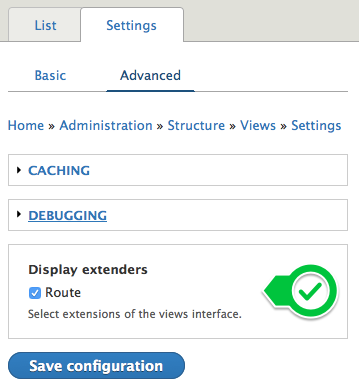
Enable Views Advanced Routing
- Enable the module.
- Go to Administration -> Structure -> Views
Click the 'Settings' tab.
Click the 'Advanced' sub tab. - Under Display extenders, enable the 'Route' checkbox.
- Save configuration.
Using Routes
- Open a view with a 'page' or 'feed' display.
- In the center column, a new 'Route' setting will be displayed. Click the link to set your custom route settings.
- Route YAML is in the same format as Drupals '*routing.yml' files. Strip top level YAML keys such as defaults, requirements, options. Input values directly into the textbox.
- Save the view.
Support
1.x branch is no longer supported, 2.x is a drop in replacement for 1.x.
Supporting organizations:
Maintenance time
Project information
 Maintenance fixes only
Considered feature-complete by its maintainers.- Project categories: Access control
 472 sites report using this module
- Created by dpi on , updated
 Stable releases for this project are covered by the security advisory policy.
Look for the shield icon below.

