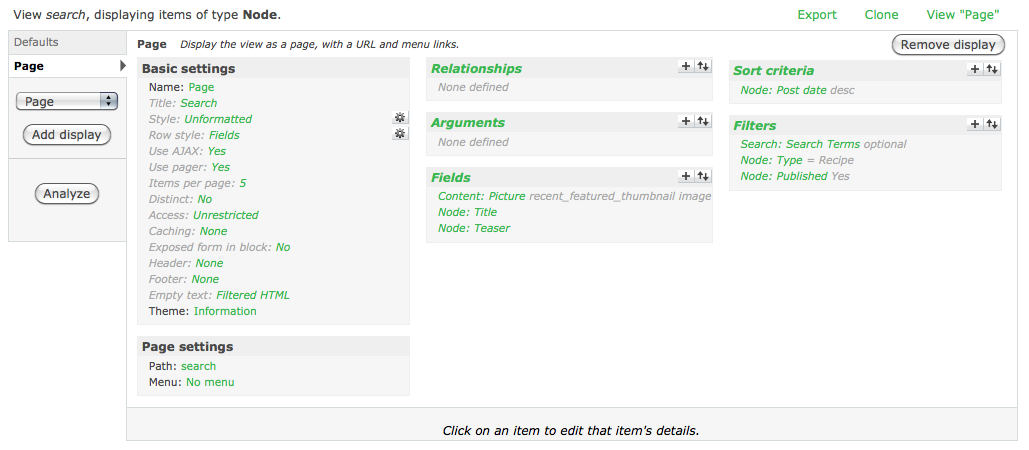
I have a view that has three filters (search terms [exposed], content-type, published). In preview and in "live" view of the view when I enter a word into the search terms filter, I always get Zero results, even though the site is 100% indexed and I know for a fact that the words I am using are in the content that has been indexed.
This was working at one point, then just stopped working.
I have attached several files for review. It appears that the sql query generated by the view gets results, in the case of using the word 'steak' it gets a single result. However the view does not show that result.
The page that is having the error is live at http://www.culinarycompetitor.com/search
As far as I can tell this is a bug, I can't find any other reason why this wouldn't work. I might be missing something.
Thanks.



Comments
Comment #1
ekristen commentedComment #2
merlinofchaos commentedDo you have any node access related modules installed such as tac or content access or og with the access control turned on?
Comment #3
ekristen commentedAh, well at one point we did have content access controls in place but removed and uninstalled them because we weren't getting the control the client wanted. Perhaps there is some lingering affect still? But with that said, it doesn't even work with user 1 which should be exempt from any of those types of controls.
Comment #4
ekristen commentedI did find that the word 'chicken' works, and the view displays 3 results, but when I run the query it returns 7 results.
Comment #5
ekristen commentedNo longer available at http://www.culinarycompetitor.com/search, please see http://www.culinarycompetitor.com/search_broken
Thanks.
Comment #6
mattgilbert commentedI have a similar issue. I've set up a view that doesn't show the results, but if I copy the sql it generates for the preview and paste it into phpmyadmin (and add the quotes phpmyadmin requires), then it gets the correct results. I don't have og or content access installed on this site.
Comment #7
dawehnerDo you have installed any kind of access module? Additional you should better add a new issue and describe what a kind of view you created.
@ekristen
Does the core search returns the right items?
Comment #8
dawehnerUpdate
Comment #9
sjovanig commentedSame here.
Views lists nodes with no problem, but when I apply a filter (exposed or not, same beahavior) with relationship nodes will not be showed, but result query return them in phpMyAdmin.
The relationship is a 'node-reference' field, and filter is a vocabulari term of reference node-type.
Comment #10
iamjon commented@ekristen
Did you find a solution. I followed your second link and searched for chicken. Seemed to find results.
If you found a solution please post it so others can benefit.
Marking this as fixed, feel free to open if your are still having issues.
Comment #11
kamydon commentedSame problem. what's the solution here?
Thanks
Comment #12
dawehner@kamydon
For example one problem could be an installed access module.
Comment #13
kamydon commentedI found out what my problem was!
I made my own page and I was assigning that to 'Path'!!
Instead, i just typed a new name as my path!
so in your views, under 'Page settings' click on 'path' and in the textfield where it says 'Page: The menu path or URL of this view' enter a new name, something random to test it out...
Comment #14
MichaelP commentedAnother reason you may see results from the SQL query and no results in the view is is that the hamfisted developer typos a value into the offset field of the items to display setting.
Happened to a friend of mine ... ;-)
Comment #15
dashah commentedHi,
Even i have the same problem
I have activity module with flag_friend module. The view displays the activities of user's friends.
The view works properly and shows data when i am logged in as admin
But doesnt show result when logged in as other user.
The query works fine in phpmyadmin. Just it doesnt display the results.
Can anyone pl help me to find the solution or help to debug it. ?
Thanks in advance..!!! :)
Comment #16
dashah commentedComment #17
dawehnerIf you get different results depending on admin/other user you should have a look at your node access modules.
Do you have one? If yes are you sure the users can access them? Take sure that you have the current version of views and drupal!
Comment #18
dashah commentedFirst of all Thanks for responding.. :)
No access modules are installed.
The "access content" permission for node is given to all the users..
Other all things working well on site except the activity.
The versions of views and drupal are current.
I am attaching my view, if that hepls to solve my problem...
Comment #19
merlinofchaos commentedWhat do you get when you do
SELECT COUNT(*) FROM node_access;Comment #20
dashah commentedThere are 93,726 records in that table...
Comment #21
dashah commentedGot it..
For the node i was testing, there was only one entry with realm value as "domain_id" and all grant field values as 1.
Manually i added new entry with realm value "domain_site" for the same node id, and i can see that entry in the activity view now..
But i am wondering, why the second entry was not inserted by itself for this node ?
For many other nodes i can see both the entries..
Any idea about it ?
Comment #22
esmerel commentedIssue with the view appears to be dealt with; otherwise, this should probably move to node_access, not here.