Hi,
I'm pretty new to views theming, so please be patient with me. :)
I've generated a view with node fields (title, upload, body) and some cck fields (filefield).
How can I check if a view field is empty or not?
I found this snippet in the documentation:
<?php
  if ($fields['field_boo_url_url']->content) {
    print '<a href="' . $fields['field_boo_url_url']->content . '">' . $fields['title']->content . '</a>';
  }
?>
And tried this:
<?php
  if ($fields['field_myfield_']->content) {
    print ("mytext" . $fields['field_myfield']->content);
  }
?>
Unfortunately it didn't work -> one of two fields with this name has data but none of both are visible now.
And, are there differences in calling a cck field and a node field (like: body, title, upload)?
Thank you very much for your help in advance... and please let me know if you need more info.
Regards,
Stefan


Comments
Comment #1
deshilachado commentedI don't understand: I thought the field name had to be unique? At least I cannot create two fields with identical name.
Comment #2
design.er commentedSorry for the chaos.
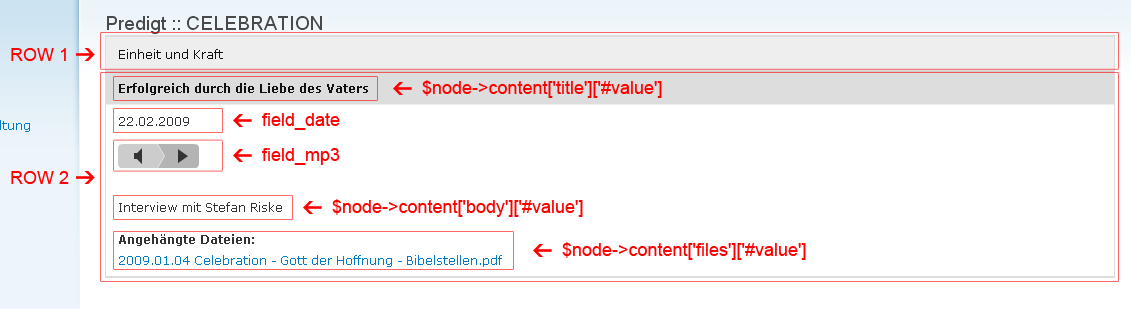
In the attached picture you can see 2 rows. Each of them has the same fields as usual - like in a table every row share the same fields with individual information.
I use the views accordion.module that's why only one row is expanded.
From the field names you can see that there are node fields (title, body and attached files) and cck fields (field_date and field_mp3).
Every field will get a field title (Date, Details etc.).
Now the question is: How to check if the respective node field/cck field is empty - so I could hide them.
Fields like attached files and details will be empty in most cases so it would be senseless to show their field titles if they have now output.
Please forgive me my poor english. I hope it was clear enough now.
Please let me know if you need more info.
Thanks a lot in advance and regards.
Stefan
Comment #3
deshilachado commentedFrom the same page where your snippet comes from there are more examples, did you try those? And do they work for you?
For example, what is the output of
Sorry if I cannot help you more, this is my first time I look into theming views.
Comment #4
merlinofchaos commentedThe PNG you post does not appear to be from a Views template at all.
What template are you using?
Comment #5
design.er commented@deshilachado: I saw and tried other examples, but did not get them to work.
Maybe I did something wrong - please correct me if so!
Example code from Views 2 theming
I tried - with the $field_date from my attached PNG:
Also tried it with
$field->dateand$field->$field_dateinstead of$field->field_date. None of all them worked for me. :(@merlinofchaos: As mentioned in #2, I use the views accordion.module for display. But I can't imagine that this should be the problem - the pure output works fine so far.
Thanks a lot for your patience and help! :)
Stefan
Comment #6
design.er commentedOk, now I've reset everything in views to standard (removed all created tpl.php templates) and tried the default 'table', 'list' and 'unformatted' display views.
The problem still exists -> if a field is has no data, the labels are still visible. So it looks pretty ugly, when user just see labels without content.
How to prevent that -> how to get empty fields invisible?
Thanks in advance.
Stefan
Comment #7
dawehnerif this is your question i mark this a duplicate
http://drupal.org/node/411296
Comment #8
design.er commentedstuff discussed in the linked thread sounds interesting.
i hope there will be a working patch soon.
thanks a lot for your help. :)