

Closed (outdated)
Project:
Views (for Drupal 7)
Version:
7.x-3.7
Component:
Miscellaneous
Priority:
Normal
Category:
Support request
Assigned:
Unassigned
Reporter:
Created:
10 Sep 2013 at 13:04 UTC
Updated:
9 Oct 2017 at 09:29 UTC
Jump to comment: Most recent, Most recent file


Comments
Comment #1
choster commentedThere aren't any tables in the image you attached, but to answer your question, yes, you can achieve those layouts by using field output and then applying CSS, without editing any template files.
Comment #2
hgurol commentedWhat you mean by there aren't any tables in the image since I can see them myself?
Anyway, I would be really happy to see an example of how to do it with applying css...
PS: I am already using the field output and then the Table option from the format section. Then I play with different settings on that Table option to get something similar to the layouts I want to achieve but it just doesn't work.
Comment #3
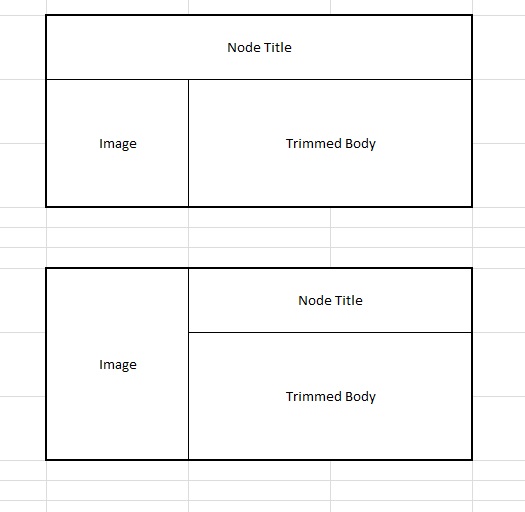
hgurol commentedAttached is what I can do best with the Table option setting on the format section, plus with custom outputting the fields. I am able to display two fields in one table cell, one after another. Even though it seems close enough the original layout I am seeking, it really does not work for me.
This is an live example of what I am working on http://dev-assembly.gotpantheon.com/our-services
Comment #4
ahillio commentedI'm not sure "table" format is going to get you want you're hoping for. I think you want the format to be "unformatted list" and then you'll use css to set the width and float properties of your image and summary. The table.jpg you posted has two concepts - are you trying to achieve the top one? It looks like your site is displayed similar to that image's bottom concept.
Comment #5
hgurol commentedMy primary goal is the top layout but if I can not get it done, then I can settle for the bottom layout.
The current layout on the site looks like the bottom layout on the table.jpg, however it actually is the layout on the table2.jpg and it does not work for me.
Is there a working example of how to do it with custom css?
I thought what I am looking for is something people would use very often. That's why I thought it would be possible to achieve something like that without fiddling with template files or using custom css which is above my skills.
I would appreciate any help.
Comment #6
ahillio commentedIf you don't know css you might want to use something like Display Suite https://drupal.org/project/ds. I've never used that but it's a popular module. If you're able to put new modules on your Pantheon platform give that one a shot. Otherwise, css is the common way of doing such things, and you'd probably want to switch from 'table' to 'unformatted list' to make the output more conducive to writing css for it.
Comment #7
hgurol commentedI believe DS is an expensive solution just to solve this single issue.
Any starting points about how to do it with CSS?
I mean other than the ones that you have already mentioned.
Comment #8
ahillio commentedI would switch from table to unformatted list. Then I would add some css to my theme and the css might look sorta like this:
That exact css won't work for you now. You would have to switch to unformatted list first, and then alter the css accordingly.
Comment #9
hgurol commentedI didn't had a chance to give it a try yet but thank you soooooo much.
Comment #10
mustanggb commented