

Closed (outdated)
Project:
Views (for Drupal 7)
Version:
7.x-3.5
Component:
User interface
Priority:
Normal
Category:
Support request
Assigned:
Unassigned
Reporter:
Created:
8 Mar 2013 at 22:48 UTC
Updated:
16 Aug 2017 at 09:11 UTC
Jump to comment: Most recent, Most recent file




Comments
Comment #1
cfox612 commentedI need the same sort of functionality. I don't see this being able to happen with one view, but you could make multiple block views (one for each content type) and manipulate that way.
Comment #2
ravi.kumar88 commentedThis can be implemented using the views_php module.
Please follow the steps:
1.Download and install views_php module
2.Create a view with all the fields required related to the content like content type,content,author id etc.
3.Add a new filter criteria as Global:PHP and under the filter code write the following code :
Comment #3
esmerel commentedThere's also the representative node... relationship? I think. I can't remember how to get to it, but that may help you along.
Comment #4
esmerel commentedComment #5
eminencehealthcare commentedThank you Ravi.
I am getting an error with test_drp.node, do I have to rename that to something else?
I tried renaming to my_content_type_machine_name.node and still no dice.
I will also try your suggestion Esmerel, thanks.
Comment #6
eminencehealthcare commentedThe error I receive Ravi is this:
SQLSTATE[42S02]: Base table or view not found: 1146 Table 'test_drp.node' doesn't exist
What should I replace test_drp.node with?
Comment #7
vensiresWhen using db_query(), instead of
FROM test_drp.nodewriteFROM {node}. It's up to Drupal to define the database name and possible table name prefix.Comment #8
eminencehealthcare commentedThanks for the reply vensires, that got rid of the error.
However the code still does not seem to be working correctly.
I have a table view of content fields.
My fields are:
Content:Title
Content:User Name
I have two filters:
Content:Type (=My content type)
Global:PHP (The PHP filter)
My results are still showing more than one content type row per user.
Comment #9
eminencehealthcare commentedComment #10
vensiresAre you sure you have to write PHP to accomplish this?
Have you tried sorting the results (thanks to the Sort section of Views) and then Grouping them By Content Type (by enabling Aggregation in Advanced section of View) ?
Comment #11
ravi.kumar88 commentedHi,
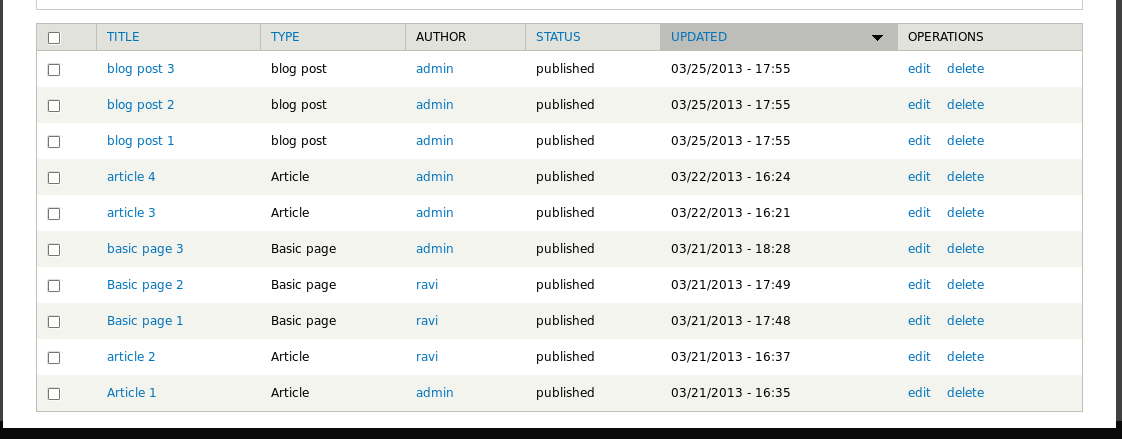
The procedure is working fine for me.Please check the screenshots.
And thanks vensires for 'test_drp.node'.I have improved the code.
Also I am unable to find a way out using Aggregation as we have to filter out the contents on the basis of both the content type and its author.
I would appreciate if you give detailed step to implement it.
Comment #12
eminencehealthcare commentedThank you guys for your persistent help.
Here are screen shots of what my view looks like and the results I am getting:
In my results it is still showing multiple content of the same content type per author.
Vensires, I agree with Ravi on the sort/aggregation method I cant find a way to do it because we have to filter out the contents on the basis of both the content type and its author. If you still think this is a good option would would the sort criteria/aggregation settings be?
Comment #13
ravi.kumar88 commentedHi,
I went through the screenshots you provided.I think you are missing the sort criteria in the view.
Could you please add a Content:Post date (desc) sort criteria to the same view and check again?
Comment #14
eminencehealthcare commentedThanks I was missing the sort criteria.
I figured out what the main problem was.
I was using field: User name instead of Field: UID
In the code it is set to UID. FACEPALM!!
One more thing I notice though, I cannot sort by anything or it breaks and no results show.
Thank you so much for your help.
Comment #15
ravi.kumar88 commentedNotice: Undefined property: stdClass::$node_created in __lambda_func() (line 2 of /sites/all/modules/views_php/plugins/views/views_php_handler_filter.inc(82) : runtime-created function).
This is the error coming when you use any other sort criteria other than content:post date.
I think that is coming due to the conflict in the queries given in the Global:PHP in filter section.
Also if you have to show the latest post you need to have that sort criteria.
Comment #16
eminencehealthcare commentedI am fine just using post date sort criteria. I am trying to table sort and default column sorting in the settings section. I do not receive an error but no results show when using any configuration of that sort method.
Comment #16.0
eminencehealthcare commented:)
Comment #17
mustanggb commented