Closed (fixed)
Project:
Views (for Drupal 7)
Version:
7.x-3.5
Component:
User interface
Priority:
Critical
Category:
Support request
Assigned:
Unassigned
Reporter:
Created:
24 Sep 2012 at 09:51 UTC
Updated:
19 Mar 2013 at 20:10 UTC


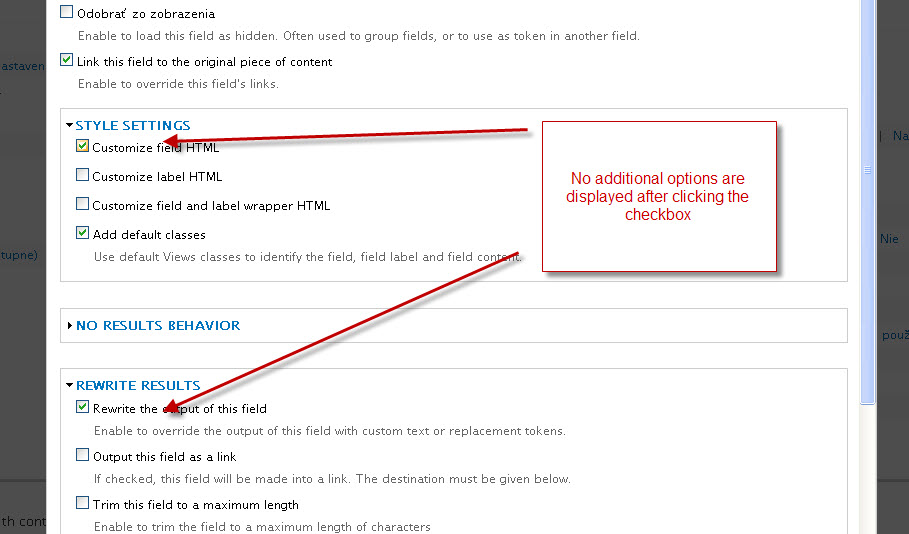
When clicking checkboxes on field properties settings, fields with further settings are not being shown.
I noticed this after some time I untached Views and after several upgrades of miscellaneous modules (Views include), when trying to change some settings on existing Views.
It is probably caused by interference with some other module(s). I tryed to uninstall as many modules as possible but with no luck. I expect the problem to by of similar nature to this I was also solving: CSS conflict with logintoboggan, prevents using Custom Permissions
Just wanted to ask the community if no one had experienced simillar issue.
Thanks in advance..
| Comment | File | Size | Author |
|---|---|---|---|
| view_checkboxes.jpg | 97.05 KB | sketman |

Comments
Comment #1
dawehnerDo you maybe see some javascript errors in your browser, but yeah this is just a fast guess.
Comment #2
haggster commentedExperiencing exactly the same problem here, on multiple sites. No JS-errors to be seen in browser.
Comment #3
sevanden commentedHave similar issue, except I can't even open the "Boxes" with additional settings if LABjs is enabled on admin pages.
Comment #4
danthewolfe commentedI had the problem when I had jQuery Update module enabled. I disabled it and views worked correctly again. I re-enabled jQuery Update after making my changes to views and everything seems to be fine.
I'm quite surprised there were no javascript errors in the console from this conflict.
Comment #5
chefnelone commentedExactly the same problem here too.
Check the capture
Comment #6
chefnelone commentedComment #7
dawehner@chefnelone
So do you also have jquery update installed?
Comment #8
chefnelone commented#7 Yes, I have it.
Comment #9
dawehnerThere is the problem.