Hello, I'm very familiar with Views in D6, but I'm not yet familiar with the new Views3 UI. I'm trying to build a simple View but am unable to select fields for a formatted HTML list. Instead I receive the message "The selected style or row format does not utilize fields." I performed a minimal D7 install, so it's possible I'm lacking a dependent core module, but I've been through the list twice and doubt that's my problem.
Thanks!
NonProfit
$view = new view;
$view->name = 'front_page_blog';
$view->description = '';
$view->tag = 'default';
$view->base_table = 'node';
$view->human_name = 'Front Page Blog';
$view->core = 7;
$view->api_version = '3.0-alpha1';
$view->disabled = FALSE; /* Edit this to true to make a default view disabled initially */

/* Display: Master */
$handler = $view->new_display('default', 'Master', 'default');
$handler->display->display_options['title'] = 'Front Page Blog';
$handler->display->display_options['use_ajax'] = TRUE;
$handler->display->display_options['access']['type'] = 'perm';
$handler->display->display_options['cache']['type'] = 'none';
$handler->display->display_options['query']['type'] = 'views_query';
$handler->display->display_options['query']['options']['query_comment'] = FALSE;
$handler->display->display_options['exposed_form']['type'] = 'input_required';
$handler->display->display_options['exposed_form']['options']['autosubmit'] = 0;
$handler->display->display_options['exposed_form']['options']['autosubmit_hide'] = 1;
$handler->display->display_options['exposed_form']['options']['text_input_required_format'] = 'plain_text';
$handler->display->display_options['pager']['type'] = 'some';
$handler->display->display_options['pager']['options']['items_per_page'] = '1';
$handler->display->display_options['pager']['options']['offset'] = '0';
$handler->display->display_options['style_plugin'] = 'list';
$handler->display->display_options['row_plugin'] = 'node';
$handler->display->display_options['row_options']['links'] = 1;
$handler->display->display_options['row_options']['comments'] = 0;
/* Field: Content: Title */
$handler->display->display_options['fields']['title']['id'] = 'title';
$handler->display->display_options['fields']['title']['table'] = 'node';
$handler->display->display_options['fields']['title']['field'] = 'title';
$handler->display->display_options['fields']['title']['label'] = '';
$handler->display->display_options['fields']['title']['alter']['alter_text'] = 0;
$handler->display->display_options['fields']['title']['alter']['make_link'] = 0;
$handler->display->display_options['fields']['title']['alter']['absolute'] = 0;
$handler->display->display_options['fields']['title']['alter']['word_boundary'] = 0;
$handler->display->display_options['fields']['title']['alter']['ellipsis'] = 0;
$handler->display->display_options['fields']['title']['alter']['strip_tags'] = 0;
$handler->display->display_options['fields']['title']['alter']['trim'] = 0;
$handler->display->display_options['fields']['title']['alter']['html'] = 0;
$handler->display->display_options['fields']['title']['hide_empty'] = 0;
$handler->display->display_options['fields']['title']['empty_zero'] = 0;
$handler->display->display_options['fields']['title']['link_to_node'] = 1;
/* Sort criterion: Content: Post date */
$handler->display->display_options['sorts']['created']['id'] = 'created';
$handler->display->display_options['sorts']['created']['table'] = 'node';
$handler->display->display_options['sorts']['created']['field'] = 'created';
$handler->display->display_options['sorts']['created']['order'] = 'DESC';
/* Filter criterion: Content: Published */
$handler->display->display_options['filters']['status']['id'] = 'status';
$handler->display->display_options['filters']['status']['table'] = 'node';
$handler->display->display_options['filters']['status']['field'] = 'status';
$handler->display->display_options['filters']['status']['value'] = 1;
$handler->display->display_options['filters']['status']['group'] = 0;
$handler->display->display_options['filters']['status']['expose']['operator'] = FALSE;
/* Filter criterion: Content: Type */
$handler->display->display_options['filters']['type']['id'] = 'type';
$handler->display->display_options['filters']['type']['table'] = 'node';
$handler->display->display_options['filters']['type']['field'] = 'type';
$handler->display->display_options['filters']['type']['value'] = array(
  'blog_entry' => 'blog_entry',
);

/* Display: Attachment */
$handler = $view->new_display('attachment', 'Attachment', 'attachment_1');
$handler->display->display_options['pager']['type'] = 'some';
$handler->display->display_options['pager']['options']['items_per_page'] = '9';
$handler->display->display_options['pager']['options']['offset'] = '1';
$handler->display->display_options['displays'] = array(
  'page_1' => 'page_1',
  'default' => 0,
  'block' => 0,
);
$handler->display->display_options['attachment_position'] = 'after';
$handler->display->display_options['inherit_exposed_filters'] = 1;
$handler->display->display_options['render_pager'] = 1;

/* Display: Page */
$handler = $view->new_display('page', 'Page', 'page_1');
$handler->display->display_options['path'] = 'front';
$handler->display->display_options['menu']['type'] = 'normal';
$handler->display->display_options['menu']['title'] = 'Blog';
$handler->display->display_options['menu']['weight'] = '0';



Comments
Comment #1
nonprofit commentedOK, I checked out the glossary sample View and it provides fields, so I know this is a setting I've missed not an issue with a handler module. Thanks! -NonProfit
Comment #2
MichaelAaronson commentedCORRECTED COMMENT
My comment was incomplete, so I have added some more information.
The problem might be that you created a view that shows content with a Display format of "Unformatted list", which doesn't seem to have any fields.
If you create a view with another Display format you should be able to select the fields you want to display.
Note: I am using Views 7.x-3.0-rc1 with Drupal 7.4.
I will first show steps that seem to reproduce the problem, and then I will list steps that seem to get around it.
To reproduce the problem:
Click on "Structure", and then on "Views".
Click on "Add new view"
Name: "ContentViewTest"
Show: "Content". It probably doesn't matter what you enter under "of type", "tagged with" or "sorted by"
Check "Create a page"
Accept the defaults in the "Create a page" section.
Click "Continue & edit"
Under "FIELDS" the message appears: "The selected style or row format does not utilize fields."
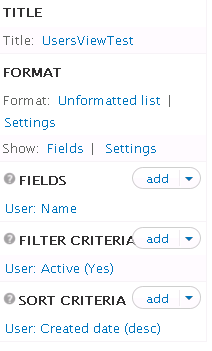
Notice that, above this, under "FORMAT", it says "Show: Content | Teaser"
This looks the same as the attachment included with the problem description from "NonProfit"
To get around the problem:
Click on "Structure", and then on "Views".
Click on "Add new view"
Name: "Content as table"
Show: "Content". It probably doesn't matter what you enter under "of type", "tagged with" or "sorted by"
Check "Create a page"
Under "Display format" select "Table". (This would probably work for the other kinds of Display format.)
Click "Continue & edit"
You should see a form with "Displays" at the top.
Under FIELDS I see "Content: Title", with an "add" button on the right.
The message "The selected style or row format does not utilize fields." does not appear
Click "Save" (near the top of the page)
Click on "Structure" and then "Views"
You should see "Content as table" in the list.
Click on "/content-as-table", in the PATH column.
You should now see a view that lists the content in your site.
So, when you create a new view, be sure to set up a "Display format" that has fields.
It looks like you have to do this when you create the view.
You apparently can't go back and change it later.
(I tried adding an attachment showing the FIELDS section, but it didn't seem to work, and I am unable to change or remove the attachment.)
Comment #3
merlinofchaos commentedThat's not a bug. The 'Content' row style (I'm a little sad about losing that term) doesn't utilize fields. Perhaps the message needs to improve because the language for the row style has gotten so generic it's hard to tell someone where to click to change it.
Please read the issue tag guidelines before using tags. :)
Comment #4
nonprofit commentedMichael and Earl, thanks!
The problem might be that you created a view...which doesn't seem to have any fields.
Yes, you are correct. To clarify for anyone else who makes a similar error, on admin/structure/views/add Under Display format, I'm able to select "Unformatted list" of "Fields" which naturally will allow the selection of fields.
It looks like you have to do this when you create the view.
You apparently can't go back and change it later.
Earl, is it true that once set, it can not be changed? In Views2, one could switch between Row style: Fields and Node.
Sorry about the issue tags...I'll review their proper use.
Thanks for your assistance!
-NP
Comment #5
merlinofchaos commentedYou can change them. Under 'Format' and 'Show', respectively.
Comment #7
viiresh commentedYou need to select Show:Fields in Format block. It will fix the problem.
Comment #8
ifernando commentedIn the
Settingsof theFormat:activate the option 'Force using fields'Comment #9
krisp1 commentedThanks viiresh and ifernando, finally got there.
Comment #10
loismota commentedI could solve it @viiresh thanks