

Closed (fixed)
Project:
Vertical Tabs
Version:
6.x-1.x-dev
Component:
Code
Priority:
Normal
Category:
Support request
Assigned:
Unassigned
Reporter:
Created:
19 May 2009 at 17:30 UTC
Updated:
21 May 2009 at 06:19 UTC
Jump to comment: Most recent file




Comments
Comment #1
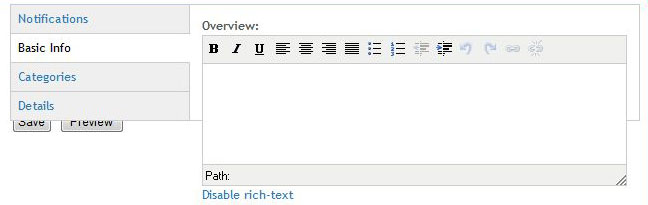
quicksketchI'm not sure if this is tinyMCE specific or not, in IE7 I can't cause the same problem with normal fields (see attached).
Comment #2
atelier commentedI tested this with a fresh install of VT. It's not limited to tinyMCE as other field types display the same behavior.
I did try switching to Garland (previous screenshot was a custom Genesis sub-theme) and that fixed the Save/Preview button problem, but not the bounding box.
Comment #3
quicksketchAre you sure you updated all the files in Vertical Tabs? It looks like vertical_tabs.js might be manually setting the height property on the tab panes, since the height of the pane (on the right) is exactly the same as the list of tabs (on the left). These two heights should now be completely independent of each other and controlled entirely by the browser, since there are no longer any height properties specified anywhere in the CSS or JS.
Comment #4
atelier commentedI re-installed and now it works fine. Not sure what caused the problem. Sorry to trouble you and thanks for helping me with this.
Comment #5
quicksketchThanks for the update atelier!