Problem/Motivation
No link to click on for the button with type of anchor
Steps to reproduce
Given that the button component "HTML tag" property was sat to "a" for a use as an anchor
When rendering the button component
Then the button will and behave as a clickable link
But no Link functionality caveat
Proposed resolution
- Add a new optional prop
"link"
- Manage disabled linked button
Disabled buttons using the <a> element behave a bit different:
<a>s don’t support the disabled attribute, so you must add the .disabled class to make it visually appear disabled.
Some future-friendly styles are included to disable all pointer-events on anchor buttons.
Disabled buttons using <a> should include the aria-disabled="true" attribute to indicate the state of the element to assistive technologies.
Disabled buttons using <a> should not include the href attribute.
<a class="btn btn-primary disabled" role="button" aria-disabled="true">Primary link</a>
<a class="btn btn-secondary disabled" role="button" aria-disabled="true">Link</a>
To cover cases where you have to keep the href attribute on a disabled link, the .disabled class uses pointer-events: none to try to disable the link functionality of <a>s. Note that this CSS property is not yet standardized for HTML, but all modern browsers support it. In addition, even in browsers that do support pointer-events: none, keyboard navigation remains unaffected, meaning that sighted keyboard users and users of assistive technologies will still be able to activate these links. So to be safe, in addition to aria-disabled="true", also include a tabindex="-1" attribute on these links to prevent them from receiving keyboard focus, and use custom JavaScript to disable their functionality altogether.
<a href="#" class="btn btn-primary disabled" tabindex="-1" role="button" aria-disabled="true">Primary link</a>
<a href="#" class="btn btn-secondary disabled" tabindex="-1" role="button" aria-disabled="true">Link</a>
Remaining tasks
- ✅ File an issue about this project
- ✅ Addition/Change/Update/Fix to this project
- ✅ Testing to ensure no regression
- ➖ Automated unit/functional testing coverage
- ➖ Developer Documentation support on feature change/addition
- ➖ User Guide Documentation support on feature change/addition
- ✅ Accessibility and Readability
- ✅ Code review from 1 Varbase core team member
- ✅ Full testing and approval
- ✅ Credit contributors
- ✅ Review with the product owner
- ✅ Update Release Notes and Update Helper on new feature change/addition
- ✅ Release Varbase 10.0.0-beta1, varbase_components-2.0.0-alpha21
- ✅ No Update
- ➖ Optional Update
- ➖ Forced Update
- ➖ Forced Update if Unchanged
User interface changes
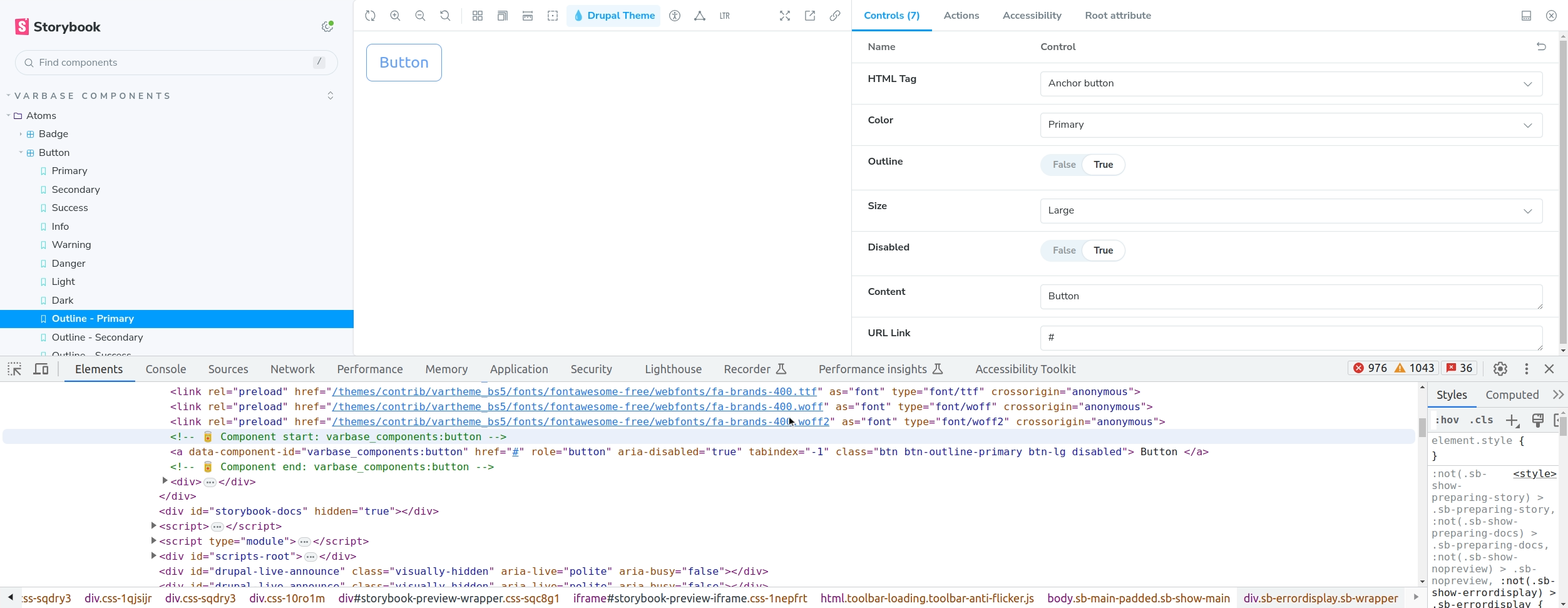
Example #3: Disabled Anchor button
{% include 'varbase_components:button' with {
  html_tag: 'a',
  color: 'primary',
  content: 'Button',
  url: 'https://drupal.org',
  disabled: true,
  outline: true,
} %}
The HTML output will be
<!-- 🥫 Component start: varbase_components:button -->
<a data-component-id="varbase_components:button" href="https://drupal.org" role="button" aria-disabled="true" tabindex="-1" class="btn btn-outline-primary btn-lg disabled">Button</a>
<!-- 🥫 Component end: varbase_components:button -->
Rendered HTML output by CL Server from Drupal

Accessibility check

When nested in other complex components
Example #2: Anchor button as Read more link in a Card
{% include 'varbase_components:button' with {
  html_tag: 'a',
  url: '/blog/blog-test1',
  content: 'Read more'|t,
  color: 'primary',
  outline: true,
  utility_classes: ['card-link', 'float-end', 'mt-3', 'read-more']
} %}

Button Storybook Docs page

API changes
Data model changes
Release notes snippet
- Issue #3381466: Fixed the Button component when having the HTML tag
prop as anchor to provide a Link functionality caveat




Comments
Comment #2
rajab natshahComment #3
rajab natshahComment #4
rajab natshahComment #6
rajab natshahComment #10
rajab natshahComment #11
rajab natshahComment #12
rajab natshahComment #13
rajab natshahComment #14
rajab natshahComment #15
rajab natshahComment #17
rajab natshahComment #18
rajab natshahComment #19
rajab natshahComment #20
rajab natshahComment #22
rajab natshahComment #26
rajab natshah✅ Released varbase_components-2.0.0-alpha21
Comment #27
rajab natshah✅ Released Varbase 10.0.0-beta1