Hi,
I was wondering if someone would just quickly help me on the following please .. I've really tried to delete the \n's etc, to no avail.
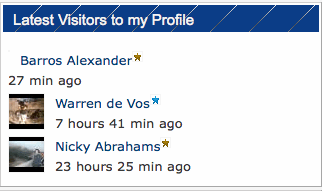
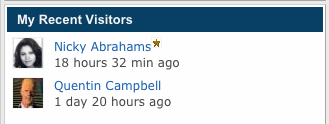
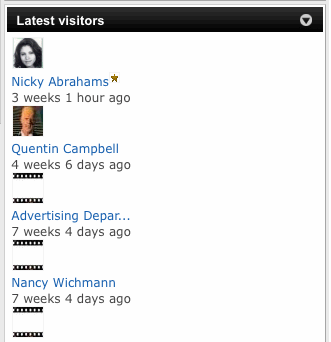
In attached screenshot have the 'recent visitors' block to a profile, but would like the name and timestamp next to the picture (and not below it)
/**
 * Themeable function
 */
function theme_user_visits($account, $timestamp = NULL, $referer = NULL) {
  $output  = '<div>'."\n";
  $output .= theme('user_picture', $account);
  $output .= ' <div class="name">'. theme('username', $account) .'</div>'."\n";
  if ($timestamp) {
    $output .= $timestamp ? ' <div class="visit">'. t('!time ago', array('!time' => format_interval(time() - $timestamp))) .'</div>'."\n" : '';
    $output .= $referer ? ' <div class="referer">'. t('Referer !link', array('!link' => l($referer, $referer))) .'</div>'."\n" : '';
  }
  $output .= '</div>'."\n";
  return $output;
}
Would most appreciate any help, and thank you.
Lilian






Comments
Comment #1
sanduhrsHi Lilian,
this is a rather generic question and not an issue with the module.
Please use the forum [1] for questions of this kind or read the documentation on CSS [2].
[1] http://drupal.org/forum
[2] http://www.w3.org/Style/CSS/
Comment #2
liliplanet commentedHi Sanduhrs,
Thank you for your response. Yes, I do realize that is should have been on the general forum, and tried that, but was not able to upload a screenshot. That's why I've added my request here. (sorry)
I've tried your suggestion and still no happiness there. Cleared cache. Still looks the same.
Look forward to any reply, and thank you for any help.
Lilian
Comment #3
sanduhrsThe solution depends on the other CSS used for the theme, the suggested code should work on most themes.
Can I access the site you did the screenshot from?
Comment #4
liliplanet commentedThank you sanduhrs,
Yes, absolutely. http://www.filmcontact.com
Most most appreciated :)
Comment #5
sanduhrshi lilian,
so try something like:
see attached screen.
Comment #6
liliplanet commentedI've done as you mentioned, cleared cache, but still no happiness.
Most appreciate you help sanduhrs.
I looked at Firebug, and it does not seem to pick up the css ..
Comment #7
sanduhrsSorry, I don't see the block anywhere, I used my local code.
Comment #8
liliplanet commentedI understand, thank you sanduhrs. You have definitely pointed me in the right direction and will work it out.
Wishing you a great weekend.
Lilian
Comment #9
liliplanet commentedHi Sandurs,
You were so kind to help me before with the css theming and it worked fabulously with 1 visitor, but with 2 or more the css does not line up each user below each other.
Please see attached screenshot :)
I also would like to remove Total Visits, if possible please ..
Currently have
Most appreciate your help, and thank you again for your wonderful module.
Lilian
Comment #10
sanduhrsDid you copy and paste the code?
You have some typos in it.
You may remove border:0px solid black;
Try height:100px; instead of height:100%x
Overwrite the themeable function to get rid of the total:
Just place the function in your themes template.php.
Comment #11
liliplanet commentedAbsolutely stunning, thank you so much Sandhurs!
I used css as follows:
see attached screenshot for the beauty .. :)
Comment #12
sanduhrsYou're welcome.
Comment #13
liliplanet commentedHi Sanduhrs,
Oops, I did it again :)
Have started a clean install (local host) and again my images are not next to the profile pictures. Have copied our exact code b4 and still not working, so sorry..
in my template.php:
and in the css:
My apologies Sandhurs, but would you be so kind to show me what I've done wrong please?
See attached screenshot.
Again, thank you for your wonderful module.
Lilian
Comment #14
liliplanet commentedWould most appreciate help here please Sandhurs ..
With only the following css, the imagecache does not work and shows a big image (see attached uservisits_with_only_css.gif)
If I add the following to the template.php, the imagecache works, but the alignment is all wrong (see uservisits_with_function_in_template_and_css.gif):
So basically, with css alone the imagecache does not work, with the function in the template imagecache works, but the css is out of alignment.
So stuck here ..
This is actually the only problem I have before I launch and have tried everything.
Would be most appreciative for assistance, and thank you.
Lilian
Comment #15
sanduhrsCan I see that live anywhere?
Comment #16
liliplanet commentedThe problem is you have to be logged in .. will send you details via contact form, if that's ok with you ?
Update : have sent login details via contact form .. Thank You!
Comment #17
sanduhrsHi Lilian,
please adjust the height of the image container.
From
To
80px works for me on FF/Linux, please check yourself for IE/FF and other on Windows.
vg
Comment #18
liliplanet commentedThank you so much for your tremendous support Sandhurs!
Comment #19
liliplanet commentedHi Sandhurs,
Sorry for still struggling .. So far the imagecache profiles picture works fabulously, but have now discovered that the default picture setup in user settings does not show in user visits.
Please see attached image.
So far to make this work, we have added:
1. to template.php
and in the css is:
Please, how would I show the default picture if a user has not yet selected a picture.
Thank you so much, and look forward to hearing from you.
Lilian
Comment #20
liliplanet commentedHi,
Sorry to re-open this again and actually it's been quite a while that I would have loved to make this perfect :)
As in #19 and see attached screen grab.
Please how would we add the default picture that has been setup in user settings for those that have not added a picture .. show in user visits?
Looking most forward to any reply, and thank you for this wonderful module.
Lilian
Comment #21
sanduhrsHi Lilly,
actually, the user_visits module does just that.
If you're still using your theme override function, you should adjust that.
Comment #22
liliplanet commentedWow, thank you sanduhrs for your super-fast reply :)
What's happened now is it only show the default picture and those that have added profile pictures have dissapeared.
Please see attached screenshot ..
Comment #23
liliplanet commentedI also see that in dblog that 404: Unable to find imagecache ..
Comment #24
liliplanet commentedcall_user_func_array() [<a href='function.call-user-func-array'>function.call-user-func-array</a>]: First argument is expected to be a valid callback, 'phptemplate_user_visits_total' was given in /home/public_html/includes/theme.inc on line 656.Comment #25
sanduhrsWell try that:
Comment #26
sanduhrsDid you remove
?
Comment #27
liliplanet commentedYou really are a super-star! Thank you so much sanduhrs!
Actually yes, I would like to remove total visits, is that perhaps possible?
Comment #28
liliplanet commentedthat's wild .. I removed
function phptemplate_user_visits_total($total = 0) { }but still shows total visits ..Comment #29
sanduhrsThe function should actually remove the output, so put it back - and clear the cache.
Comment #30
liliplanet commentedBeyond appreciation, thank you so much sanduhrs! It's going to make a major difference to my site :)
Wishing you a fabulous weekend!
Comment #31
sanduhrs