

Closed (fixed)
Project:
Superfish Dropdown Menu
Version:
7.x-1.8
Component:
User interface
Priority:
Major
Category:
Support request
Assigned:
Unassigned
Reporter:
Created:
30 Jan 2013 at 04:12 UTC
Updated:
11 Jan 2014 at 14:50 UTC
Jump to comment: Most recent, Most recent file


Comments
Comment #1
mehrpadin commentedHey there,
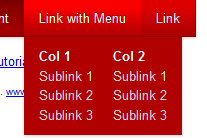
Yes it does, simply enable the "Mult-column sub-menus" via your block configuration page.
Comment #2
lan commentedHi,
Thanks for your help. I have enabled the "Mult-column sub-menus", but it still displays vertically. :(
Comment #3
lan commentedAnother question about the menu CSS:
When i hover the drop down menu, it s parent is disappeared, as i guess the main menu font color that is white and caused the problem, but how can i css that color to black when i hover the drop down menu? (please see attachment and you will know what i mean).
I tried to use
#nav ul.menu li a:selected{ background-color: #fff; color:#3f3f3f; text-decoration: none; }
but it changed all the colors.
Thanks for your help in advance!
Comment #4
mehrpadin commented:selected? such a selector does exist?! best would be to look at one of the styles under /styles in the SF library.:)