

Closed (fixed)
Project:
Subscriptions
Version:
7.x-1.0
Component:
Miscellaneous
Priority:
Normal
Category:
Support request
Assigned:
Unassigned
Reporter:
Created:
30 Oct 2012 at 21:52 UTC
Updated:
16 Nov 2012 at 19:51 UTC
Jump to comment: Most recent file

Comments
Comment #1
salvisThe page you reference is for D6.
The ability to change the default template has just been added in #1821292: Implement an editable default template. See the -dev version.
Comment #3
herbiek commentedCan somebody explain me the correct procedure to update to this -dev version? Its probably a question from a beginner (which I am). The module that checks for new versions doesn't find this -dev version and manually installing doesn't work because a message warned me that Subscriptions is already installed.
Next thing I tried is to un-install (after disabling several connecting modules) which was not successful, the module does not disappear. Renaming the module wasn't help full either.
I hoped the settings allready made in the regular Subscriptions module would be saved after upgrading..
I'm afraid I messed things up by now...
Comment #4
salvisThat -dev version has been superseded by 7.x-1.1 on November 1. The -dev version is a snapshot of the latest state, and occasionally, a release version (such as 7.x-1.1) is created from the then current state, and the -dev version continues to evolve. So, if I mention 7.x-1.x-dev version on October 30 and there's a release version 7.x-1.something created after October 30, then you know that corresponding feature usually is now in that release version (and in any later 7.x-1.x-dev version).
I'm afraid so, too. Try installing 7.x-1.1.
Comment #5
herbiek commentedOk, I have installed the 7.x-1.1 version. Where can I setup the default template? Not the translated templates (at admin/config/system/mail-edit)!
Comment #6
salvisIt's on the same page and called .DEFAULT.
Comment #7
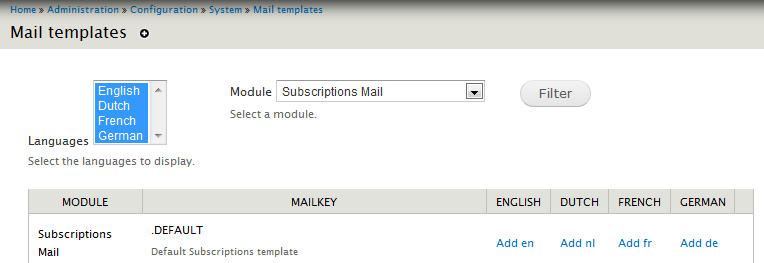
herbiek commentedI see it, under the column "MAILKEY". But I only can edit or click on that by clicking on one of my 4 enabled languages: Add en, Add nl, Add fr or Add de. See attached picture.
At the moment I don't use the languages and they do not appear on the website, that is something I will use later. So I like to change the template for the "default" language.
Maybe the English is somewhere already set up as default language and I have to "Add en" anyway to archive this?
Comment #8
salvisThe default templates are default over the content types, but they are language-specific.
Ideally, if you install the Dutch translation, you get a Dutch translation of the English template with it. There is no way that you could edit the (original) English default template and have the Dutch one change magically.