

 The 2026 Drupal Business Survey is open. Your response will help shape the future of the Drupal business ecosystem.
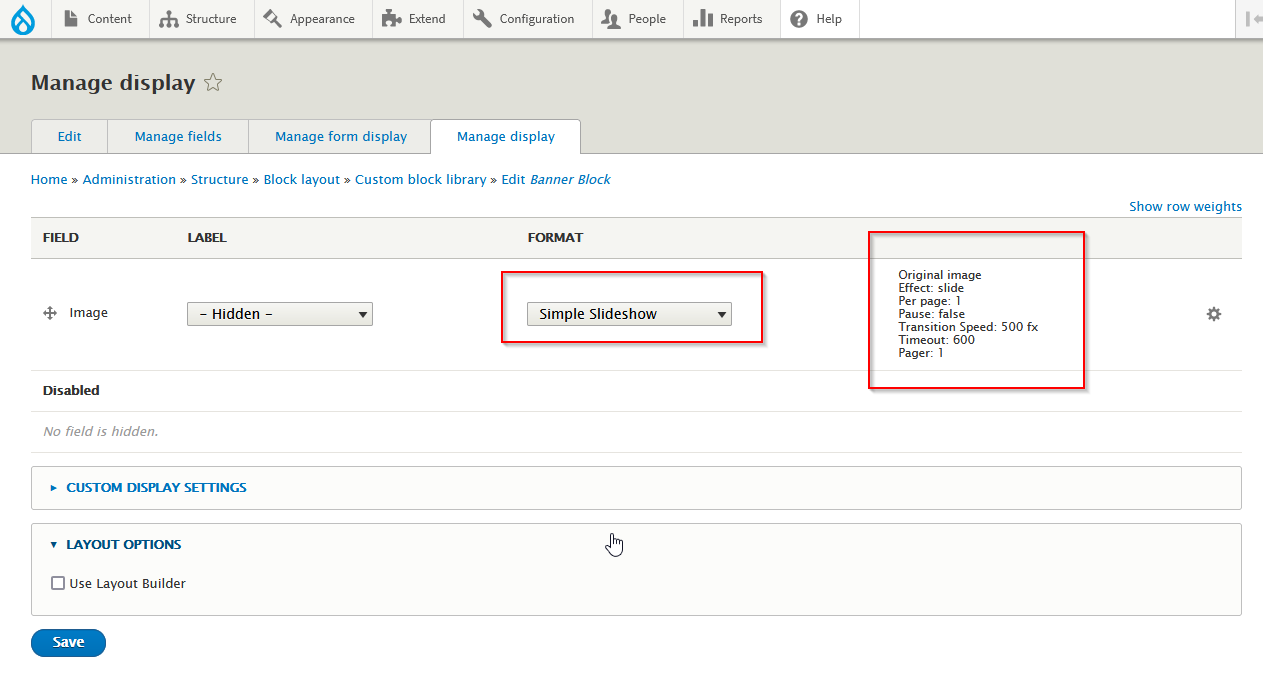
Simple Slideshow is a fork of Imagefield Slideshow with some exceptions:
- Replace jQuery with Splide
- Very small and very fast
- Support slide, loop and fade effect.
- Support multi blocks
- Link image to url
Splide is a lightweight, flexible and accessible slider/carousel written in TypeScript. No dependencies, no Lighthouse errors.
How to Install
- Download Splide JS then extract to /libraries/splide/. So you will see: /libraries/splide/dist/css/, /libraries/splide/dist/js/, and so on
- Install this module as usual
How to use
- Create new Block Type (/admin/structure/block/block-content/types), i.e: Banner Block
- Add Image field and set Allowed number of values > 1 or Unlimited
- On Manage Display - Image - Format = Simple Slideshow and choose your Slideshow Options
- Add Custom Block (/block/add) and choose Banner Block
- Add the Block Description and choose files for this Slideshow then Save
- Put this new Block to Block Layout
- Repeat step #3 if you want to create new Slideshow with same Options, or repeat step #1 to create new Slideshow with different Options
Project information
- Project categories: E-commerce, Content editing experience, Content display
 68 sites report using this module
- Created by drupalnesia on , updated
 Stable releases for this project are covered by the security advisory policy.
Look for the shield icon below.

