

Active
Project:
Sortable Grid Views Plugin
Version:
7.x-1.x-dev
Component:
User interface
Priority:
Normal
Category:
Bug report
Assigned:
Unassigned
Reporter:
Created:
23 May 2013 at 15:01 UTC
Updated:
1 Apr 2014 at 12:19 UTC
Jump to comment: Most recent, Most recent file




Comments
Comment #1
Scott McDaniel commentedComment #2
i-dont-use-this-account commentedHi Scott - I was having the exact same issue. Then after some debugging and coming back to the open issues I found this:
https://drupal.org/node/1605014#comment-6556784
Row style needs set to sgrid.
Comment #3
peterkortvel commentedHI, it's not working for me too. I have the same problem. I set the row style to sgrid too.
The problem appeared after I created 2nd view with sortable grid. But then I deleted the first one...
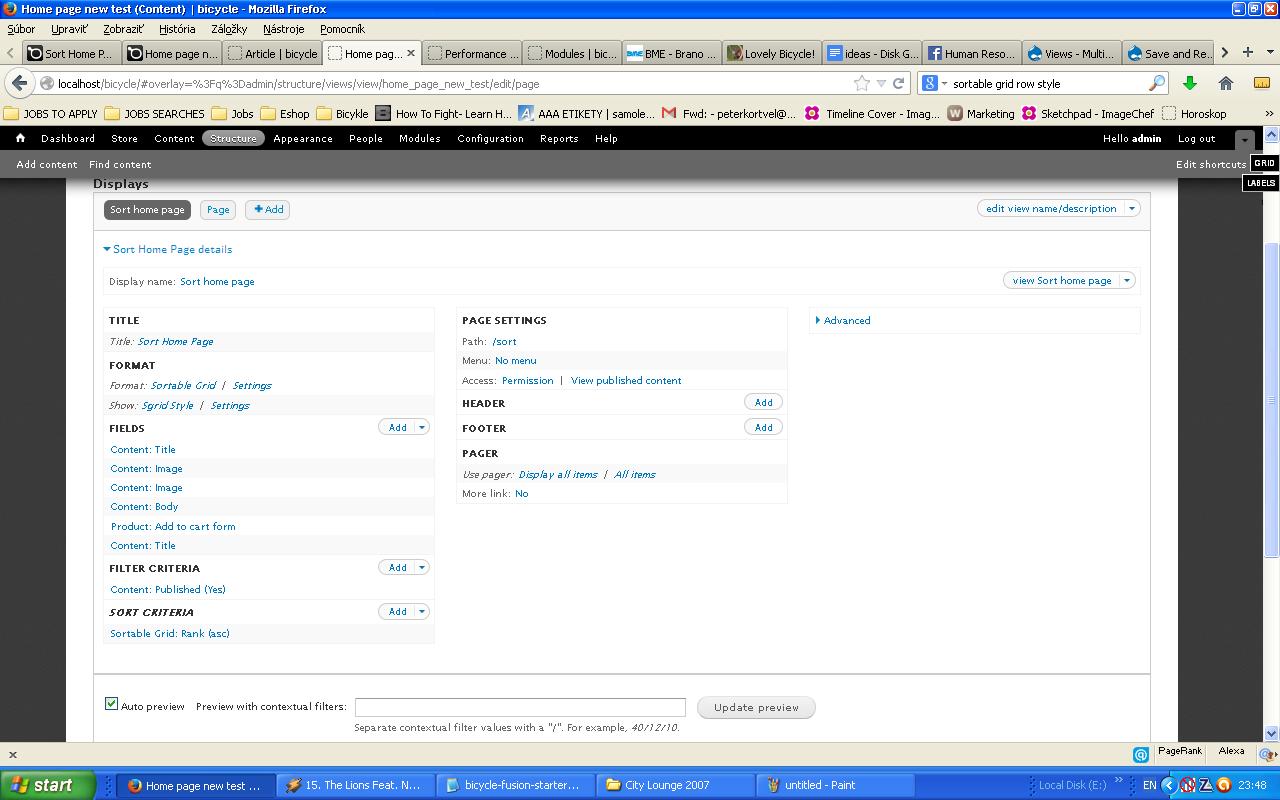
I am enclosing my settings. Thanks a lot for help.
Comment #4
peterkortvel commentedNo clue? Please, anything would help.
Comment #5
morleman@gmail.com commentedExperiencing the same issue where the buttons are not working and sit at "Saving..." or "Reset Order...". So far I've tried creating a separate sortable view and a parent/child view for the sortable (following the example video by Bisonbleu ). It shows up fine (no errors) but the buttons will not save and are not even functioning beside being clickable. I notice it doesn't even start to refresh the page ether, so it doesn't seem to be executing at all. Also my buttons show up generic and non-styled unlike the others in my Views. Any help would be great appreciative!!! Other questions: Which jquery version in "jquery update" do you need to run for sgrid in Drupal 7?
Comment #6
Thambos commentedI think this same thing is happening to me. The module worked just fine when I installed it a couple days ago, but then today when I went in to add more items to my list it suddenly started saying the order saved (so I don't get the "Saving..." but I get "Order Saved"), but the order didn't save. Reloading it goes back to an arbitrary order that was there when I started.
Even stranger is that when I'm logged in on my actual page, the order of items is different than on the sort page (which is different than the order I try and save it in), and different from the order when logged out. I don't know what order it's trying to do because none of the 3 orders I've seen items in are in alphabetical or by post-date, or by any sort order I'd done before.
I'm on the latest D7 and latest version of this, with jQuery Update 7.x-2.3. Cleared all the Drupal caches and my browser cache. The only change I had made to the View before adding new items and getting this problem was to filter published items rather than unpublished items. I don't know if that would have had anything to do with this.
Attached are my settings for my sort page.
Comment #7
peterkortvel commentedPlease, any idea?
Comment #8
wellingtonwong commentedJust to share my experience, I've encountered this problem using sgrid-7.x-1.x-dev.
The problem came up when I was implementing the module on a staging website inside a directory.
The solution was to modify 'modules/sgrid/sgrid.js':
- Line 35 from:
url: '/save_order/' + Drupal.settings.sgrid.view_name + '/' + Drupal.settings.sgrid.display_name,to
url: 'http://' + window.location.hostname + Drupal.settings.basePath + '/save_order/' + Drupal.settings.sgrid.view_name + '/' + Drupal.settings.sgrid.display_name,Line 47 from:
url: '/save_order/' + Drupal.settings.sgrid.view_name + '/' + Drupal.settings.sgrid.display_name + '/1'to
url: 'http://' + window.location.hostname + Drupal.settings.basePath + '/save_order/' + Drupal.settings.sgrid.view_name + '/' + Drupal.settings.sgrid.display_name + '/1'This is a quick fix, and could be tweaked.
In my case, the saving and resetting function is getting a '404 page not found' when the drupal install is not in the root.
Building the absolute path to the 'save_order page' did the trick!
Hope it helps.
Comment #9
HashKey commentedHello any news ?
Same problem, I click but nothing happens. Only the button from save to saving...
please help ?
I use the last version of query update and sgrid.
hashkey
Comment #10
Fakos commentedSolution #8 worked for me. Now it saves instantly and works as expected. Thank you very much.
Comment #11
chrisivens commentedI had a similar issue with saving not working on my site. It turned out to be the serialize call getting the delimeter wrong and producing an empty array. I've tidied up the javascript so linters will not complain any more and produced a patch.