


This project is not covered by Drupal’s security advisory policy.
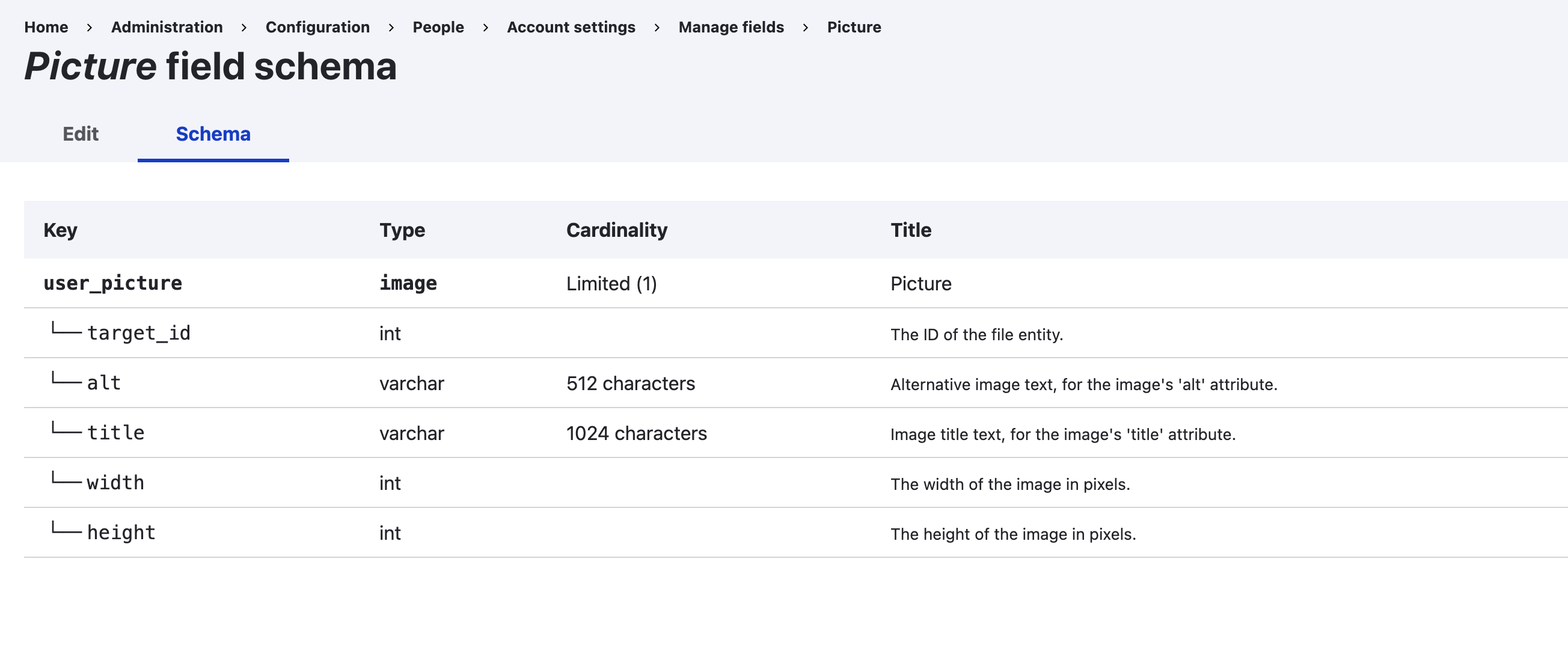
The Schema UI module is a must-have tool for Drupal beginners, offering a clear visualization of the schema information of any entity type and bundle. Through a user-friendly table, users can quickly access fields, field columns, their types, cardinality, and descriptions. This module is a bridge to understanding Drupal's entity system without the complexities.
Features
- Basic Functionality: Schema UI presents entity schema details in a structured table format.
- Unique Features: Once enabled, the module shows EVERY field's name, type, cardinality, and label, along with any associated columns.
- Use Cases: It's a boon for developers and site builders wanting a concise overview of entity structures. Particularly beneficial during site planning, development, migration and debugging.
Post-Installation
After installing Schema UI, there's no separate configuration needed. Simply head to the entity type page, and you'll spot a new "Schema" tab. Clicking this reveals the schema information table for that entity type and bundle.
Additional Requirements
Schema UI is built on Drupal core, eliminating the need for extra modules, libraries, or APIs.
Recommended modules/libraries
Pairing with the Devel module can further enhance the development experience, offering deeper insights into entities.
Similar projects
Drupal core's Field UI module offers field management, but Schema UI stands out by focusing on presenting the actual database schema information in an accessible format.
Community Documentation
Your feedback is invaluable! Share your thoughts, suggestions, or feature requests to enhance Schema UI for the entire Drupal community.
Project information
- Project categories: Import and export, Site structure
 2 sites report using this module
- Created by bpstr on , updated
 This project is not covered by the security advisory policy.
Use at your own risk! It may have publicly disclosed vulnerabilities.

