

Closed (works as designed)
Project:
RootCandy
Version:
6.x-1.7
Component:
User interface
Priority:
Minor
Category:
Feature request
Assigned:
Unassigned
Reporter:
Created:
3 Jun 2010 at 19:02 UTC
Updated:
7 Jun 2010 at 07:52 UTC
Jump to comment: Most recent file

Comments
Comment #1
sign commentedI can see it there
Try to set a different theme, eg. garland whether it happens there too.
If you still cant find it, do you think any other module can cause it?
Marek
Comment #2
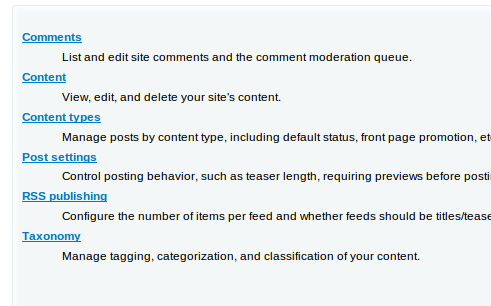
Branjawn commentedI can't find using Garland either. Just to be sure, it should show up on /admin/content right?
Comment #3
Branjawn commentedI have been using Drupal for a year and a half now and it still slips my mind that when using the admin interface it relies on MENUS.
I solved the problem, Post Settings was not 'checked' on the Navigation menu.
For those like me that don't really understand why a "Menu" determines the content of a page, it would be nice to have something in RootCandy (and all admin themes for that matter) that would remind or prompt me when I am searching for a link and it isn't active.
I'm not at all saying it's RootCandy's duty to do this, just saying it would be nice!
Comment #4
sign commentedI am sorry, but this is a won't fix from me, something that theme shouldn't deal with. In fact, it might be tricky, since this theme is not being used just by admins but clients too.
Thanks