

Closed (fixed)
Project:
RootCandy
Version:
6.x-1.6
Component:
User interface
Priority:
Normal
Category:
Bug report
Assigned:
Unassigned
Reporter:
Created:
7 Feb 2010 at 15:18 UTC
Updated:
19 Apr 2010 at 15:40 UTC
Jump to comment: Most recent file




Comments
Comment #1
sign commentedcan you try to:
switch your admin theme on admin/settings/admin to lets say garland
and see if the same thing happens?
Comment #2
superflyman commentedIt only seems to only be happening in Root Candy. I've tried other themes and they are fine.
Comment #3
sign commentedCan you post a screenshot please?
Thank you
Comment #4
superflyman commentedHere are two shots. One of the Open Panel tab disabled and another showing the collapse/expand missing.
Comment #5
superflyman commented@sign
any thoughts?
Comment #6
sign commentedsorry got distracted
do you have any content in the sliding panel?
Can you try one more thing, disable the sliding panel in theme settings, is it still happening?
Comment #7
superflyman commentedHey sign, thanks for your advice. I actually ended up purging all of the caches the other day and this resolved the problem. I'll let you know if it pops back up but for now it is ok.
Comment #8
sign commentedok great.
feel free to re-open this issue if it happens again.
Thanks!
Comment #9
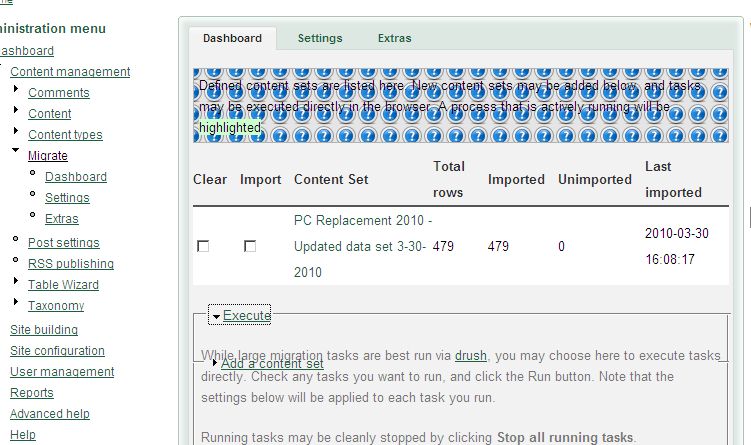
verta commentedI have seen this, most recently with the collapsed areas in the Migrate module's dashboard display using Rootcandy 6.x.1.6.
I've seen it in other modules also, but I haven't quite worked out the pattern to this condition yet. I'll install 1.7 and test it.
Comment #10
verta commentedAttached is a screen shot of the Migrate module's settings page with the first section (Execute(just uncollapsed from its default collapsed state. The second collapsed section (Add a content set) is still in the mid screen position instead of under the now uncollapsed Execute section.
Also of note, when I updated from 1.6 to 1.7 the info icon started repeating in the help area, both IE7 and FF 3.0.18. Attached also is a screen shot of the admin/settings/performance page after hitting the clear cache button. Can move to new issue if anyone thinks this is a bug. (edit - never mind, I see it's reported, found and fixed already!)