

Closed (works as designed)
Project:
Revisioning
Version:
6.x-3.9
Component:
Miscellaneous
Priority:
Normal
Category:
Support request
Assigned:
Unassigned
Reporter:
Created:
8 Apr 2010 at 17:35 UTC
Updated:
17 Jun 2011 at 06:33 UTC
Jump to comment: Most recent file



Comments
Comment #1
rdeboerHope to have time to look into this soon.
Comment #2
rdeboerSo I had a look...
I went to Site building >> Views
I clicked the Add tab to create a view of type "Node revision" (as opposed to Node), pressed Next and proceeded with:
o Style: Table
o Fields (ie. columns) "Node revision: Vid" (for debug purposes), "Node revision: Title", "Node revision: Created date" and "Node revision: State" (also for debug).
o DESCending sort on "Node revision: Created date"
Save. Preview. Looked ok. Then I added a Filter:
o "Node revision: State" Is one of "Current, published"
I may misunderstand you, but Isn't that what you're after? A list of the current, published revisions with their creation dates (which may be equal to or older than the corresponding latest revision(s)).
Comment #3
rdeboerNaturally, there IS this caveat: there are no separate "modification" and "publication" dates.
So the question is: Should publication of a pending revision change the "modification" dates (of revision and node) or should the modification date be reserved for changes to title and content? I believe at the moment the latter is true. But I could be convinced that any change to any aspect of the node or its revisions should update the "modification" date.
Comment #4
cookie235 commentedI'm gonna try to explain it better. What I want is a list of the last modified or created articles. Thus, when a new version of an article is published, it should get on top of the list.
Here is what I did.
A. Create article 1 and publish it
B. Create a new revision or article 1 as a draft awaiting moderation
C. Create article 2 and publish it
D. Set revision 2 of article 1 as the new "current", and thus updating article 1
E. Create a new revision of article 2 as a draft awaiting moderation.
From this example, here is what my last modified list should look like:
A. article1
B. article1
C. article2, article1
D. article1, article2 (1 was updated with new revision for the public)
E. article1, article2 (2 was updated but this change isn't public yet)
I've included the available dates I have available in a view (screenshot). I'm trying to look at which order to sort with:
- Revision creation date: doesn't work. Revision 2 of article 1 was created before article 2, and will never change
- Publication date: doesn't work. Article 1 was created before article 2, that will never change.
- Modification date: doesn't work. From Drupal's perspective, at stage E, article 2 IS updated, even though no modification is made visible to the public.
I hope it's clearer. I guess my point is that the modification date a visitor cares about is the one they can see. Modifications in the background of unpublished revisions should not matter. Maybe this this should be a new field then : public_modified ?
I thought about setting a trigger and a custom CCK field that gets updated every time a revision is set as the new current, but that seems a bit cumbersome.
Any other idea ?
Comment #5
rdeboerHmmm.... Where do you get this "Date de publication" from? That's not a standard Views field, is it? According to the Views translation files it refers to the "Posted date" of a comment or node....
Also, I still believe that my suggestion in #2 might be close to what you want because of the "Node revision: State" filter, I created especially for moderated content in Revisioning. Perhaps we can start from that and you can tell me what's wrong with it, perhaps using another screenshot?
Comment #6
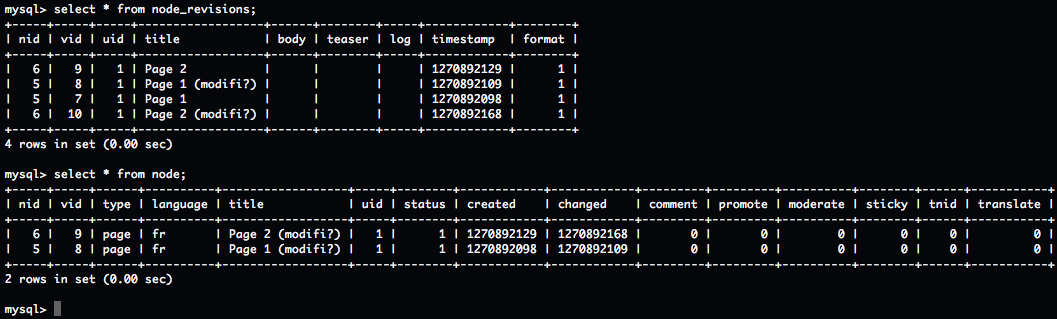
cookie235 commentedAlright, I did exactly as mentioned in #2, following the scenario explained in #4. My issue is still the same: there is no modification date recorded for a revision, only a creation date. It means that you can create a draft and then publish it a year later, and the only date you have for that revision is the date one year ago. As for the node itself, the modification date can't really be used either, because it's gonna get updated when a new draft (pending moderation) is created, even though the _published_ version, the one my users can see, did _not_ change.
I guess my issue is that the date I'm looking for is simply not recorded anywhere by Drupal. I should add a table or a custom column to record the publishing date of a new revision of the content.
Btw 'Date de publication' was just the french for 'published', I didn't think about changing my locale before doing the screenshot.
Comment #7
rdeboer"It means that you can create a draft and then publish it a year later, and the only date you have for that revision is the date one year ago."
"I should add a table or a custom column to record the publishing date of a new revision of the content."
Yep and yep... that's what I meant by: Naturally, there IS this caveat: there are no separate "modification" and "publication" dates.
However, if you have a view of node revisions (as opposed to nodes), sorted descending by creation date and filtered by "state=current, published", then on average you should still get a reasonably meaningful view of your content and the order in which revisions that are in a published state, were created (as opposed to published).
Comment #8
rdeboerNo activity for over a year