

Closed (fixed)
Project:
Realname registration
Version:
7.x-2.0-rc2
Component:
Documentation
Priority:
Normal
Category:
Feature request
Assigned:
Unassigned
Reporter:
Created:
30 Jun 2012 at 22:14 UTC
Updated:
3 May 2014 at 19:20 UTC
Jump to comment: Most recent

Comments
Comment #1
sgerbino commentedYou need to specify the correct Profile2 type, you can find this by:
Structures -> Profile types, Then use the machine name of the Profile type containing the field you'd like to use. It should then recognize your field name as is.
Comment #2
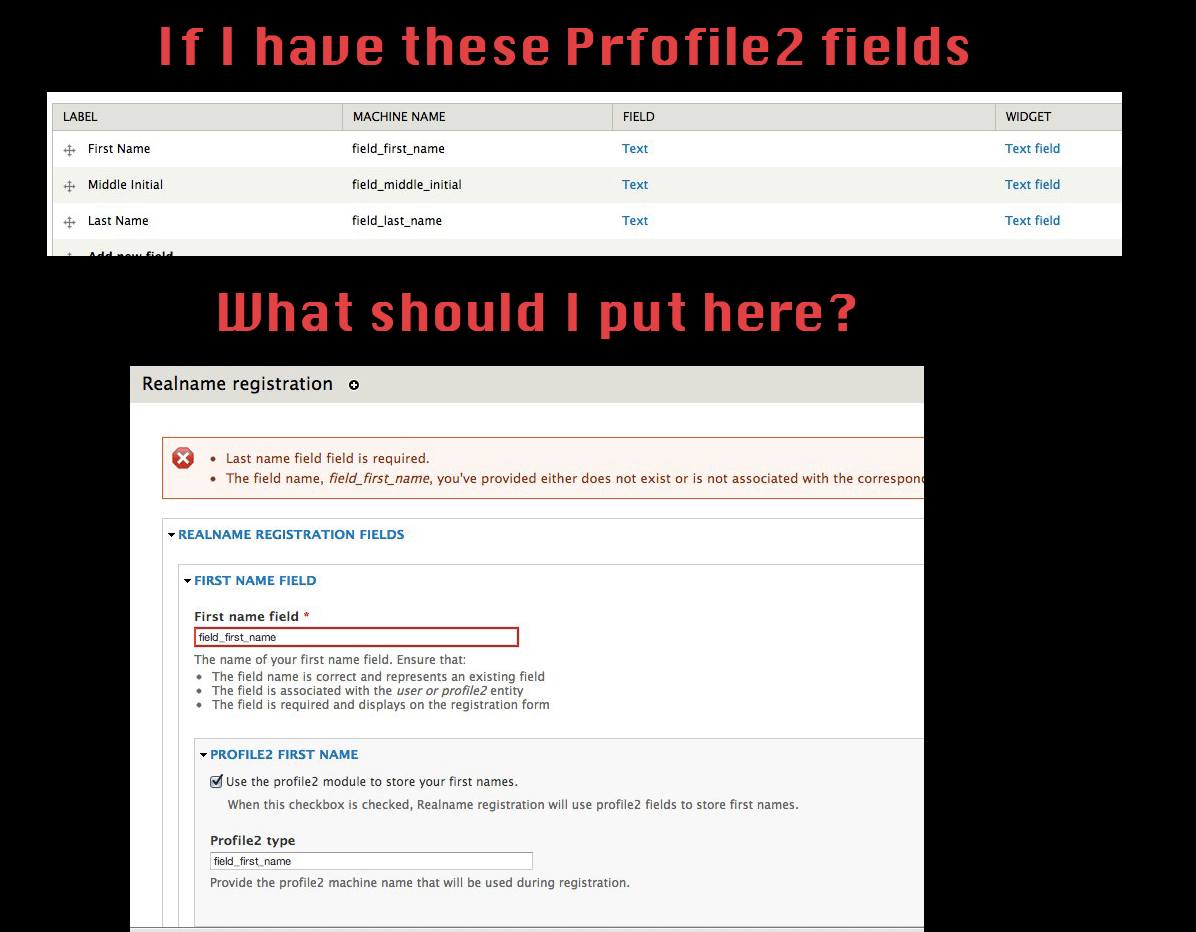
mattyoung commentedthat would be "field_first_name", but that no good.
Comment #3
sgerbino commentedIf you had 'field_first_name' in Profile2 type Personal Information having the machine name (personal_information), it would be set like this:
First name field: field_first_name
[x] Use the profile2 module to store your first names.
Profile 2 type: personal_information
It will then check to see if there is a first_name_field in the Profile2 entity, then check to see if it's a text field, etc. If it is, it will save successfully. I hope that is more clear, if you are still having troubles I can take a closer look for you.
Comment #4
mattyoung commentedOkay, got it. thanks!
perhaps use a syntax like personal_info.field_first_name would simplify this a whole lot and the UI and really easy to understand.
My trouble was with comprehending "Profile2 type". I didn't know what it was especially after reading the explaining text. How about making it a drop down menu?
Comment #5
mvcI've added a README.txt file that should hopefully help.