

 Come together with the global Drupal community in Rotterdam, 28 Sept – 1 Oct 2026. Sessions, contribution, connection, and Early Bird savings until 8 June.
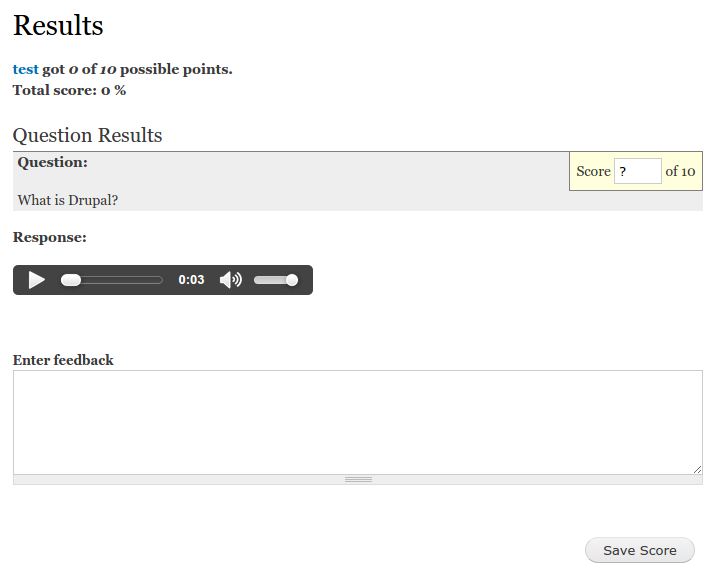
Quiz voice answer module provides a new content type to use with quiz module as a question type. It allows users to record and save voice message as a response to quiz question.
Requirements
- Quiz 7.x-4.x
- File entity 7.x-2.x
- Libraries API 2.x
Installation
- Copy record question folder to modules directory (usually sites/all/modules)
- Download the library https://github.com/Ruslan03492/Recordmp3js-Drupal
- Insert the contents of the archive here sites/all/libraries/Recordmp3js-Drupal
- At admin/build/modules enable the Quiz voice answer module in the Quiz Question
package. - Hit "Save configuration" button.
Installation via Drush
A Drush command is provided in the latest versions for easy installation of the Recordmp3js-Drupal plugin.
drush rmp3plugin The command will download the plugin and unpack it in "sites/all/libraries".
It is possible to add another path as an option to the command, but not
recommended unless you know what you are doing.
For detailed instructions on installing contributed modules see:
http://drupal.org/documentation/install/modules-themes/modules-7
Supporting organizations:
Project information
- Project categories: Content editing experience, User engagement
 9 sites report using this module
- Created by rutel95 on , updated
 Stable releases for this project are covered by the security advisory policy.
There are currently no supported stable releases.


