

Closed (fixed)
Project:
Poormanscron
Version:
7.x-2.x-dev
Component:
Miscellaneous
Priority:
Normal
Category:
Support request
Assigned:
Reporter:
Created:
20 Dec 2005 at 13:47 UTC
Updated:
20 Feb 2006 at 14:01 UTC
Jump to comment: Most recent file



Comments
Comment #1
fgmThe attachment is not a patch but a complete version of poormanscron.module compatible with both 4.6 and 4.7 in the same file.
Comment #2
netbjarne commentedI have tested the attached poormanscron on the cvs version of drupal (2006-01-04) at http://drupaldanmark.dk/ and I have not experienced any problems so far.
Nice work
Regards
Bjarne
Comment #3
netbjarne commentedMaybe I was too quick.
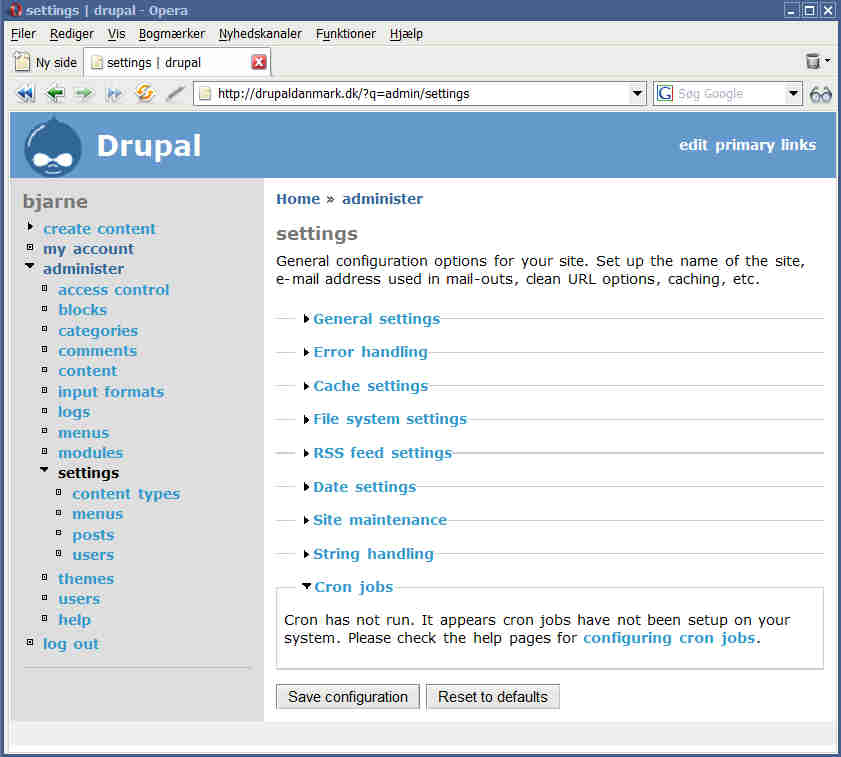
Even though poormanscron activates and logs as configured, it seems that the cron counter in Administration | Settings | Cron Jobs is not updated. That is, on my installation, even thoug poormanscron has logged "Cron run completed (via poormanscron)" - the Cron Jobs page says "Cron is running. The last cron job ran (loooong time) ago." - refreshing the page does not help, but manually visiting cron.php does the trick.
A core or poormanscron problem, I don't know, but somethings fishy :-|
Regards
Bjarne
Comment #4
fgmNot sure what you are describing exactly : where is this "cron jobs" page ?
It looks as if it were a page from your hosting plan, not a drupal page, and you are looking for poormanscron to activate
cron?If this is the case it is only natural: poormanscron won't run 'cron jobs' on drupal.
Cronoranacronis normally used to schedulewgethits on<drupal>/cron.php, which poormanscron replaces by invokingcron.phpat the end of some normal page displays by any users, not interacting with the system-level cron in any way.In other words,
cron.phpis either fired by acronjob (in which case you can check your cron logs on your system) or bypoormanscron.moduleon any page (in which case your system sees nothing). The log you can trust to check whethercron.phphas been run is<drupal>/admin/logs/, not your system's logs.Or is it something else ?
Comment #5
netbjarne commentedEh, I think a screenshot may clear things up a bit, so I've attached one.
It actually consists of two screens:
upper part: the logs, saying that poomanscron has been run a few minutes ago.
lower part: the settings | cron job page, last time cron ran was more than a day ago.
Now, if I manually visit cron.php, the "last run" time on settings | cron jobs gets updated (no screenshot of that). That leads me to suspect that cron.php is actually *not* triggered by poormanscron, even though it does say so in the logs..
I have no access to my hosts crontab, therefore the need of poormanscron.
Hope that clears things up a bit - please let me know if I can do further testing.
Regards
Bjarne
Comment #6
fgmI don't know what version or poormanscron you are using: on 4.7beta2, this "cron jobs" collapsible form does not appear with the version I posted. You must have another version, or another module interacting with poormanscron.
Comment #7
pfaocleThat fieldset has been introduced into HEAD recently, after beta2 was packaged up.
Comment #8
netbjarne commentedOh, I'm a bit too late ... I did a fresh install of the cvs today, and attached is a screenshot of the settings page with the cron jobs info. It seems to be of informational purposes only, as nothing can actually be configured.
I thought that beta period was for bughunting only, not for new features ;-)
Anyway, I hope that we can sort this out, to me, poormanscron is the first module to be installed after the core - actually, I think it ought to be a core module..
Best regards
Bjarne
Comment #9
Uwe Hermann commentedI have fixed the problem with the cron status in admin/settings not being displayed in the latest CVS version of poormanscron. Also, I branched the module for 4.7 now. However, I don't want to create a version which works with both 4.6 and 4.7, sorry.
Thanks to you both for the testing and updates. Feel free to reopen the issue, if you have problems...
Comment #10
netbjarne commentedHi
I just tested poormanscron on a fresh drupal 4.7.0 beta 4 installation, at drupaldanmark.dk, and it seems to work fine. The built-in cron-jobs status page, now gets updated when poormanscron kicks in. I'm happy :-)
Nice job!
//Bjarne
Comment #11
icenogle commentedMy experience is different.
I set up poor man's cron once before (it just worked,) and not having fooled with it since, I needed to refresh myself on installation.
So, after upgrading to 4.7.0 beta 4, I installed the module and enabled it. the README.txt says that "Poormanscron can be configured at administer -> settings -> poormanscron." That was the first sour note. I can see no such setting. The closest thing is a "Cron Jobs" twisty that appears on the main settings page, but as someone else mentioned, it is only informational, and says that the last cron job ran over two weeks ago. (I'm still unclear whether this bears any relationship to poor man's cron.)
The next problem is that it doesn't seem to run. I have been messing with the upgraded Drupal all day today. There is no sign in the log that poor man's cron has run.
I'm guessing that there is supposed to be a config page somewhere, but I can't find it. Any help?
Comment #12
Uwe Hermann commentedIf you use Drupal HEAD or 4.7betaX and the latest HEAD/4.7 version of poormanscron, enable the module in administer->modules, you _should_ be able to go to administer->setting->poormanscron just fine.
The "Cron Jobs" message in the main settings dialog is _not_ related to poormanscron, however the latest version _will_ update that info as well...
Comment #13
(not verified) commented