

 The 2026 Drupal Business Survey is open. Your response will help shape the future of the Drupal business ecosystem.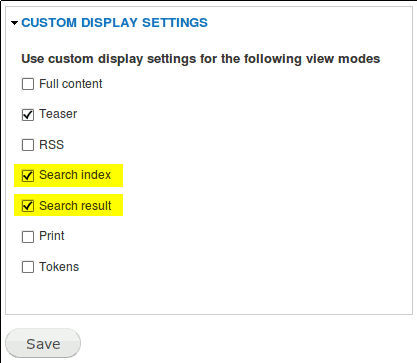
What is it ?
PDF Formatter provides two formatters for dealing with PDF files. These formatters use the pdftotext and pdftohtml utilities. Under Ubuntu, they come with the poppler-utils package. Though PDF Formatter has been developped under Linux, it should work under Windows as long as these utilities are installed on the system.
How does it work ?
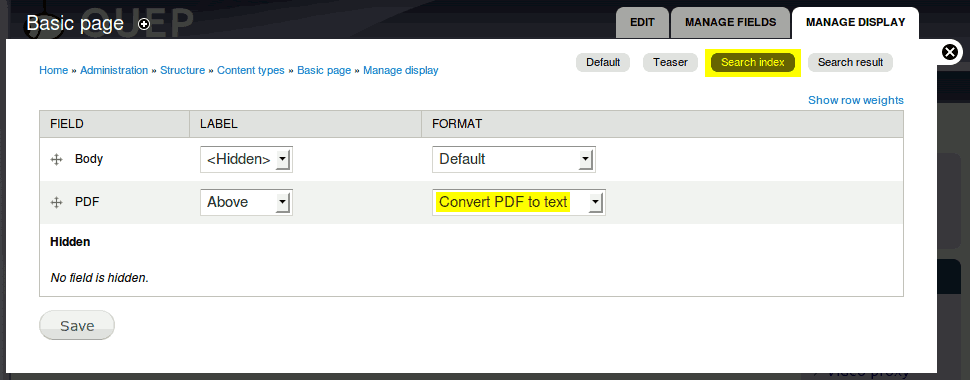
Under Drupal 7, a formatter can be assigned to a combination of field and display (Structure→Content Types→Manage display).
The available formatters are :
- Convert PDF to text
- Convert PDF to HTML
When the Search module tries to index your content, it asks for a “Search index” display mode. On a standard installation, this defaults to the default display mode which is the one used when displaying the content to a user. With these formatters, Drupal will generate a more complete while less enjoyable (but that doesn’t matter) version especially suited for indexation.
Applying the same formatter to the “Search result” display will allow the search results to show highlighted found terms.
Why use PDF Formatter ?
If you look for Drupal indexing of PDF files, you will surely find the following solutions :
- Tika / Solr : needs installation of a complete JRE environment, of Solr+Tika (which is not straightforward to setup)
- Swish-e : I couldn’t find a Drupal 7 module
- Search files : the Drupal 7 version is still in dev and does not work (at the time of this writing)
PDF Formatter only needs the poppler-utils installed (a simple “sudo apt-get install poppler-utils” is enough under Linux Debian). You can decide exactly which node types will see their PDF files indexed (but you have to tell every node types to use PDF Formatter).
If you look for a complete search indexing for attachments, you have to go the Solr way. But if you only wants to index PDF files the simplest way, PDF Formatter is here.
Notes
The generated output is crude because PDF Formatter aimed at making PDF file attachment indexable by the search module. Therefore, PDF Formatter should preferably be used on the “Search index” or “Search result” displays. Using it on other displays will work but will not provide a satisfactory experience.
You may have to enable Custom display settings for 'Search index' and 'Search result'.
There is no table, no variable, no menu, no settings page.
Project information
 Minimally maintained
Maintainers monitor issues, but fast responses are not guaranteed.- Maintenance fixes only
Considered feature-complete by its maintainers.  16 sites report using this module
- By Anonymous on , updated
 Stable releases for this project are covered by the security advisory policy.
There are currently no supported stable releases.
