

 Come together with the global Drupal community in Rotterdam, 28 Sept – 1 Oct 2026. Sessions, contribution, connection, and Early Bird savings until 8 June.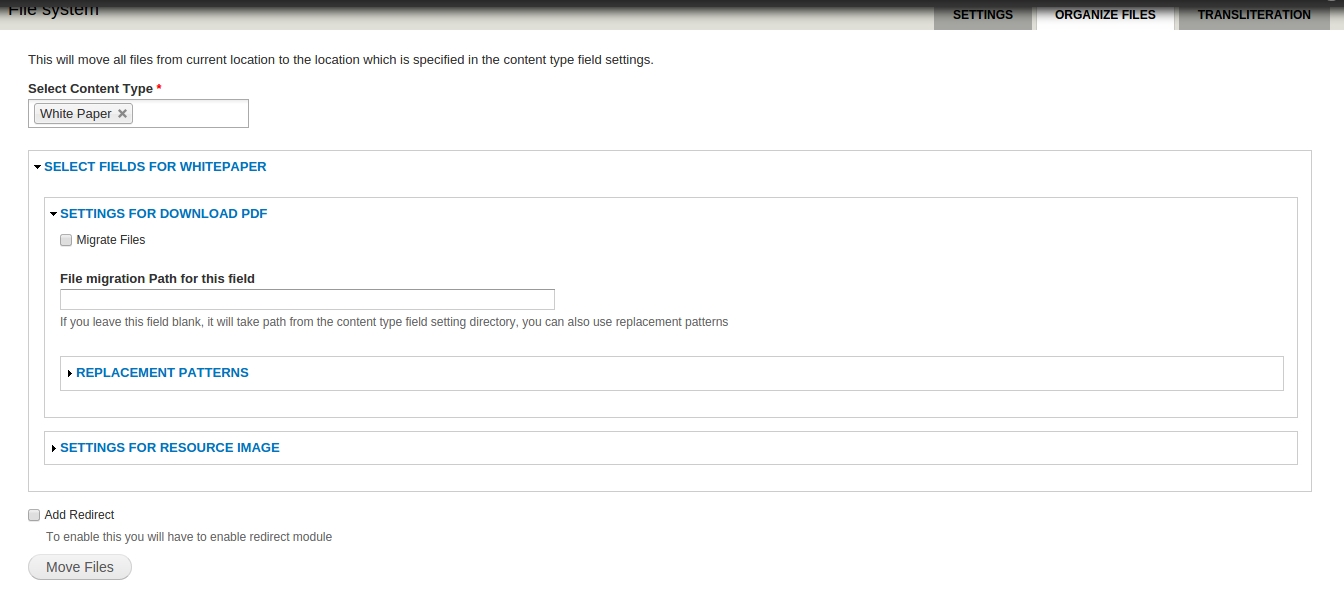
Description:
This module provides the functionality of moving files related to a content type from one directory to another directory with the possibility of adding 301 redirects from old destination to the new one. The module will keep the mapping of files with the node in-tact.
Why I came up with the idea of this module?
In the early phases of one of our client projects, we didn't pay attention to the default directory of the file fields of various content types. Over a long period of time, the team had created a lot of content on the site with lots of files. One major problem with this was that google had indexed most of these files but we wanted that some of these files should not have been indexed. We realized that the only way to prevent this was to organize files of different fields in better directory structure. That way, we will be able to block a pattern of files from indexing.
This module provides the configuration to move your content type fields files to your custom path or default directory path specified in the field settings. This would mean that if you have files lying flat in the default directory, you could come up with directories for every file field by setting it up from the content type interface. You could also set a directory structure based on the file's tokens e.g. year, month and date of the file added.
If you have the redirect module on, this module will allow you to configure a 301 redirect from the old location to the new one. And then, like in our case, if you need to block a particular directory from robots, all your previous files will now be de-indexed because of a 301 redirect to a blocked file.
And I think a lot of developers like me face a similar issue and since, I could not find a module to do this, I came up with this idea. Also, I think this will help existing sites to migrate their current flat directory structure in a more organized manner without having to lose the link juice of existing files from SEO perspective.
Limitations:
- Currently, this module supports only file and image type of fields.
- You can only organize content type fields for now.
In Future:
- Support for Webform files.
- Support for other field types.
How to use:
- Download the module using drush or from the drupal.org
- Goto admin/config/media/file-system/organize
- Select content type and select fields.
- You can provide custom path for each file field which will override the default directory settings.
- If you want to add redirect, tick the Add redirect box (available only if you have redirect module enabled).
- 6. Migrate.
Supporting organizations:
provided the motivation and support in developing this module.
Project information
- Project categories: Media
 16 sites report using this module
- Created by gaurav.goyal on , updated
 Stable releases for this project are covered by the security advisory policy.
There are currently no supported stable releases.

