The image_count field handler at views2inc/node_gallery_views_handler_image_count.inc works fine when the field is added on a gallery, but not when it's added on an image with a relationship to the parent gallery defined. Original post follows:
Hi,
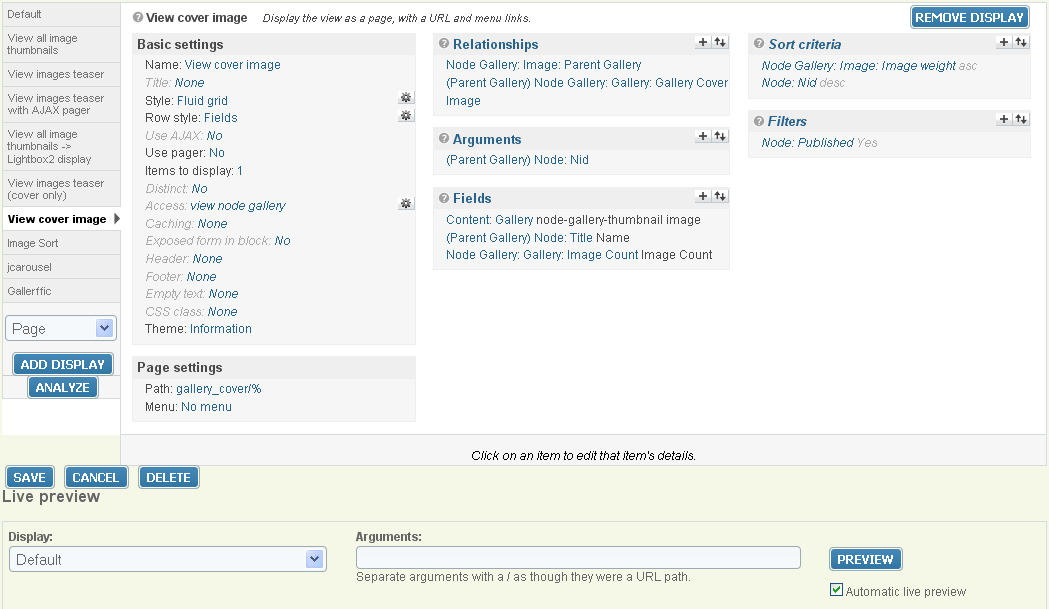
I am currently using "view cover image" in my gallery node teaser mode, and am wondering if there is a way to modify the display so that :
1) the cover image will be linked to gallery node, not the gallery image node;
2) show gallery image count
I tried something as shown in attachment without success:
1) have no idea how to link cover image to gallery node
2) in my setup, the image count is always 0, and the query is obvious incorrect:
SELECT COUNT(*) FROM node_gallery_images ng JOIN node n on ng.nid = n.nid WHERE n.status = 1 AND ng.gid = node.nid
Any ideas how to accomplish this?
Thanks.


Comments
Comment #1
foredoc commentedJust figured out how to link cover image to gallery node by following the example:
views: node_gallery_gallery_summaries
display: galleries cover grid
Thanks.
Comment #2
foredoc commentedTried different relationships ( for field Node Gallery: Gallery: Image Count ):
1) gallery cover image
2) parent gallery
3) no relationship
None of them get the correct number of images in the gallery, because all of them are based on the same query:
SELECT COUNT(*) FROM node_gallery_images ng JOIN node n on ng.nid = n.nid WHERE n.status = 1 AND ng.gid = node.nidI thought relationship: "parent gallery" will do the job. No idea why it fails.
Comment #3
justintime commentedUpdating title and marking as a bug report
Comment #4
justintime commentedSorry, have to run and don't have time to test, but can you give this a shot?
Comment #5
justintime commentedGood thing you waited, that patch didn't work :)
I had time to actually test this one, and it works for me in both cases, plus it uses our cache instead of hitting the DB so it should perform better.
Comment #6
foredoc commentedThanks, I applied this patch, and it pulls the correct number out. However, for some reason the SUFFIX disappears.
In views setup, I have suffix: " Photos". So it should looks like:
50 photos
After applying, it looks like:
50
Any ideas?
Thanks.
Comment #7
justintime commentedYeah, that's a bug in the patch. I'll have to refactor that a bit.
Comment #8
justintime commentedgive this one a shot, it should work for you.
Comment #9
foredoc commentedThanks. Problem solved.
Comment #10
justintime commentedThanks for reporting and testing! Merged into 3.x-dev.
Comment #11.0
(not verified) commentedupdating summary for specific bug