

 Come together with the global Drupal community in Rotterdam, 28 Sept – 1 Oct 2026. Sessions, contribution, connection, and Early Bird savings until 8 June.
Problem/Motivation
With version 5.0.1 of the module and core 11.0.0-rc1 release and the following JavaScript error occurs in two different browsers too:

Steps to reproduce
- Install with Composer, enable with Drush
- Go to the module list page: /admin/modules
- Expected: all the existing modules are displayed on the list
- Experienced: the list is empty. Changing status of the three checkboxes have no effect at all.
Proposed resolution
…
Remaining tasks
…
User interface changes
…
API changes
…
Data model changes
n. a.
Original issue summary
During the D11 upgrade of jquery_ui_autocomplete, I just needed another module that depends on it to test if it works. I've chosen module_filter as its 5.0.0 version is marked as D11-compatible. Required in Composer, installed, but when checking the /admin/modules listing page, no results showed up:
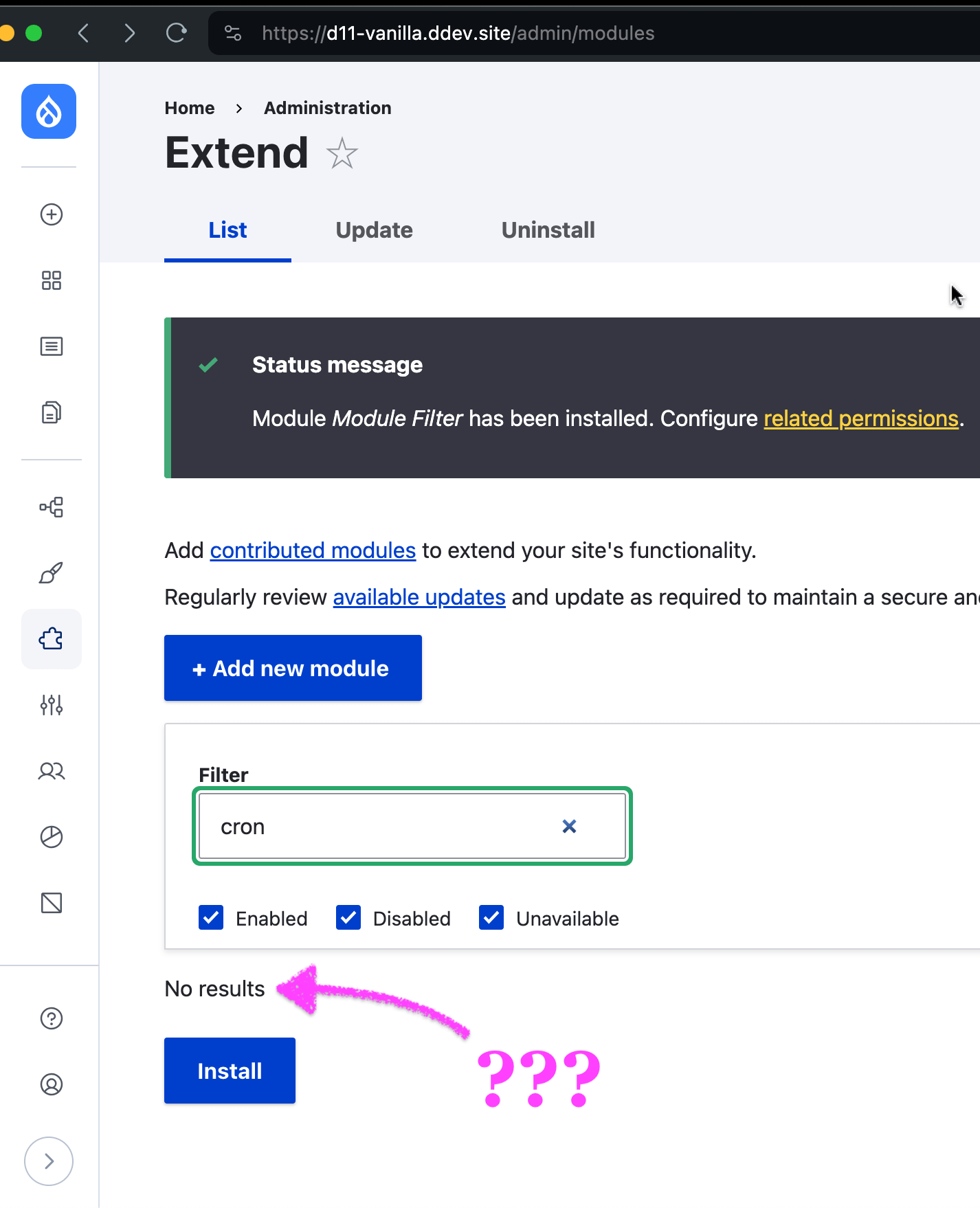
Disabling the module_filter module, the list is filterable again as before. I am also unsure about how this module is supposed to work as the core's default Claro theme already offers some Ajax-based filtering options.
| Comment | File | Size | Author |
|---|---|---|---|
| #13 | Module-filter-errors 2024-08-21 132325.png | 30.56 KB | uv516 |
| #9 | 3452347-9_branching.png | 16.13 KB | baluertl |
| #9 | 3452347-9_console.png | 38.11 KB | baluertl |
| #4 | 3452347-4_javascript-console-with-error-message.png | 106.42 KB | baluertl |
| #2 | Screenshot 2024-06-17 at 10.22.06 AM.png | 297.19 KB | smustgrave |
Issue fork module_filter-3452347
 Show commands
Start within a Git clone of the project using the version control instructions.
Or, if you do not have SSH keys set up on git.drupalcode.org:
- 3452347-fix
 changes, plain diff MR !55
 - 5.x changes, plain diff MR !54



Comments
Comment #2
smustgrave commentedIf installed correctly this is what you should see

Comment #3
smustgrave commentedSince there hasn't been a follow up going to close for now.
Comment #4
baluertlI admit I missed checking the JavaScript console when first encountered the issue and opened the ticket. Now rechecked again and experienced the same, so reopened this ticket and retitled to describe the situation in more detail.
Some “probably-irrelevant-but-who-knows-might-come-handy” backend information:
Comment #7
clivelinsell commented`jQuery.sort` was removed in v4, and D11 is using that version. It just needs a slight tweak to sort an array instead.
This is the first time I've used the MR flow, so apologies if something's not right.
Comment #8
clivelinsell commentedComment #9
baluertlHi @clivelinsell, thanks for the prompt solution. Now tested, commit d82cea90 eliminates the error message in the console and makes the list appear again indeed:

Regarding the merge request-based workflow: no worries, only one suggestion I would give. Usually better to create a separate branch for your suggested solution (eg.

123456-solution-approach-one). The Drupal․org GUI offers an input field pre-filled with a suggestion based on the ticket title. If it sounds weird as a branch name (sometimes it's not optimal) then you're able to rename it arbitrarily before creating the issue repo:Leaving the issue repository's default branches intact has a key benefit. This way anyone else coming up with a different idea for solving the same issue, can still open another branch (eg.
123456-solution-approach-two) freshly stemming out from the original default branch (and open a separate merge request, of course). Finally, the project maintainers can decide which MR they agree with and get merged at the end.Comment #12
smustgrave commentedComment #13
uv516 commentedDrupal 10.3.2:
I have the same errors: No modules is showing at all.
When I save Module filter settings (admin/config/user-interface/module-filter), the settings in the three fields disappear and I get the error shown in the attached image.