

 Come together with the global Drupal community in Rotterdam, 28 Sept – 1 Oct 2026. Sessions, contribution, connection, and Early Bird savings until 8 June.
This began as a bug report and transformed into a simple feature request.
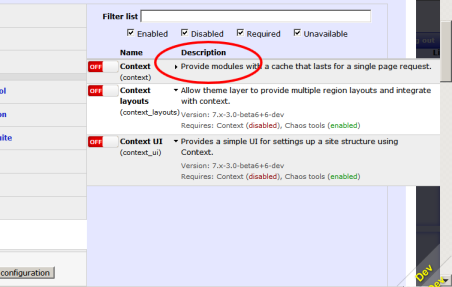
The bug report was related to using a zen subtheme as the administration theme rather than seven. When any description was collapsed the description was not being shortened but shown as one long line and the display would overflow to the right.
On testing with the seven theme the collapsed description is limited to one line but truncated and ends with ...
Why this was not happening with the zen subtheme has not been resolved.
However, changing the collapsed view to show the full description with word wrap rather than one line truncated works in seven and with the zen subtheme. It also provides a more useful UI and is therefore being put forward as a feature request.
Original issue:
If all the modules displayed have the descriptions expanded the display looks good and the description appears within it's column with word wrap.
If even one module description is collapsed the display no longer looks correct and instead overflows to the right. The description column width is no longer controlled to fit the display but instead takes on the width of the longest collapsed description.
See attached screen captures.



Comments
Comment #1
izmeez commentedok, haven't rolled a patch yet but the following part borrowed from #2433229-2: Version column missing?
on line #27 of css/modules.css
removing the three lines fixes the display so there is no overflow when descriptions are collapsed or expanded.
The default display is collapsed as currently intended by the module maintainers.
Thanks.
Comment #2
izmeez commentedComment #3
izmeez commentedActually only the third line needs to be removed. Here's a patch.
Comment #4
greenskin commentedWhat admin theme are you using?
Comment #5
greenskin commentedComment #6
izmeez commentedI was using a zen subtheme.
I took a look with seven and it looks fine with the patch.
Maybe, I should go back and look at seven again without the patch?
Comment #7
izmeez commentedThanks for the gentle nudge.
I took a look with seven and can see how it's made to behave.
When collapsed it is a single line description ending with ...
This was not happening with the zen subtheme.
The patch in #3 when collapsed shows the full description with word wrap.
When expanded the additional information is shown.
I'll have to post some screen shots.
Showing the full description doesn't take up more space and I prefer it.
Seeing the full description is more helpful and when expanded the extra information is more obvious.
Comment #8
izmeez commentedHere are the screenshots using seven theme showing the collapsed view with the one line description without the patch and with the full description if the patch in #3 is applied.
Comment #9
izmeez commentedChanged title, to help clarify.
Comment #10
izmeez commentedThe same thing can also be achieved by not removing the line and changing
Comment #11
izmeez commentedComment #12
izmeez commentedHere's a patch modifying not removing the one line to show full description when collapsed.
Comment #13
izmeez commentedIt's also left me wondering why in my zen subtheme
white-space: nowrap;fails to end the line at the column margin whilewhite-space: normal;performs word wrap at the column margin.Comment #14
izmeez commentedEdited the issue summary to explain how this began as a bug report and transformed to a feature request. The original problem was not resolved. But, what has been observed in the process may make it worthwhile to consider as a feature request.
Sorry for mixing two issues in one. It was not intentional. One led to the other.
Comment #15
izmeez commentedComment #16
greenskin commented@izmeez the Zen theme likely alters the table-layout style on the table element. This needs to have the "fixed" value.
The dev branch contains an update that provides an option on the Module Filter's configuration page for defaulting the description to expanded. The reason for the one line is to conserver vertical space. This page can grow to be quite long, and the one line solution attempts to make the page length more bearable. Thanks @izmeez for your work on this issue!