

Closed (outdated)
Project:
Location
Version:
6.x-3.x-dev
Component:
Location_views
Priority:
Normal
Category:
Feature request
Assigned:
Unassigned
Reporter:
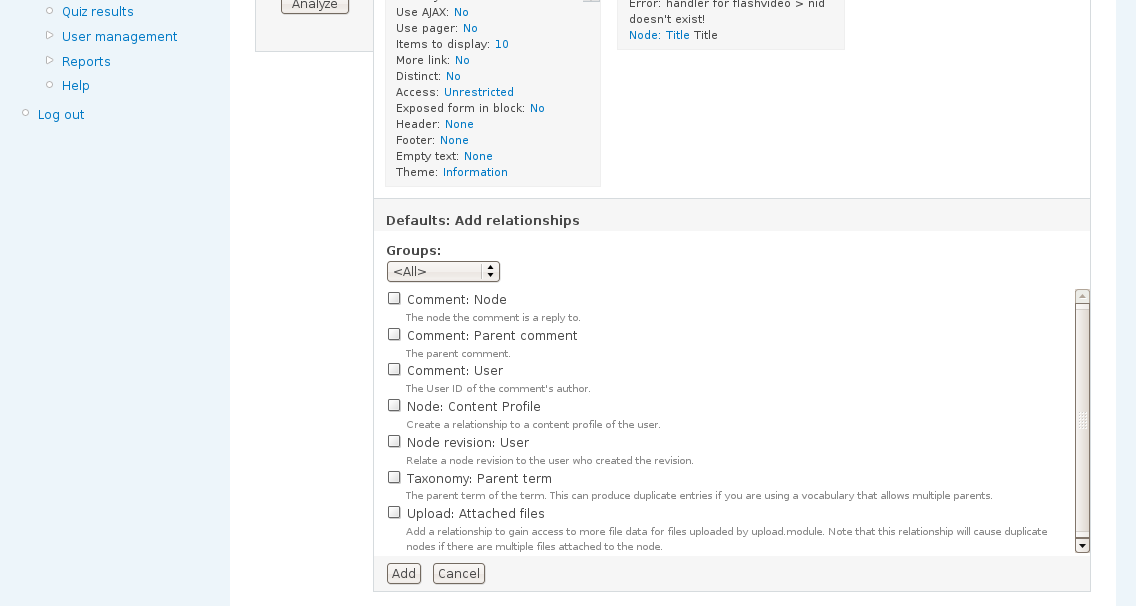
Created:
25 Mar 2009 at 09:42 UTC
Updated:
19 Jul 2016 at 11:57 UTC
Jump to comment: Most recent, Most recent file

Comments
Comment #1
merlinofchaos commentedPlease file in the proper place.
Comment #2
no longer active 7 commentedComment #3
no longer active 7 commentedComment #4
yesct commentedAre you using the native location fields or cck location fields?
If you are using the native node or user location fields, views should work... Maybe add a sceen shot of your view ui showing the setting or export the view you at trying? ... Or it reply with more info :)
See #391160: CCK/Views: location_instance fix if you are using location cck fields.
Comment #5
no longer active 7 commentedI am using native locaiton module fields. I want to create relationship based on location-country field. But not able to find location country field in relationship of views. It is showing in arguments and fields listing.
Attached a screenshots too.
Comment #6
yesct commentedCan you clarify what you need the relationship for that you can't do with the field?
(I'm probably showing I don't understand relationships or views very well, but I'm trying to)
Comment #7
Webster619 commentedYou don't want users to have to enter a location twice. Once as a part of location module and another as a separate field.
The field needs to stay as a part of location module so it will work with stuff like gmaps.
That's my guess as to why.
Comment #8
nickl commentedMarked as duplicate to continue location_instance discussions at [#2333150]
Comment #9
Bobuido commented@nicl - Is that (#8) supposed to be a node reference to another issue?
I'm having this issue and have trawled through many that are very similar but are still particular instances of my issue - This is the closest I have found to my situation.
I am using user_location and a simple custom node type
I am trying to create a Node view which also displays the User who published the node (no problems there) & the location of that user, which just displays nothing and does not let me add a relationship (which is what I expected to have to do to get the data). Presumably without specifying I want user location it tried to pull the location of the node.
I have tried doing it the other way round.
i.e. using user or location as the primary table and still no relationship is available to me and I'm always missing one piece of the puzzle
So, in summary, I need a simple view that's (user+node+location) where the location is a user location and not a node location
Some people seem to have had better luck using Content Profile as a workaround - So I'll keep this in mind or perhaps just write a custom query
I have tried Location 3.0 and 3.1-RC1 but not the latest dev snapshot yet
I just wanted to see if perhaps I'm missing something simple first :) Thanks and sorry for opening this up again!
Comment #10
Bobuido commentedForgot to set this back to active
Comment #11
yesct commentedyeah, gotta try (on a test site) the dev version. let us know if you still have the problem in the dev version.
also... something about views arguments might also help, but it might be in combination to a relation.
Comment #12
Bobuido commentedOK, so I definitely should have the option of a relationship in this scenario?
I.e. it is a feature now to be able to link the three tables in views
I'll install dev and see where that gets me
Thanks YesCT :)
Comment #13
yesct commentedwill you for sure... I dont know.
My only personal experience is with cck location.
Can anyone with user location experience chime in?
Comment #14
Bobuido commentedWell I didn't do a full un-install but upgrading to dev still didn't give me any new relationship options - All I have is:
Comment: Node
Comment: Parent comment
Comment: User
Node revision: User
Taxonomy: Node
Taxonomy: Parent term
Taxonomy: Related terms
Taxonomy: Related terms
I suppose there's no reason I can't go the content profile route and that should work. I guess I was just trying to wrap my head round relationships in views and learn a bit more about location. Also would be good for everyone to just clear this up for anyone trying a similar approach - Or request it as a possible feature, if this scenario hasn't been catered for.
Comment #15
rooby commentedThis is kind of a hijacked issue but oh well.
You use case is not currently catered for.
The problem is that when you have a node view you can't make a relationship to the user and vice versa.
So if you have a node view the location table is joined to the node table and you get node locations. Other user data is joined automatically by views to give you the basic user fields but location doesn't know about this.
So possible solutions could be:
1. to always join to location on the node and user tables for node views.
2. to add a new user locations relationship that can be added to node views.
I think 2 would be the better option as 1 will introduce unnecessary joins for the majority of users who don't need this feature.
Comment #16
legolasboClosing old D6 issues as D6 is end of life