

Closed (fixed)
Project:
litejazz
Version:
6.x-1.8
Component:
User interface
Priority:
Normal
Category:
Support request
Assigned:
Unassigned
Reporter:
Created:
24 Jun 2012 at 06:40 UTC
Updated:
24 Mar 2013 at 17:57 UTC
Jump to comment: Most recent file


Comments
Comment #1
kisugiai commentedof course you can
you have to find out how the menu its called in the suckerfish menu
eg.: menu-block-8
then take an new css file maybe custome.css put this in the litejazz/css folder add the two image files every were in my example its litejazz/images
and fill in the custome.file above code
after that enter in the theme or aperance settings at local content file css/custome.css and aktivate it go to performance and clear cache and if all right the it coult loks like at exsample picture.
keep care this is made on Drupal 6 i am not sure if its work on D7 becase it coult be thats the the css classes have diffrent nams
Comment #2
Beernink commentedHi Alyx, thank you very much for the detailed response! I will try it out tomorrow and let you know how I get on. Again - much appreciated!
Comment #3
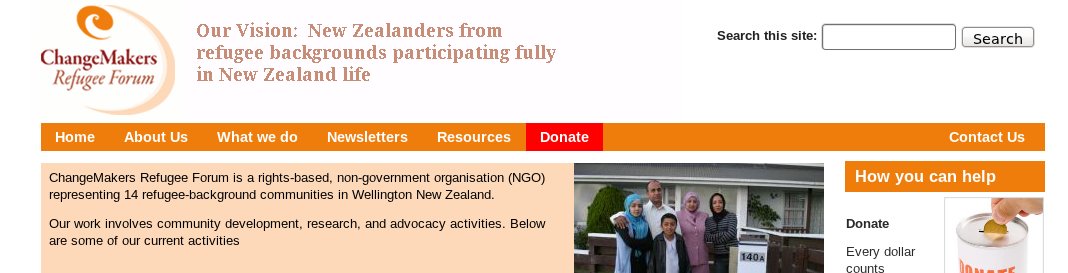
Beernink commentedI found an easier way to do it, which is to use the Block Theme functionality. I used your code example to apply it to the couple of themes that I then applied to the two menu blocks. See attached image for final result. The donatemenublock theme puts a red background on the Donate menu item (which has its own menu), and the secondmenublock flushes the secondary menu items right.
Comment #4
kisugiai commentedwell i have blocktheme funtionality in the theme but i am not sure what what will happents with blocktheme.
the flushes you can try to use a float style
the second point is, the menu order is dependent from block structure
btw.
you site with zen theme locks nice :)
a little hint if you have all settings correctly you shoud use the css aggreation
Comment #5
kisugiai commented