

Closed (fixed)
Project:
Links Package
Version:
master
Component:
User interface
Priority:
Normal
Category:
Feature request
Assigned:
Reporter:
Created:
14 Mar 2006 at 12:39 UTC
Updated:
15 Aug 2006 at 02:15 UTC
Jump to comment: Most recent file



Comments
Comment #1
Bèr Kessels commentedDid you try enabling and using menu.module?
Comment #2
benthere commentedYes, menu.module is enabled and I'm comfortable using it. But this module does not allow you to change that link.
(see attached: user's point of view of Navigation menu)
Comment #3
benthere commented(see attached: Navigation menu in admin/menu)
Comment #4
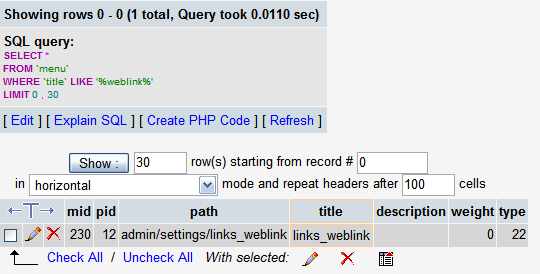
benthere commentedThe 'weblinks' menu item doesn't have a record in the 'menu' table.
(see attached: SQL search "LIKE '%weblink%'" in menu table)
Comment #5
Bèr Kessels commentedI have a feeling that there is a problem on your side. Does refreshing the cache work?
Comment #6
benthere commentedI just tried clearing the cache. Same results as screenshots.
It's really strange because it seems to be the only menu item that doesn't have an entry in the menu SQL table.
Comment #7
brashquido commentedI've noticed the same thing to using Drupal 4.7 RC3 and the latest CVS of the links package from the 19/4/06
Comment #8
phildu commentedi have the same problem, do you have solve the problem ??
Comment #9
moggy commentedTry this.
I believe menus need to be cachable for them to appear in the menu modification page/database.
Comment #10
syscrusher commentedThis does seem to fix the problem. Thanks to all who posted on this issue. I've just committed the patch to CVS. Please test at your convenience.
Scott (Syscrusher)
Comment #11
syscrusher commentedNobody has complained that this patch didn't work, so I'm assuming the problem is fixed. Reopen if not.
Syscrusher
Comment #12
(not verified) commented