Closed (won't fix)
Project:
jQuery Map Hilight
Version:
6.x-1.0-beta1
Component:
User interface
Priority:
Normal
Category:
Bug report
Assigned:
Unassigned
Reporter:
Created:
24 Aug 2009 at 14:25 UTC
Updated:
27 Aug 2009 at 16:09 UTC


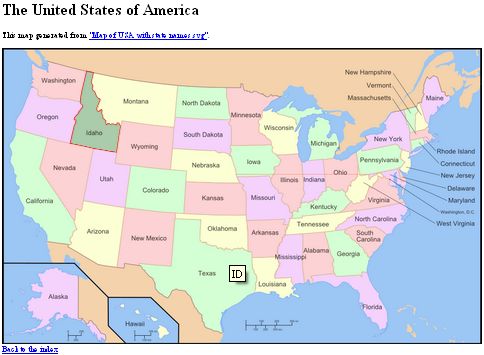
When using Google Chrome, if you zoom the page, then the maps will become way off. The more you zoom in or out, the greater the error will be.
On the attachment picture, you will notice by the position of the tool tip showing ID (Idaho) that the mouse was somewhere over Texas. However, it is Idaho that has been highlighted. This example has been reproduced by zooming out.
| Comment | File | Size | Author |
|---|---|---|---|
| mouse_hovering_over_texas.jpg | 31.57 KB | asiby |


Comments
Comment #1
asiby commentedComment #2
WorldFallz commentedSorry but this is not a bug of the module which is just a wrapper for the plugin. I don't have google chrome installed, but it doesn't happen on firefox 3.5. It's either a browser issue or a plugin issue.
I wish there was a 'can't fix' status, but since there isn't-- this is a 'won't fix'.