

Closed (fixed)
Project:
IP Geolocation Views & Maps
Version:
7.x-1.x-dev
Component:
User interface
Priority:
Normal
Category:
Support request
Assigned:
Reporter:
Created:
27 Oct 2012 at 10:49 UTC
Updated:
19 Feb 2013 at 22:48 UTC
Jump to comment: Most recent file



Comments
Comment #1
rdeboerHi MXT,
To be honest... no idea! I haven't gone there myself.
OSM and XYZ seem the most likely candidates to me....
Strange that RAW doesn't come up...
Let us know how you go.
Rik
Comment #2
rdeboerHI MXT,
Did you find out more on this issue?
I haven't had time to look into it yet.
Rik
Comment #3
mxtI've tried to choose XYZ but I've not reached the result I want.
What I want is to change the marker labels that appears on the map (see screenshot).
Changing the default "Location markers #X" layer title for "ip_geoloc_marker_layerX" layers in /admin/structure/openlayers/layers has the result only to create another "layer label" (see the label "MARKER MAX" that's appear under "base layer group", always in the same screenshot).
How I can reach my purpose?
Thank you very much
Comment #4
rdeboerYes how to change these labels, indeed...
I'll have to research how OpenLayers works.... not my favourite topic... haha...
Rik
Comment #5
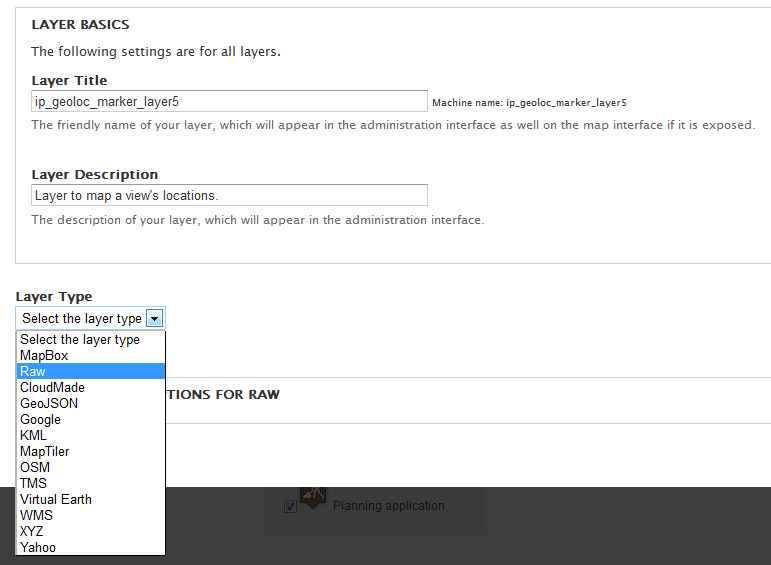
leveller commentedI implemented the following hook to add the Raw type to the layer type dropdown when editing the layer. This allows you to change the title and successfully save the layer; I don't know if this is the best solution though!
Comment #6
rdeboerThat's great Vin!
Thanks for sharing.
Rik
Comment #7
mxtThank you very much leveller, I've implemented your suggestion and finally I was able to change the label.
But I receive the following notice on save:
the code I wrote is:
I'm missing something?
Comment #8
rdeboerThanks again to both of you, leveller and MXT...
I haven't put this through its paces, but if I take the code from #5, replace MY_MODULE by 'ip_geoloc' and wack it into ip_geoloc.module would that solve everyone's issue?
Bar that Notice discovered by MXT in #7, of course...
Rik
Comment #9
leveller commentedSounds good to me.
Vin.
Comment #10
rdeboerCommitted #5 to 7.x-1.x with attribution. Not properly tested yet.
Thanks Vin.
Rik
Comment #12
IKE0088 commentedPossibly related: http://drupal.org/node/1920586
I tried the fix for #5 and tried both MY_MODULE and change to ip_geoloc. Neither worked.
Comment #13
rdeboer@IKE0088, #12
The fix w.r.t to #5 refers to you writing a small module, code-named MY_MODULE and putting that function in, with the 2 replacements of MY_MODULE.
The good news is that with the latest IP Geolocation Views & Maps check-in (corresponding to a development snapshot dated 20 Feb 2013 or later) that function is included.
See if that works for you.
Rik