Active
Project:
Image FUpload
Version:
6.x-3.0-rc2
Component:
Code
Priority:
Normal
Category:
Bug report
Assigned:
Unassigned
Reporter:
Created:
28 Mar 2009 at 02:15 UTC
Updated:
22 Oct 2009 at 19:01 UTC
Jump to comment: Most recent file


In FUpload's settings, if you configure some node fields to be editable by the uploader, but the uploader doesn't have the "edit captions" permission, he will get the error message: "You must upload an image". I think this message is a bit misleading. Any way to change this?
| Comment | File | Size | Author |
|---|---|---|---|
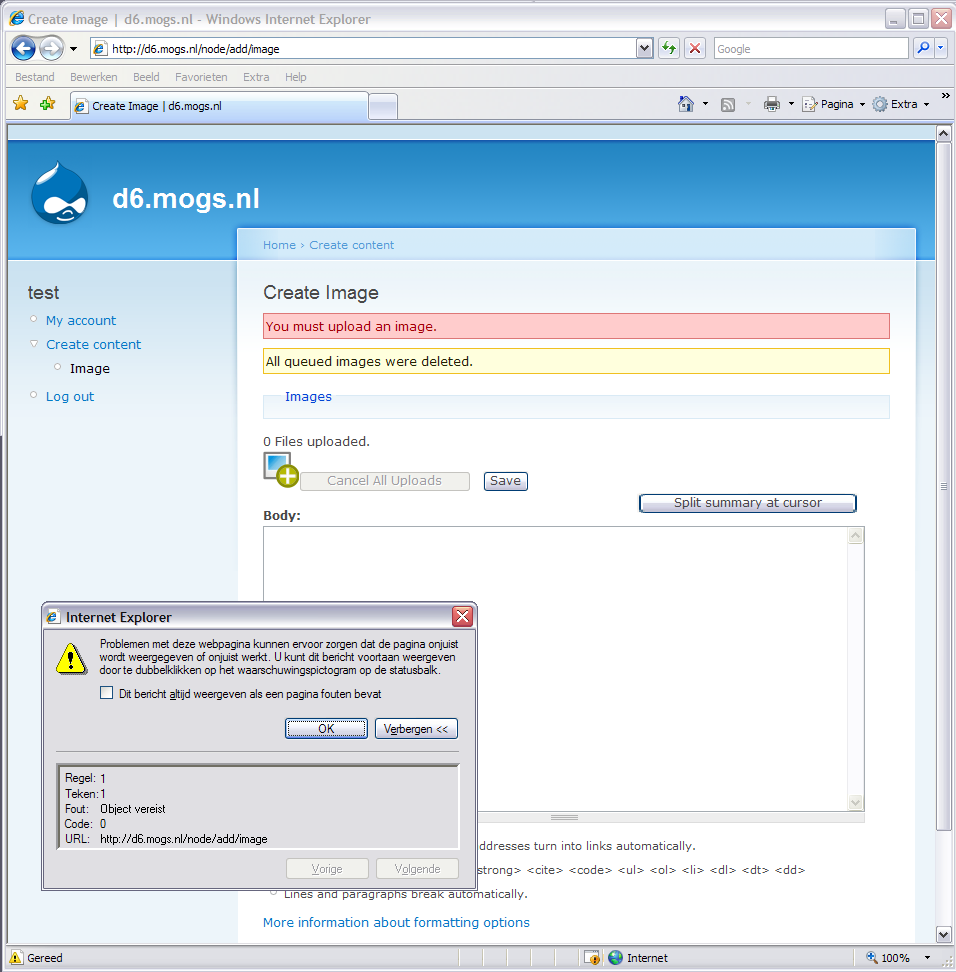
| #16 | imagefuploaderror.png | 93.73 KB | toniw |

Comments
Comment #1
grandcat commentedI didn't see this yet. I think it appears with a combination of some modules and settings. Please give me a detailed list of settings and modules.
Comment #2
extect commentedModules are:
Image
Image Assist
Image FUpload
CCK
Views
FUpload settings:
Preview Image Preset: Thumbnail
Image Attributes: class="image-preview"
Editable Fields: Title, Body
Image Title Processor: _;{;}
Image settings:
Default image path: images
Maximum upload size: 2000KB
Image sizes:
Original - (operation)Scale image - (width)800 - (height)800 - (link)Same window
Thumbnail - (operation)Scale and crop image - (width)160 - (height)160 - (link)Same window
Preview - (operation)Scale image - (width)230 - (height)330 - (link)Same window
Please tell me, if you need some more information.
Comment #3
grandcat commentedI couldn't reproduce your error message. Please give me a list of all steps you made.
Comment #4
Dret commentedI have the same problem... and i found probably a reason...
I use the modules with Image.
As administrator all works fine but the users have the problem described above:
Message: " No images have been found in queue, probably no images have been uploaded yet. Please return to image upload page if you want to upload some images."
appear in edit captions page.
The problem disappear if i grant the permission "administer nodes" to all my user... but this is an improbable solution...
My user have the permission to create and edit all their own Image content type but seems to be not enough to edit caption for all uploaded images.
Problem in the same in 6.x-3.0-rc2 and 6.x-2.2 Version.
I hope it could be usefull... for a solution...
Thanks
Bye!
Comment #5
grandcat commentedThis is an old bug which is fixed in the newest version.
Comment #6
Dret commentedI have tested it on 6.x-2.2 but it still the problem remain after upgrading to last 6.x-3.0-rc2...
Is there another newest one...??
Thanks!
Bye
Comment #7
Dret commentedAn indication more: in the upgrade procedure I had previously uninstalled the old version of Fupload and then re-installed the last one.
Bye!
Comment #8
JohnWoltman commentedI too am experiencing this issue. All the latest released of CCK, ImageField, ImageCache, and FUpload. The uploading procedure itself works great! Thank you for such a great module. But there is no way to edit captions, even when I grant Edit Caption permissions. Whatever info you need from me I will be happy to provide.
Comment #9
grandcat commentedMhh.... I tested it with a non-admin & admin user and it works. Are you sure that you set all important permissions?
Comment #10
JohnWoltman commentedI got it working. I think the documentation isn't quite clear on what needs to happen. After the permissions are setup correctly, when you create the content you must...
Merely enabling Field Settings->Editable Groups->Title (ImageField) is not enough.
Comment #11
grandcat commentedThat's right, so it's more an usability issue.
Comment #12
Dret commentedIn the previous posts You are referring to strange settings for ImageField but i'm using the Image module...
The only Field group for permissions editing are inside fupload settings page placed, as a tab, inside the Image settings page.. Here are avaiable the checkbox for permission editing of Title and Body... and are correctly enabled...
I tryed also to modify the settings once more... but still not working for me...
:(
Thanks!
Bye!
Comment #13
grandcat commentedDid you also see the setting in Drupal's permission table? There, you have to set exclusivly "edit captions" for the (non-admin) users.
Comment #14
Dret commentedI my permission table... for module Fupload there's 2 settings:
1) Modify (translated in my own language)
2) Mass Upload
Both are given to users...
For Image module:
1) Edit own image: is given to all
2) Edit all image: is not given (but nothing situation is the same if i change the setting)
Thanks!
Bye
Comment #15
Dret commentedHi to all!
I tryed to install Fupload on another site with support of Image module.
Incredible... all work fine!!!
The strange things: the site has the same permission rules of the one in which the problem described above appear...
I'm in a dead-end situation: suggestions to solve the problem in the problematic site?
Thanks a lot!
Comment #16
toniw commentedThis one is actually quite easy to reproduce on a fresh install:
install Drupal 6.13
install image (6.x-1.0-beta1)
install image-fupload (6.x-3.0-rc2)
enable image
enable image-fupload
enable image-fupload (image)
goto admin/settings/image/image_fupload and save
in permission give authenticated user: create images, delete own images, edit own images, view original images, mass upload images (NOT edit captions)
create a new user
login as the newly created user
goto node/add/image
select more than just a few (say 10) images and hit save
Fails in both IE7 and Fx3.5
In IE you get an additional javascript error (see attached screenshot)
I also wonder what the purpose of the edit body textarea is on this page (see screenshot). If I give the user the edit captions permission then this textarea is not displayed. Maybe this is related to the error?...
Comment #17
digidoo commentedHi there,
same problem here as described in #4 and #12. In addition I'm using the Exif module.
The only way to make it work is by granting the "administer nodes" permission. And that really is a no go.
Anyone found any solution yet?