

 The 2026 Drupal Business Survey is open. Your response will help shape the future of the Drupal business ecosystem.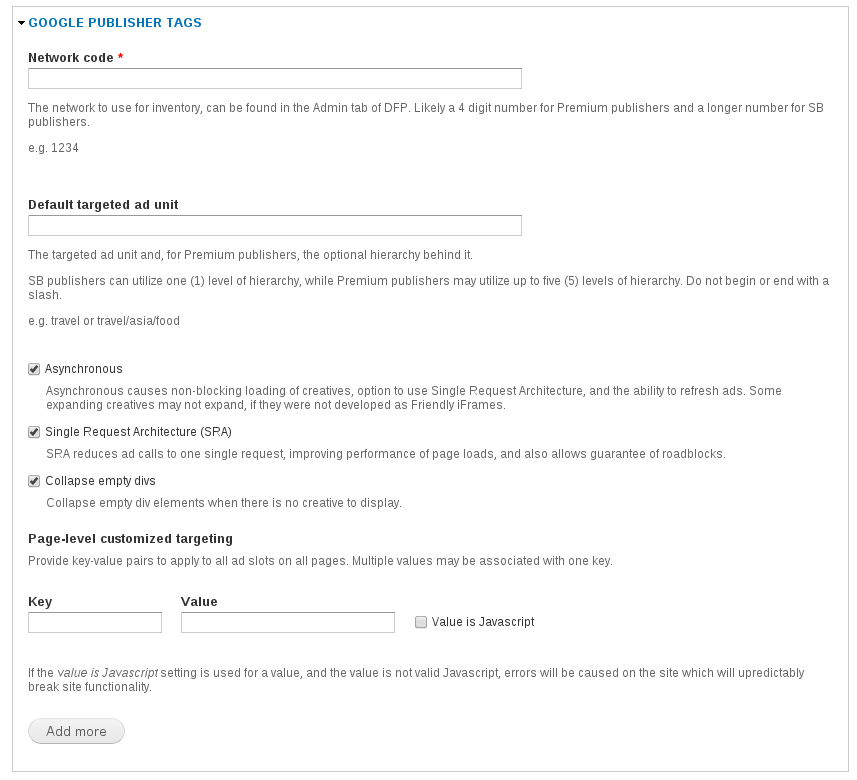
This module provides a way to serve DoubleClick's Google Publisher Tag (GPT) (Premium and Small Business) ads on Drupal.
Documentation for setting up GPT, creating and editing ad units, and altering settings is available in the project's documentation.
Benefits of GPT
The new Google Publisher Tags have multiple benefits over Google Ad Manager (GAM) tags and the legacy DoubleClick for Publishers Dart tags.
- Asynchronous
Ad loading does not block the page from rendering, improving page load time. Can be disabled if desired. - Google Publisher Console
Accessed by loading a page of your site with ?google_console=1 appended to the URL page and using the keyboard shortcut Ctrl+F10 to toggle the console. - Single request mode
The browser sends a single request for retrieving all add units for the page, enabling advanced roadblocking and improving page load time. - Multiple instances of the same ad unit on a page
- SSL support
- Slot-level custom targeting
- Refreshing ad slots on a page
Requires the asynchronous option to be enabled, which is on by default. - While not a feature of GPT itself, this module also provides support for responsive ad units. This allows you to specify different sized ads for different breakpoints the site design supports. Available in 7.x-1.0-beta2 and beyond.
Entity specific targeting
GPT comes bundled with a module called GPT entity targeting which allows setting targeting, asynchronous, Single Request Architecture, and collapse empty divs options on individual entities (nodes, terms, etc).
Please read the documentation for more details.
Dependencies
- Ad Manager
- CTools
- Subform - for releases after 7.x-1.0-beta1
This project is not developed by Google but merely exists to provide easy integration with a Google product into Drupal websites. DoubleClick and Google are trademarks of Google, Inc.
Created and maintained by the Bonnier Engineering Group. Learn more about Bonnier Corporation at bonniercorp.com.
Project information
- Project categories: E-commerce
- Created by codycraven on , updated
 Stable releases for this project are covered by the security advisory policy.
There are currently no supported stable releases.


