

Closed (fixed)
Project:
GeSHi Filter for syntax highlighting
Version:
6.x-1.x-dev
Component:
Code
Priority:
Normal
Category:
Feature request
Assigned:
Reporter:
Created:
10 Jun 2008 at 23:51 UTC
Updated:
11 Jul 2009 at 13:00 UTC
Jump to comment: Most recent file


Comments
Comment #1
quinntaylor commentedAttaching the patch file, which didn't seem to make it last time.
Comment #2
soxofaan commentedI still don't see a patch ;)
About your first request: what's the benefit of refining the CSS file in the way you described? That CSS file is not meant to be read by normal users/visitors. It's also not meant to be edited (by admins or themers) because it's automatically generated, so I don't see a point why the comments should be tweaked or made more readable. It's not that they are completely unstructured and unreadable now anyway.
About you second request: I don't think we can assume that the overhead of recreating a CSS file is small: there are a lot of rather big files to be read and parsed, they have to be processed and transformed to CSS and then again written back to a file. In a normal setup where the language definition files never change, it's only logical to create the file only once the first time and reuse it.
If you are in a situation where you change/edit language definition files I would recommend to use inline CSS + clearing the page cache during editing (that's how I do it) and setting it the CSS mode to CSS classes+external style sheet when you're ready.
Comment #3
quinntaylor commentedComment #4
quinntaylor commentedPosted the patch in the clear. Stupid attachments...
First request: Not only is readability increased and the file conforms to CSS norms, but the file size is decreased. When I started tweaking the Objective-C definition for GeSHi, I looked at the CSS file a lot to see what rules matched up where. While readability is not the primary concern, it always helps in such situations. If you've ever used something like CSSEdit (http://macrabbit.com/cssedit/) you'll know why the groups are nice. If you haven't, you should really try it... ;-)
This ties with the second request, because although the CSS file is "auto-generated", it is only generated once for each unique set of enabled languages, hence the MD5 hash excerpt in the filename. However, if one of the language definition files changes (as was the case frequently while I was modifying the Objective-C file) the CSS remains stagnant. Even when flushing the cache of available languages.
My claim of low overhead is based on the assumption that the function _geshifilter_generate_languages_css_file() is called infrequently; as far as I saw, it was only when the settings for enabled languages was changed. It seems that in such situations, and *especially* given the name of the function, it would be prudent to actually generate the file. My only workaround without this patch was to manually delete the file with the matching MD5 sum and refresh so the function would actually regenerate it.
We don't want to use inline CSS in our situation, because that makes each page larger, and the CSS cannot be cached from page to page. (In fact, cached pages will continue to have the incorrect CSS unless the cache is flushed. Also, if the external file for that language set ever existed, it will still not be re-generated afterward.) That may be a good solution for someone editing the language defs that also has rights to clear the Drupal caches, but this is not always the case. I realize that twiddling with language files *might* be fairly irregular, but on our site, we are not averse to changing the colors to match our whim and fancy.
I know nobody wants to impose extra overhead, and I'm trying to avoid that. By my count, the function in question is called in exactly 2 places, both in geshifilter.admin.inc:
- geshifilter_admin_general_settings_submit():221
- geshifilter_admin_per_language_settings_submit:318
Unless the overhead imposed by regenerating the CSS file only when one of those functions asks it to is excessive, I think the added convenience is well worth it. This is a simple patch, and it runs exactly the same, except it's easier to understand. How can you lose?
Comment #5
quinntaylor commentedFor an example of the new CSS stylesheet format, see this page:
http://cocoaheads.byu.edu/sites/default/files/geshifilter/geshifilter-la...
Comment #6
soxofaan commentedIf I understand you correctly, your feature request is based on the fact that you want to edit the language definition files to change the styling and want those changes directly to be propagated to the automatically generated CSS file.
I think you there is a better way to do this. First, you edit the language definition files directly for changing the CSS definitions, which I would not recommend. It's like hacking Drupal core directly to implement a feature. This is generally viewed as a very bad practice. The proper Drupal way is keeping Drupal core pristine and override/implement stuff in an custom module/theme. For your case I would likewise recommend to leave the language definitions alone and do your customization directly in CSS. That way you have full control over the CSS and you do not depend on the GeSHi library/GeSHi filter module behavior and when it regenerates the CSS file.
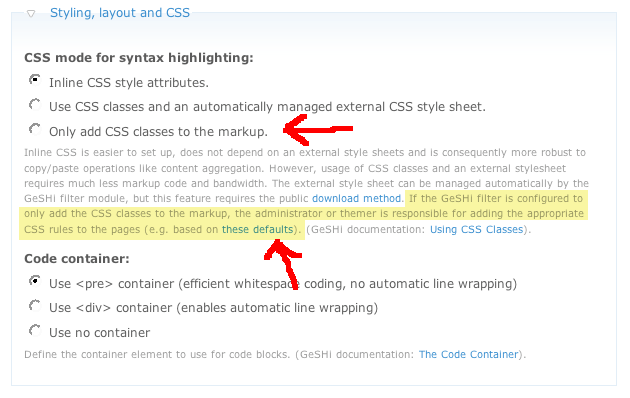
In http://drupal.org/node/244493 I added a feature (which is in the 6.x-1.1 version) where the GeSHi filter module only adds the CSS classes to the source code and the admin/themer is responsible for including the CSS rules in the page. This way you can use your own style sheet and construct/edit/layout it in any way you want. To be clear: this CSS file does not have to be the automatically generated one files/geshifilter/geshifilter-languages-blablabla.css, you can create your own anywhere (e.g. in your theme) as long as it is included in each page.
To have a starting point you can of course use an automatically generated CSS file, there is even a link for this in the description of the CSS mode setting of the GeSHi filter module (see screenshot).
Is this different approach of any value for you?
Comment #7
quinntaylor commentedSorry for the delay, but I've been working on my Master's thesis and publications.
No offense, but I think some of your assumptions are flawed. Editing the language files and expecting it to propagate to auto-generated CSS is not like hacking Drupal core, especially since I have submitted my language patch to GeSHi. The problem with your suggested approach of editing the CSS manually is that any CSS changes get thrown out the window if I ever change to a different set of enabled languages. (That's an optimization feature of your module, not GeSHi, and one that I find somewhat debatable. I simply don't the potential for a huge computation hit, since I don't imagine that people switch enabled languages frequently enough to merit it.)
I like the auto-generated CSS file. I'm even fine with the distinct versions using MD5 hashes, although I think it's silly and wastes more space with inactive CSS files than it would waste processing time. I just don't see why I can't even choose to actually regenerate the file when my language files have changed, not just when my enabled set has changed.
Perhaps this scenario will make sense. Say I install an update to GeSHi itself, and some of the language files have been updated, but I haven't changed my set of enabled languages. I'd like to be able to refresh the highlighting to match any changes in the language files by regenerating the CSS. Currently, your filter won't do that if the file already exists. I'd have to go find the CSS, delete the one with the right MD5 digest (or all of them) and then get it to regenerate. Not at all intuitive.
To me, the option to add only classes and no rules seems like a step backward. I can't imagine wanting to supply all my own CSS rules for highlighting--that's why we're using GeSHI and your filter. However, if you add an optional feature like that, it makes absolutely no sense that I can't tell the filter to regenerate my CSS file! Not even automatically, just when I ask it to! I think that the _geshifilter_generate_languages_css_file() function should do what it says it does, and not try to guess that I actually don't want to recreate the file since it already exists. I'd even settle for a button or checkbox that allows me to specify this behavior. Heck, there's one for generating empty CSS rules.
(Never mind the fact that my patch also includes fixes to the CSS that makes it easier to edit in the case where I might want to modify it directly. The file is smaller and more readable. Why is there such resistance to that idea? I don't get it.)
Sorry to rant, this is just a bit frustrating. These features seem like obvious wins. I'll try to calm down now. :-)
Comment #8
davedelong commentedsubscribing...
Comment #9
soxofaan commentedNo need to get agitated over this ;)
It's not because I'm not blindly committing your patch that I'm not listening. ;)
I still think it is. You're hacking something inside a library, while it's generally better to override things where possible, that's why it's called cascading style sheets. Overriding instead of hacking the recommended way to work in/with Drupal.
However, if you're indeed pushing a patch to the GeSHi library and it gets in the official version, you have a point.
That's not what I meant in #6. If you enable "Only add CSS classes to the markup." you can manage your own style sheet, outside of the realm of GeSHifilter, so nothing gets overwritten when you en/disable languages.
This is a valid critique, but I copied this system from the color module which is a core module. (will be addressed later)
This feature is for sites with the private download method enabled, because GeSHi filter can't manage a publicly accessible CSS file.
Because it's an automatically generated file that isn't meant to be read by humans, let alone edited by humans. The extra processing just seems like overkill, especially since the current version is readable enough already.
You have a point however about the smaller file size, but I would make a separate issue out of that, and leave this out of this discussion.
This is a valid feature request, which I try to address in the attached patch.
It adds a button on the languages configuration page for flushing the GeSHi language definition cache.
Flushing the language definition cache now does two things:
* forced regeneration of the CSS file
* flushing the cache of available languages (there was a link with callback for this previously, but that's now replaced with the button)
Also included: I dropped the MD5 hash stuff in the filenames of the generated CSS files. There is now only one CSS file:
files-dir/geshifilter-languages.css
The trick with the MD5 (also copied from the color module) was just a form of caching, but with the reworked generation of the CSS file, there is no need to keep this. So no more inactive CSS files anymore
be free to test the patch
still todo (for a subsequent patch): automatically flush language definition cache (including regenerate CSS file) when an upgrade of the GeSHi library is detected
Comment #10
soxofaan commentedI reworked the patch of #9 a bit
The button to flush the GeSHi language definition cache is now on GeSHi's general settings settings page in the GeSHi library fieldset (see attached screenshot)
I also reworked the description a bit.
Feedback is welcome, especially on the text as English is not my native language.
(edit: the screenshot was a bit messed up)
Comment #11
Undefined.za commentedsubscribing...
Comment #12
soxofaan commentedreroll
Comment #13
soxofaan commentedreroll
Comment #14
soxofaan commentedcommitted this one
http://drupal.org/cvs?commit=230552